

GN Law is a medical negligence firm in Ramat Gan. Two partners, twenty years of practice, and about three hundred articles on misdiagnosis, birth injury and surgical error.
Those articles are the firm’s marketing. They take a decade to write and one careless afternoon to wreck.
Their old site ran on a Bootstrap theme with 73 PHP files, three animation libraries and 22 active plugins. It shipped 2.5 MB over 125 requests just to draw the homepage.
I rebuilt it from a Figma file. Not as a loose reference image, which is how most handoffs actually go, but as the source of truth, read node by node through the Figma MCP. Then I moved all 301 articles into it without losing a word.


What the firm got
- A site that is theirs. The old theme was built for them too, so this is not custom against off-the-shelf. It is that the old one had accreted for years, 73 PHP files and 22 plugins deep, with the article bodies sitting in an ACF field rather than in the posts. In the new one every CSS line traces back to a node in the firm’s own Figma file, and every section to a written brief. I made the longer argument for a bespoke theme elsewhere.
- Their content, intact. All 301 articles were verified word by word against the old site, not spot-checked.
- Pages they can edit. Practice areas, success stories, partner biographies and office details are fields now. One screen holds the address, phone and opening hours, and editing it updates the contact page, the footer and the structured data at once.
- A fifth of the weight. The numbers are below.
Keeping the content intact matters more than it sounds. The firm comes up for “רשלנות רפואית באבחון” because somebody wrote a careful article about misdiagnosis in 2019, and that ranking belongs to the article, not to the site. Lose a paragraph in the migration, or quietly reword one, and twenty years of rankings go with it.
Before and after, in numbers
I measured both sites on the same machine, in the same session, back to back, with the same script: Lighthouse on a mobile profile, three runs each, median taken.
These are lab numbers rather than field data. What makes them worth publishing is the symmetry, since neither side got a warm cache or a second chance.
Page weight, mobile
2,576 KB
430 KB
homepage, median of 3 lab runs
Requests
125
32
JavaScript
29 files, 1,580 KB
3 files, 200 KB
no jQuery, no Bootstrap bundle
Images
47 files, 790 KB
20 files, 121 KB
AVIF and WebP, sized and lazy
Lighthouse, mobile
58
96
accessibility: 76 to 100
LCP
18.2 s
2.8 s
lab, same machine and session for both
Articles
143 with no article body
301 of 301 migrated
0 words lost, 0 words invented
Reading the design file properly
A Figma file is only a source of truth if you treat it as one. The usual pattern is to look at the design, form an impression, and build the impression.
Reading it properly means pulling the actual node data and writing what is there rather than what you remember seeing. Three rules made that reliable, and I learned each one the hard way.
One file at a time
The Figma Dev Mode MCP resolves node IDs against whichever document is focused in the desktop app. Two copies of this design existed, and they shared identical node IDs.
Because the ids match, a call against the wrong file succeeds silently and returns the wrong design. Do NOT change focus in Figma. If calls start failing, or return something that contradicts your brief, STOP and report BLOCKED.
That is from my own constraints file for the project. The danger is that there is no error state: you ask for node 1508:40348, you get a node 1508:40348, and it is the wrong one. Nothing in the response tells you. I wrote up the mechanics of that workflow separately.
Transcribe, do not sample
I transcribed the palette from the style guide’s Colors page instead of eyedropping it from the frames. The header comment in my stylesheet records the catch:
/* Palette - transcribed verbatim from the Figma Style Guide "Colors" page
   (node 1424:2098). Do not invent shades; every value below is in the guide.
   Only 6 of the 51 swatches are bound to real Figma variables, so the names
   come from the swatch labels. */
Six of fifty-one. That is the honest state of most design files, and it is still a source of truth, just not a machine-readable one.
The rule I hold myself to is that inventing a shade inline is a defect. A stray hex in a template is how a design system quietly stops being one.
A screenshot is not the design
Two hero artboards existed. One was the clean homepage hero; the other was the same hero with a video popup open. Because get_screenshot composites overlapping canvas layers, screenshotting the second one rendered a modal over the design.
Trust the metadata tree and get_design_context, not a single screenshot. The same pass caught a layer named Slider that was a single static block rather than a carousel. Building from the name alone would have produced a whole feature nobody asked for.
I still need the screenshot, because it is the only thing that reliably tells me which side an element sits on. But it answers “where”, not “what”.
Two frames, not one
The mobile frame is authoritative for mobile. It is not a narrow version of desktop, and treating it as one loses real content: the 360 frame carries its own sizes, weights, padding, section order, and sometimes elements desktop does not have at all.
When the mobile frame needed a field my component interface lacked, I amended the interface. The tempting alternative is to drop the requirement and log it as a concern, which is how a mobile design slowly becomes a worse copy of the desktop one.
Then there is direction. This is a permanently right-to-left site and Figma’s generated code is left-to-right, so it will hand you justify-end, items-end, text-right, left- and right-. Every one of those is a defect here, because they resolve to the visual left under RTL. Only logical properties survive the translation, which is what lets one stylesheet serve both directions.
The subtler trap is grid placement, since under RTL column 1 is the visual right. On one section my own plan put the call-to-action on the wrong side for exactly that reason. It got caught because the build was checked against the screenshot rather than reasoned out from the frame’s x-coordinates.
Where the design file was wrong
Treating a file as ground truth means you find its errors. That is the method working, not the designer failing. What matters is what you do at the moment of contradiction, and my answer is always the same: transcribe faithfully, report it, do not improvise.
- A paragraph that appeared twice. One section’s intro was identical to its fourth body paragraph, in both frames. I checked it twice per breakpoint before saying anything, because the first assumption should be that I misread it. Then I built it as drawn and flagged it.
- An icon with no addressable node. A card’s arrow was two layers, each positioned by its own transform, and the MCP could not reach the override instance. I never hand-author SVG path data, so I pulled the raw vectors and repositioned them using the transform maths from Figma’s own generated code.
- A poster frame that was a screenshot of a video player, complete with baked-in player UI. The mobile frame had a clean photograph, so I used that at both breakpoints and wrote down why.
What I did not fix
Nine info cards shipped with empty href attributes because no destinations existed anywhere: not in the frame, not in the brief, not on the old site. Inventing links would have been worse than leaving them inert. That is a content decision waiting on the firm, and it is written down as one.
The loop that made it tractable
The Figma rules above are the technique. What made a 638-commit rebuild possible for one person was that every section went through the same four steps:
- A written brief that named the Figma node and its constraints.
- A build against that brief.
- An independent review against the diff, not my description of the diff.
- A written report that recorded what deviated, and why.
I should be precise about how that was possible, because the answer is not that I type quickly. I ran the project with Claude Code.
The honest version of that claim is narrower than the marketing one: the AI did not design the site, and it did not decide anything that mattered. What it changed was the cost of working in small, individually verified steps.
A brief, a build and a review is a slow loop when one person does all three. It is fast enough to run 638 times when an agent drafts each step and I check the diff.
The discipline is the point, not the speed. An agent will cheerfully build whatever you describe, so the brief is where you find out that what you described is not what you wanted, while that is still cheap to discover.
I have written about where this helps and where it breaks WordPress, and about the MCP servers that connect it to real tools.
Twelve briefs, twelve reports, and a saved review diff for each task. Before I committed anything, both linters had to be at zero, there had to be no PHP notice, and the render had to match the frames at both widths.
Node IDs live in the code comments and in the commit titles, so any line of CSS can be traced back to a frame:
f6f2307Build the practice-area cards from the 1920 and 360 comps (Figma 1508:40324)
The loop only matters because it records where it trips up. It logged a hard stop when the Figma bridge went unreachable, instead of letting me quietly fill the gap from memory. It also logged a review finding that turned out to be a false positive, which I traced back to an error in my own briefing.
One honest limit: there is no Code Connect map here. Node IDs in commit messages are a manual version of what Code Connect handles properly, and on a longer-running design system it would be the better answer.
I ended up with a Tailwind v4 theme: CSS-first, with no config file. One stylesheet at 24 KB gzipped serves the whole site, including its right-to-left layout, with no separate RTL build. The old theme shipped nine stylesheets totalling 203 KB, one of them Bootstrap. I put the setup details in my Tailwind v4 writeup.

 BeforeAfter
Moving 301 articles that had no article
The hard part was not the volume. It was that in 301 posts, there was no single database field with a finished article in it.
143 posts had completely empty post_content. Another 158 had post_content that was never rendered, because it had been superseded years earlier. The actual article lived in an ACF flexible-content field with 16 layout types, then got assembled at render time.
A database export would have given me 143 blank pages and 158 wrong ones. So I treated the rendered frontend as the source of truth: fetch every article as HTML, parse it, and rebuild it into the new templates.
That is more fragile than a database export, which is exactly why I had to verify it differently. I diffed every post against its source, word by word: 0 words lost, 0 words invented, across all 301 posts. That verification step is the core of how I move a content archive.
| Migrated | Count |
|---|---|
| Posts | 301 of 301 |
| Featured images | 278 unique, across 299 posts |
| Yoast meta values | 1,995 |
| Links preserved | 1,738 |
| Success stories | 88 of 88 |
Three bugs only the diff caught
- 284 hidden HTML comments left behind by Google Docs. Invisible on the page, and happily carried along by any naive copy.
dirandlangattributes stripped as though they were styling. On a Hebrew site they are semantic: they are what makes an embedded English phrase or a phone number render in the right order.- Two words silently merged. The separator in the source was a
<span dir="LTR"> </span>, which looked like whitespace to the parser and disappeared.
All three would have shipped silently. A page-level check or character-count check passes every one of them. If you migrate content by scraping, the word-level diff is not a nice-to-have. It is the only thing standing between you and an archive that is subtly wrong in 301 places.
Keeping the URLs
A rebuild is where link equity dies. Twenty years of articles accumulate inbound links, and a new URL structure discards them quietly: the pages still work, the rankings do not.
So I kept every URL that existed and redirected only what could not survive. Success stories were the interesting case. On the old site they were ordinary posts; now they are a custom post type with a filterable archive. Same slug, same address, different object, no redirect, because nothing moved.

 BeforeAfter
68 redirect rules are live, all 301, none of them regex, and they caught 738 requests in the first month. The biggest groups are two retired post types: 23 rules for old video pages and 8 for old FAQ pages.
The detail I like most is the misspelled ones. Around 21 of those rules point from Hebrew URLs that were typo’d on the old site and had picked up real inbound links anyway. Preserving a typo feels wrong, but it is correct: the link exists, the traffic is real, and nobody who linked to it is going to fix their side.
I also turned off WordPress’s URL guessing, which quietly 301s an unknown address to whichever post has a similar-looking slug. Now a URL that does not exist returns a 404, so I can see it and fix it. What actually causes those 404s is its own piece.
Nati Elimelech reviewed the SEO on staging and found three things worth calling out:
- The homepage H1 was sitting on the slogan instead of on the phrase the firm actually ranks for.
- The structured data had an
Organizationwith a name and logo, but no address, phone or opening hours. - That URL guessing was still on.
All three are fixed on the live site.
Performance
The gains came almost entirely from removing things the page never used. No clever trick hiding in this section.
| Homepage, mobile | Old | New |
|---|---|---|
| Total transferred | 2,576 KB | 430 KB |
| Requests | 125 | 32 |
| Scripts | 29 files, 1,580 KB | 3 files, 200 KB |
| Third-party | 59 requests, 1,549 KB | 5 requests, 201 KB |
| Images | 47 files, 790 KB | 20 files, 121 KB |
| Largest Contentful Paint | 18.20 s | 2.77 s |
| Total Blocking Time | 270 ms | 1 ms |
The single largest line is third-party scripts: 1.5 MB of tag manager, analytics and pixels on the old build, compared with 201 KB now. Most of a slow WordPress site is usually not WordPress.
One removal was harder than it looks. Dashicons was 36 KB gzipped and render-blocking, pulled in by a plugin for a widget the site does not use.
My first fix dequeued it and lost a race with the caching plugin’s own form integration, which re-added it. The version that works filters the stylesheet tag at print time instead, which is the reliable way to remove CSS a plugin insists on loading.
The rest is ordinary: AVIF hero images with media-scoped preloads, the carousel library loaded only when a carousel nears the viewport, a 1.6 MB video not requested on phones, and analytics moved out of the head so it stops outranking the hero image for priority.
The same two pages, scored by Google
Those are my numbers from my machine. Here are Google’s. I put both homepages through PageSpeed Insights on 1 October 2026, three minutes apart, on the same emulated Moto G Power over slow 4G.
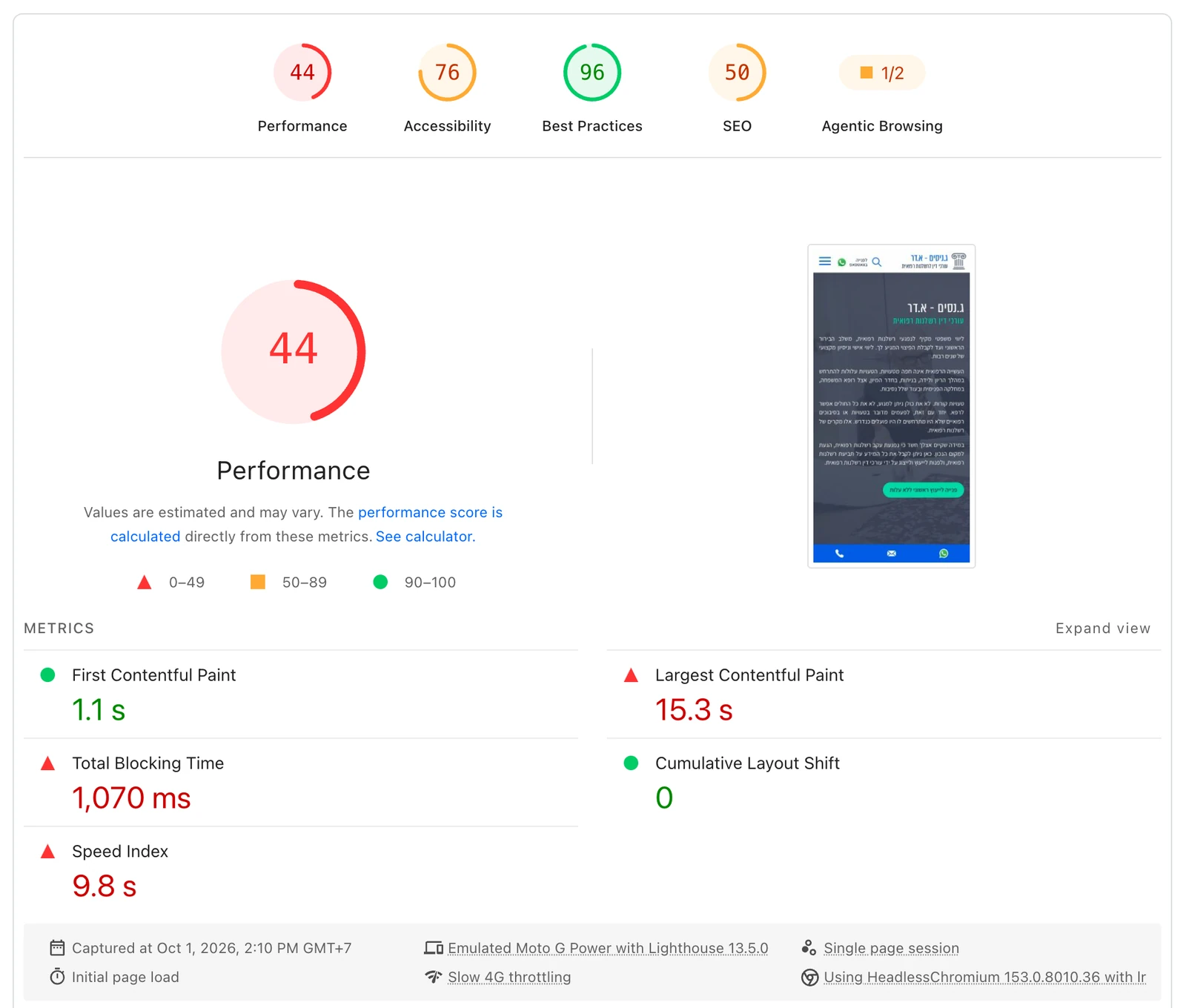
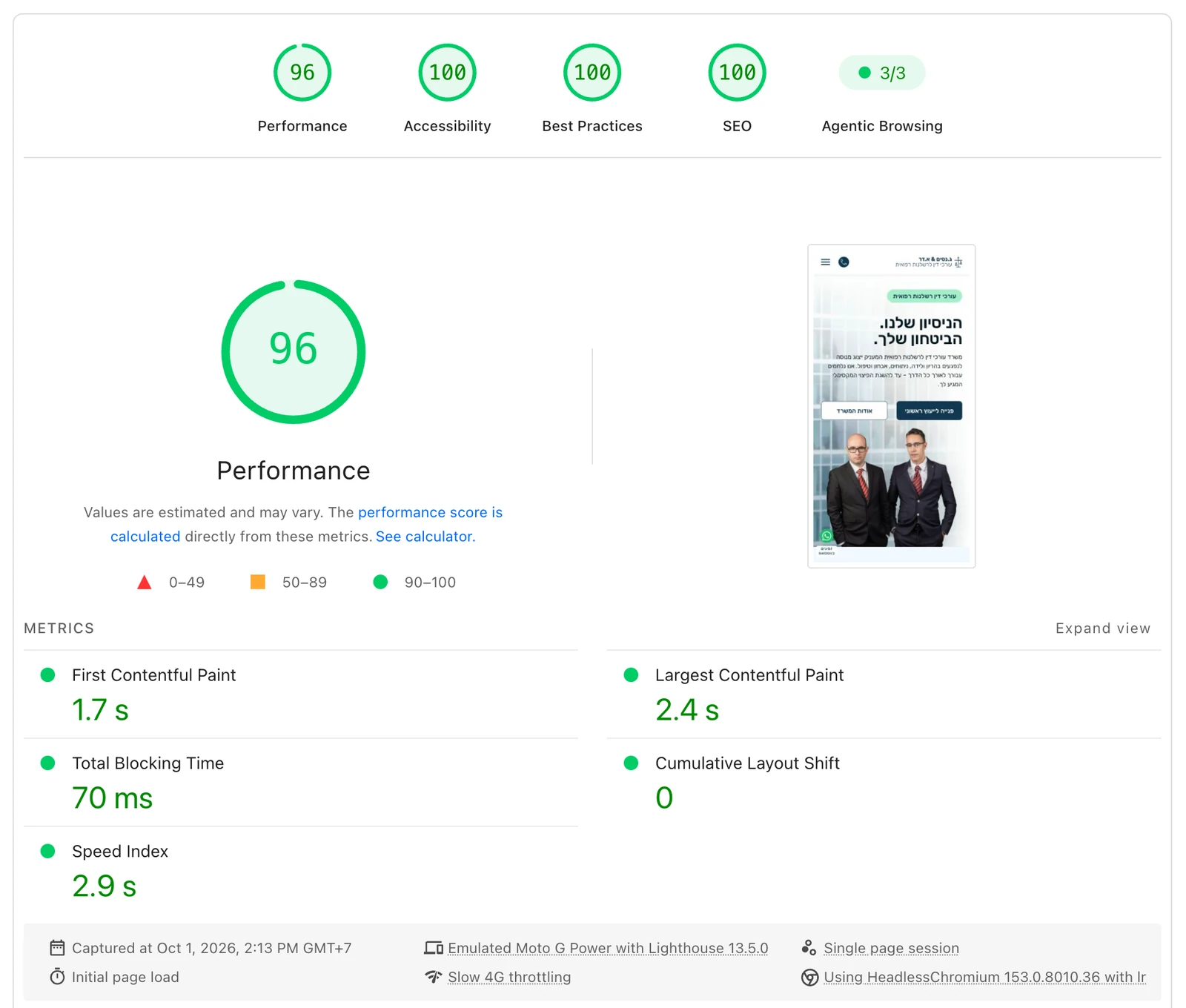
One number went the wrong way. First Contentful Paint moved from 1.1 s to 1.7 s. The old page put text on screen early and then spent another fourteen seconds arriving at its largest element; the new one paints once, at 1.7 s, and is finished at 2.4 s.
Two lab runs that disagree: my local Lighthouse scored the old homepage 58, PageSpeed Insights scored it 44. Same build, different hardware and network profile. That gap is the reason to treat any single score as weak evidence and read the direction instead. Neither is a Core Web Vitals report either, so Search Console’s field data stays the source of truth for what Israeli visitors actually experience. Running these audits from the command line is its own writeup.
The deploy step that refuses to run
Three WordPress installations live side by side on this server. A wrong deployment path would not fail loudly. It would quietly copy this theme over somebody else’s site and then flush their caches.
So before my deploy writes anything, it checks where it has landed:
- name: Verify the target application before writing anything
  # Three WordPress installs live side by side. A wrong DEPLOY_PATH would not
  # fail, it would quietly deploy the gnlaw theme over somebody else's site
  # and then flush their caches.
  run: |
    test -f "$DEPLOY_PATH/wp-config.php"
    test ! -d "$DEPLOY_PATH/wp-content/themes/sevenis"
    test "$(wp option get home --path=$DEPLOY_PATH)" = "$EXPECTED_HOME_HOST"
The workflow is GitHub Actions. A push to main builds and rsyncs the theme, then purges three cache layers in order, because they nest. 385 runs so far, three failures, and a green deploy in about 40 seconds.
The caching plugin’s own CLI command does not touch minified assets. I found that out the hard way, when a rewritten script deployed correctly and the page kept running the previous version, with nothing in the log looking wrong. I wrote up the CI/CD and cache-purge pitfalls separately.
What went wrong
Four things, because a case study where nothing went wrong is a brochure.
I measured from the wrong continent, three times
I reported the origin’s time-to-first-byte as a problem, revised it, reported it again, and revised it again. All three versions were wrong for the same reason: every measurement came from a network egress in Thailand rather than from Israel.
What settled it was a control. Connect time to the site’s origin was 0.261 s; to an unrelated Israeli host from the same place, 0.264 s. Three milliseconds apart. There was no origin problem, just a measurement taken 7,000 km from the audience. TTFB is worth understanding properly before you act on a reading of it.
Both retracted versions are still in the audit document, because an audit that quietly edits out its own errors is not an audit.
I wiped a site by hand-copying a caching drop-in
Early on, I copied an Object Cache Pro install from another site onto staging. It brought Redis into play mid-install, a stale options read persisted a broken active-plugins list to the database, and the site came back with the default theme and every plugin apparently deactivated.
The data was intact, since it was a cache coherency failure rather than a loss, but the exact pre-incident plugin list was gone and I had to reconstruct it. It happened on staging, before launch, which is the only reason this is a paragraph and not a much worse story.
Two smaller ones
- My deploy workflow is still called “staging”. The target has been production since launch. Renaming resets the run history and the target guard already enforces the right host, so it has stayed. It still confuses whoever reads it next.
- Analytics from before launch includes my own traffic. My local copy reported page views into the live property as real sessions until I added a host guard. That is why this case study cites no analytics figures at all: the only honest thing to do with a polluted date range is to not quote from it.
Where it landed
The firm has a site that loads in a fifth of the weight, carries all 301 articles with every word intact, answers on every URL it has ever published, and can be edited by the people who own it.
What is not finished is written down:
- 97 page titles run past 70 characters, inherited from a title template that came across with the migration.
- Nine info cards still have no destinations.
- One practice-area page ships 288 KB of HTML because it carries 87 images in its body, which is a content decision rather than a template one.
What made this tractable was not speed. It was that the design was a readable source of truth rather than a picture, that every line of CSS traced back to a node ID, and that each section had a written brief and an independent review before I let it count as done.
That audit trail is not overhead. It is the part that makes the work checkable a year from now, by which point I will not remember why the mobile frame had an extra button.
If this is the kind of build you need, the Figma to WordPress service page describes it, and the 7is rebuild is the same method on a bilingual site at a smaller scale.