You may want to prevent the display of the WordPress version you are using that appears automatically in the site header. One reason to do this is securing your WordPress site.
If those trying to breach your site know the version you use by looking at the site source, it can guide them and make their job easier because they can easily check for security vulnerabilities in that version.
// remove version info from head and feeds
function sv_complete_version_removal() {
    return '';
}
add_filter('the_generator', 'sv_complete_version_removal');
If your site allows registration to your WordPress site, you may want to redirect new registrants to a specific page after successful registration. For example, a page where they can download a file, or one that shows important information you want that user to see after registration:
function sv_registration_redirect(){
    return home_url( '/finished/' );
}
add_filter( 'registration_redirect', 'sv_registration_redirect' );
Information about redirects related to this topic can be found in the post 301 redirects and their importance for SEO.
By default, WordPress does not allow users with the Contributor role to upload images to the media library. Of course you could give that user higher-level permissions, but that would allow them to perform additional actions on the site that you may not want them to be able to perform.
The following code lets Contributor users upload images to posts they wrote without any additional permissions:
function sv_allow_contributor_uploads() {
    $contributor = get_role('contributor');
    $contributor->add_cap('upload_files');
}

if (current_user_can('contributor') && !current_user_can('upload_files'))
    add_action('admin_init', 'sv_allow_contributor_uploads');
For more on file uploads in WordPress, see Enable Additional File Type Uploads.
The following code displays in the footer the number of database queries the page executed, the time it took to run those queries, and the memory usage of the page.
function sv_performance( $visible = false ) {

    $stat = sprintf( '%d queries in %.3f seconds, using %.2fMB memory',
        get_num_queries(),
        timer_stop( 0, 3 ),
        memory_get_peak_usage() / 1024 / 1024
    );

    echo $visible ? $stat : "<!-- {$stat} -->" ;
}

add_action( 'wp_footer', 'sv_performance', 20 );
The result appears as a comment in the footer. Check the page source to see it:
<!-- 33 queries in 1.532 seconds, using 48.75MB memory -->
For more performance optimization, see Improve WordPress Loading Time.
Add the following code to your functions.php file to add your own fields to the user profile page in the WordPress admin.
// CUSTOM USER PROFILE FIELDS
function my_custom_userfields( $contactMethods ) {

    // ADD CONTACT CUSTOM FIELDS
    $contactMethods['contact_phone_office']     = 'Office Phone';
    $contactMethods['contact_phone_mobile']     = 'Mobile Phone';
    $contactMethods['contact_office_fax']       = 'Office Fax';

    // ADD ADDRESS CUSTOM FIELDS
    $contactMethods['address_line_1']       = 'Address Line 1';
    $contactMethods['address_line_2']       = 'Address Line 2 (optional)';
    $contactMethods['address_city']         = 'City';
    $contactMethods['address_state']        = 'State';
    $contactMethods['address_zipcode']      = 'Zipcode';
}
add_filter('user_contactmethods','my_custom_userfields',10,1);
To display these fields you can use one of the following methods:
the_author_meta('facebook', $current_author->ID)
<?php $current_author = get_userdata(get_query_var('author')); ?>
<p><a href="<?php echo esc_url($current_author->contact_phone_office);?>" title="office_phone"> Office Phone</a></p>
For a more robust approach to custom fields, see Beginner’s Guide to Advanced Custom Fields.
WP-CLI is a set of tools that provides functionality for managing WordPress sites. In this guide we describe the benefits of using WP-CLI and demonstrate several advanced commands that will make your life easier in a WordPress development environment. You can use wp-cli to upgrade or downgrade WordPress to a specific version.
Update to the latest WordPress version:
wp core update
Update to a specific WordPress version:
wp core update --version=5.5.3
Install or downgrade to a specific WordPress version:
wp core update --version=5.5.3 --force
Check the installed WordPress version:
wp core version
Or with extra info:
wp core version --extra
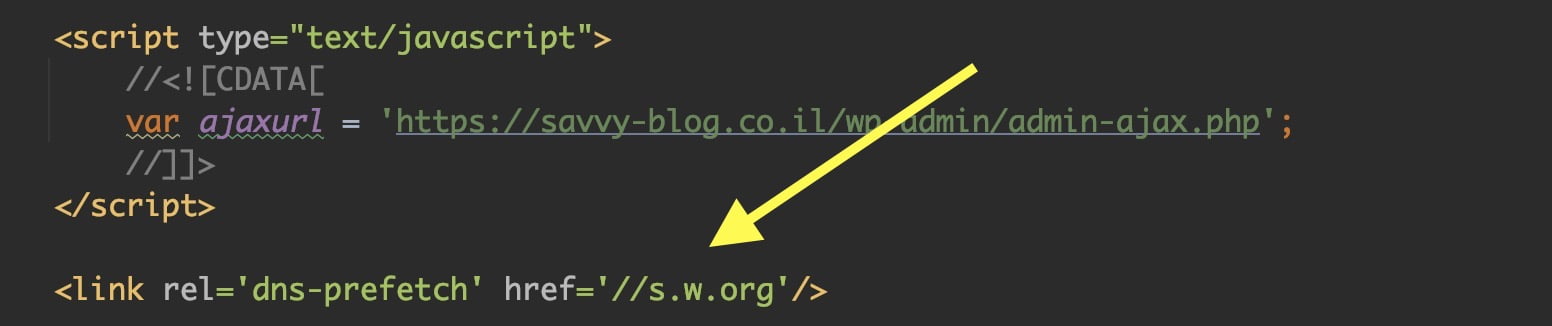
Making WordPress faster is an ongoing process. One small step with minimal impact is removing DNS prefetching for the following addresses (if you want to remove them):
<link rel='dns-prefetch' href='//s.w.org'/>
<link rel='dns-prefetch' href='//fonts.googleapis.com'/>
In the page source it looks like this:
%27%20fill-opacity%3D%27.5%27%3E%3Cellipse%20fill%3D%22%230d0d0d%22%20fill-opacity%3D%22.5%22%20rx%3D%221%22%20ry%3D%221%22%20transform%3D%22matrix(108.62291%20236.02014%20-363.27193%20167.18766%201288.3%20171.6)%22%2F%3E%3Cellipse%20fill%3D%22%234d4d4d%22%20fill-opacity%3D%22.5%22%20rx%3D%221%22%20ry%3D%221%22%20transform%3D%22matrix(512.7786%20-518.17671%20297.59087%20294.49071%20411.7%20181.6)%22%2F%3E%3Cpath%20fill%3D%22%23494949%22%20fill-opacity%3D%22.5%22%20d%3D%22M797.2%20415.3L906.3%20300l-12-91z%22%2F%3E%3Cpath%20fill%3D%22%23111%22%20fill-opacity%3D%22.5%22%20d%3D%22M1203.4-94l-194%20127.3%206-78.8z%22%2F%3E%3C%2Fg%3E%3C%2Fsvg%3E "Removing DNS prefetch loaded automatically by WordPress")
To remove these, add the following code to your theme’s functions.php file:
function remove_dns_prefetch () {
    remove_action( 'wp_head', 'wp_resource_hints', 2, 99 );
}
add_action( 'init', 'remove_dns_prefetch' );
If you are not familiar, here is a post explaining what DNS is.
A very useful snippet that lets you limit the number of lines of text using CSS only. Use the line-clamp property in CSS like this:
.text {
   overflow: hidden;
   text-overflow: ellipsis;
   display: -webkit-box;
   -webkit-line-clamp: 2; /* number of lines to show */
   -webkit-box-orient: vertical;
}
Example markup:
<div class="text">
Lorem ipsum dolor sit amet, consectetur adipiscing elit. Aliquam consectetur venenatis blandit. Praesent vehicula, libero non pretium vulputate, lacus arcu facilisis lectus, sed feugiat tellus nulla eu dolor. Nulla porta bibendum lectus quis euismod. Aliquam volutpat ultricies porttitor. Cras risus nisi, accumsan vel cursus ut, sollicitudin vitae dolor. Fusce scelerisque eleifend lectus in bibendum. Suspendisse lacinia egestas felis a volutpat.
</div>
For more CSS optimization tips, see Optimize CSS for Better Performance.
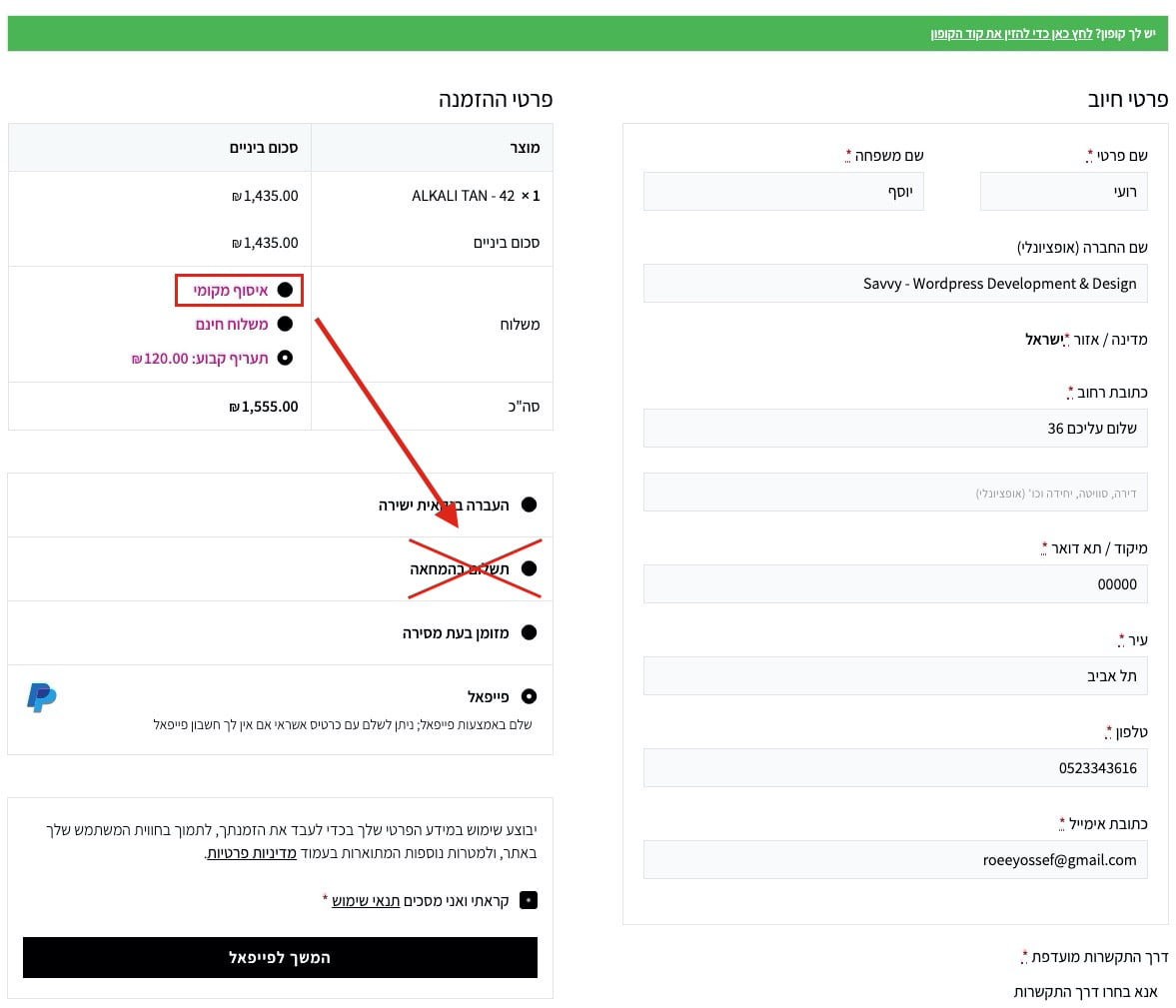
A look at the WooCommerce checkout page and specifically how to disable a payment method for a customer based on the shipping method they selected. For example, disable “Cash on Delivery” for the “Local Pickup” shipping method.
%22%20transform%3D%22translate(2.3%202.3)%20scale(4.59766)%22%20fill-opacity%3D%22.5%22%3E%3Cellipse%20fill%3D%22%23919191%22%20rx%3D%221%22%20ry%3D%221%22%20transform%3D%22matrix(70.87015%20-5.8002%201.98842%2024.29563%2040.3%20212.5)%22%2F%3E%3Cellipse%20fill%3D%22%23cdcdcd%22%20cx%3D%22126%22%20cy%3D%229%22%20rx%3D%22255%22%20ry%3D%2221%22%2F%3E%3Cpath%20fill%3D%22%23fff%22%20d%3D%22M-16%2053l287-27-46%20208z%22%2F%3E%3Cellipse%20fill%3D%22%23c9c9c9%22%20rx%3D%221%22%20ry%3D%221%22%20transform%3D%22matrix(-65.88504%20-13.37744%205.03916%20-24.8183%2071.6%20192.8)%22%2F%3E%3C%2Fg%3E%3C%2Fsvg%3E)
Here is a snippet that lets you do something like this (functions.php):
/**
 * @snippet       Disable a payment method for a specific shipping method
 * @author        Roee Yossef
 * @website       https://savvy.co.il
 */

function sv_gateway_disable_shipping_326( $available_gateways ) {

   if ( ! is_admin() ) {

      $chosen_methods = WC()->session->get( 'chosen_shipping_methods' );

      $chosen_shipping = $chosen_methods[0];

      if ( isset( $available_gateways['cod'] ) && 0 === strpos( $chosen_shipping, 'local_pickup' ) ) {
         unset( $available_gateways['cod'] );
      }

   }

   return $available_gateways;

}
add_filter( 'woocommerce_available_payment_gateways', 'sv_gateway_disable_shipping_326' );
If you use PayPal as a payment option on the WooCommerce checkout page, you can replace the PayPal logo displayed there. Add the following code to your theme’s functions.php file:
/**
 * Add custom gateway icons
 *
 * @param string $icon Image HTML.
 * @param string $gateway_id Gateway ID.
 *
 * @return string
 */
function sv_custom_wc_gateway_icons($icon, $gateway_id)
{
    // Example for PayPal:
    if ('paypal' == $gateway_id) {
        $icon = '<img src="' . get_stylesheet_directory_uri() . '/images/paypal.svg" alt="' . __('PayPal') . '" />';
    }
    return $icon;
}

add_filter('woocommerce_gateway_icon', 'sv_custom_wc_gateway_icons', 10, 2);
Change the path and filename to your new image and you are set!