This is the first part of the Google SEO guide and it discusses Technical SEO. It’s an essential step to complete before moving to Content Optimization and On-Page SEO, which is covered in a separate guide.
If you’re looking to optimize your WordPress site for search engines yourself, this guide is for you. Whether you run a business, manage websites, or work in SEO, you’ll find the information you need here.
Implementing these recommendations won’t guarantee a #1 ranking, but I’m confident it will help search engines crawl your content properly and understand your site’s structure.
Let’s start by explaining what Technical SEO is…
What is Technical SEO?
Technical SEO is a critical stage in any website’s SEO efforts. If your site has technical issues, your optimization work – whether done in-house or with an agency – might not yield the results you expect.
The good news? Once you run a Technical SEO audit and fix the issues it uncovers, most of these configurations won’t need to be revisited.
So, what is Technical SEO, you ask? – Technical SEO refers to optimizing your site for the crawling and indexing stage by Google (and other search engines). You’re helping Google access, crawl, parse, and index your site without issues.
The process is technical in nature because it doesn’t involve content. The primary goal is to optimize the site’s infrastructure.
To understand the complete picture, take a look at the diagram below depicting the three pillars of the SEO process: Technical SEO, On-Page SEO & Off-Page SEO:
On-Page SEO is the process related to content and how to make it relevant to what users are searching for. In contrast, Off-Page SEO (also known as link building) is the process of creating links from other sites to build authority (or Trust) in the site ranking process.
As you can see in the diagram, there are no clear boundaries between Technical SEO, On-Page SEO, and link building, as they work together to achieve full optimization of your site in terms of SEO.
Technical SEO – Recommended Actions
So what can you do to improve technical SEO on your site? Here’s a list of actions to focus on. It’s wise to complete these before moving to On-Page SEO and content optimization.
First, a few relevant terms for this guide:
- Index – In the context of SEO, index is another term for the database of search engines. The index contains the information of all sites that Google managed to find. If a site isn’t in the index, users won’t be able to find it.
- Googlebot – The general name for Google’s crawler, sometimes referred to as Spider or Crawler. In other words, software developed by Google for scanning web pages.
- SEO – Search Engine Optimization – the process of improving the site for search engines and also the description of the role of the person responsible for performing this action.
- Link Equity – A ranking factor in search engines based on the idea that certain links pass value and “authority” from one page to another. Also called ranking power or sometimes “Link Juice.”
- SERP – A term describing the results in the search engine – Search Engine Results Page.
- Crawl Budget – The number of pages that Google crawls on your site each day (limited budget).
1. Maintain Proper Site Hierarchy
Every site has a homepage, which typically gets the highest visit rates and serves as the starting point for many visitors. Consider how you can make it easier for users to navigate from a general or category page to a more specific content page.
Ask yourself: is there a sufficient number of pages on a specific topic that justifies creating a category or archive page to group them? Do you have hundreds of products that need to be split into category and sub-category pages?
These decisions help maintain a proper hierarchical structure and should be considered during site planning – both for search engine crawling and visitor navigation.
Hierarchy and Site Structure – Important Points
- The ideal site structure resembles a pyramid, with the homepage at the top and categories beneath it. For larger sites, use sub-categories to segment posts, products, and pages.
- Try to keep categories of similar sizes. If one category is significantly larger than the others (in terms of post and content quantity), consider dividing it into two.
2. Use the Properly Structured Navigation Menu
The best navigation menu is the one that provides the best user experience. Your main menu plays a big role in helping visitors find content quickly.
A well-structured menu also helps search engines understand which content you prioritize. Even though search results are displayed at the page level, Google wants to understand each page’s role within the broader site hierarchy.
Main Site Navigation Menu – Emphasized Points
- Prioritize user experience in navigation on the site, and only then optimize for SEO.
- Categorize content hierarchically with logic for the user.
- Add site categories to the navigation menu if relevant.
- Avoid using JavaScript for creating links.
- Navigation should be text-based, not images.
3. Use Breadcrumbs
Breadcrumbs are a navigation element that shows the page hierarchy and usually appear near the top of the page.
They let visitors quickly jump back to a parent section or the homepage. Google also uses breadcrumbs to understand your site’s structure and hierarchy.
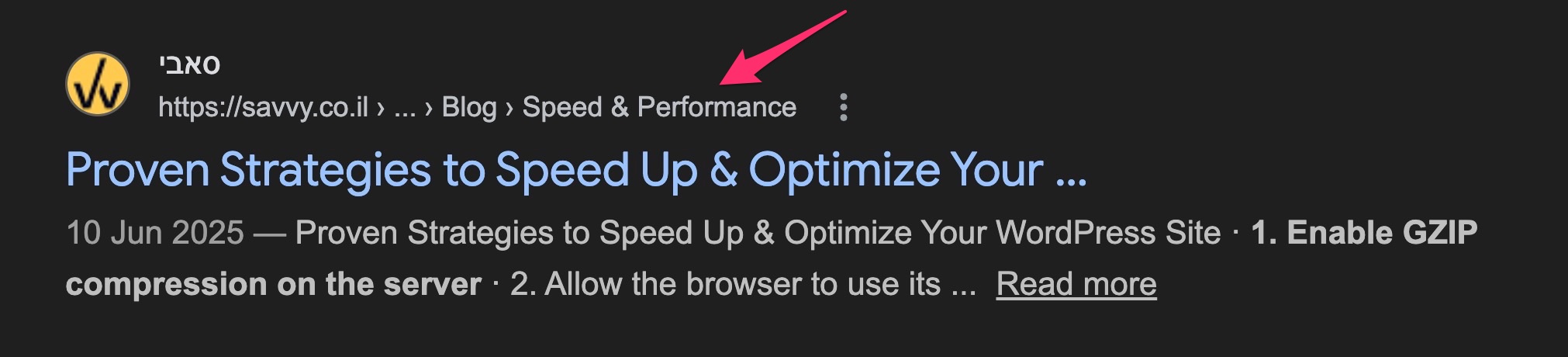
In breadcrumbs, the most general page (usually the homepage) appears first, followed by increasingly specific sections. It’s recommended to use structured data for breadcrumbs so Google can display them in search results, as shown in the following image:
Breadcrumbs – Key Points
- Breadcrumbs do not replace the main menu on the site.
- Breadcrumbs should appear at the top of the site, usually below the main menu and above the title.
- Always display all stages in the hierarchy, don’t skip a stage as it might confuse users.
If you have a WordPress site, take a look at the following guide that explains how to add breadcrumbs to these sites and delves deeper into the topic.
4. Build Internal Links Correctly
Internal links are a core part of any SEO strategy. An internal link points to another page within the same domain.
Good internal linking creates an “architecture” for your site, distributing link equity between pages. It also helps users navigate, discover content, and establishes an information hierarchy.
An optimal site structure resembles a pyramid. The homepage sits at the top, passing link equity down through categories and sub-categories to individual posts. The fewer clicks between the homepage and any page, the more ranking power that page receives:
In this structure, there’s a short link path between the homepage and every other page, allowing link equity to flow throughout the site. This increases the ranking potential of each page.
But hierarchy alone isn’t enough. Within each branch, related posts should also link to each other, forming topic clusters. A cluster has a pillar page at its center with supporting posts linking both to the pillar and to each other. This strengthens topical authority and signals to search engines that your site covers the subject in depth:
Internal Links – Important Points
- Create quality content. A good internal link strategy requires a good content strategy – one cannot exist without the other. Building topical authority through clusters of related content makes your internal linking more effective.
- Try to write natural Anchor Text. Strive to write natural text for links without excessive optimization. However, try to include relevant keywords in this text.
- In general, avoid linking to pages in the upper hierarchy of the site. These pages should appear as links in the main navigation menu.
- Use Follow links for internal links.
- Use a reasonable amount of internal links, there’s no need to overdo it.
- Opinions vary, but try to avoid linking to contact pages at the end of each post (unlike what’s done on this blog).
I’ve written a comprehensive guide discussing internal links and proper strategies. Take a look at the post on Internal Links and Their Importance for SEO.
5. Optimize for Core Web Vitals
Core Web Vitals are a set of metrics that Google uses to evaluate the real-world user experience of your pages. Since 2021, these metrics have been part of Google’s page experience ranking signals, and as of March 2024, the three current Core Web Vitals are:
- Largest Contentful Paint (LCP) – Measures loading performance. A good LCP is 2.5 seconds or less.
- Interaction to Next Paint (INP) – Measures responsiveness to user interactions throughout the page lifecycle. A good INP is 200 milliseconds or less. INP replaced First Input Delay (FID) as a Core Web Vital in March 2024.
- Cumulative Layout Shift (CLS) – Measures visual stability. A good CLS score is 0.1 or less.
Unlike many other ranking factors, Core Web Vitals are measured from real user data (Chrome User Experience Report). You can check your scores using PageSpeed Insights, Google Search Console, or Chrome Lighthouse.
Core Web Vitals act as a tie-breaker between pages of similar quality and relevance. They won’t override strong content and backlinks, but they can give you an edge over competitors with similar content who have poorer performance scores.
6. Don’t Hesitate to Use Outbound Links
Outbound links are one of the ways used by search engines to discover new content. Outbound links improve your site’s ranking, build trust with your audience, and can create relationships with other businesses.
They provide additional value to readers and enhance the user experience. I’ve written an extensive post on the topic (click the link above) so I won’t go into detail here.
7. Use Short and User-Friendly URLs
Creating categories and filenames that describe the page’s content helps organize the site more effectively.
Friendly URLs are easier to understand for people who want to link to your content. Visitors might be discouraged by long or cryptic URLs.
Compare these two URLs pointing to the same page:
✗ https://example.com/index.php?cat=7&id=120&ref=nav

✓ https://example.com/blog/technical-seo-guide/
The first URL is cryptic and meaningless to both users and search engines. The second is short, descriptive, and includes relevant keywords.
Some users who link to your content use the URL as the anchor text. A descriptive URL gives them (and their readers) useful information about what to expect on that page.
WordPress users (and in general) are invited to check out the post Choosing the Best Permalinks Structure for SEO for more information on the topic.
8. Create a Sitemap (XML Sitemap)
A sitemap (XML Sitemap) is a file listing all the pages you want search engines to index. Google will crawl your site even without one, but a sitemap makes it easier to discover new and updated content.
An XML Sitemap specifies all relevant URLs along with their last modification dates. You can submit your sitemap through Google Search Console.
Creating an XML Sitemap – Important Considerations
- Use tools and plugins that generate the Sitemap automatically.
- Submit the Sitemap to Google using the Search Console.
- Add only the canonical version of the address to the Sitemap.
- Do not add a Noindex-tagged address to the site map.
- For sites with over 50,000 URLs, use a Sitemap Index file that references multiple individual sitemaps, each under the 50,000 URL limit. Segment sitemaps by content type (e.g., posts, products, categories) for better monitoring in Search Console.
9. Use 30X Redirects
When different users link to different versions of the same page URL, ranking power gets split between them. Use permanent 301 redirects to consolidate that power.
If your site has identical content accessible through different URLs, implement a 301 redirect to the URL you want to rank – the “strong” version that you’ve decided is dominant.
30X Redirects – Key Points
- All types of redirects carry a certain level of SEO risk.
- 301 redirects preserve full link equity when properly implemented with relevant 1:1 URL mapping. The destination page should contain equivalent or improved content.
- The best redirect is when the page remains exactly the same except for the URL.
- Avoid excessive chaining of redirects, meaning one address pointing to another, which points to yet another address. Each additional hop increases latency and consumes crawl resources.
- Keep redirects live for at least 12 months to allow Google to fully migrate link equity and for external sites to update their links.
- Redirects for SEO purposes include, among other things:
- Removing Query Strings from the URL.
- Improving folder structure and URL.
- Changing the URL and adding keywords.
- Making the URL more readable for humans.
Here’s a guide explaining how to implement redirects in WordPress (with an emphasis on regular expressions) using the Redirection plugin.
If, for some reason, it’s not feasible for you to perform permanent redirects or any kind of 30X redirect, you can also use canonical URLs to indicate the dominant page among different URLs containing the same content.
10. Use Canonical URLs
A canonical URL tells search engines that a specific URL represents the master version of a page. Using canonical URLs prevents issues from duplicate content appearing under multiple addresses. In practice, a canonical tag tells search engines which version you want to appear in results.
Here’s how a canonical tag is written in the <head> of a specific page:
<link rel="canonical" href="https://example.co.il/master-version/" />
Solving duplicate content issues can be tricky. Here are some important points to consider when using canonical tags.
Canonical Tags – Key Points
- A canonical URL can point to itself. In other words, there’s no restriction against having a canonical tag in page X that points to the URL of page X.
- Since duplicate home pages are common and can be linked to in multiple ways beyond your control, it’s generally a good idea to add a canonical tag on the home page pointing to itself.
11. Use SSL Certificates and HTTPS Protocol
HTTPS is no longer optional – it’s the baseline standard for any website. Google confirmed HTTPS as a ranking signal back in 2014, and since then, adoption has become nearly universal. All major browsers now display a “Not Secure” warning for sites that still use plain HTTP.
Here are the key advantages that SSL certificates and HTTPS provide:
- SSL certificates provide a simple way to protect customer information on your site.
- Google takes HTTPS into account as a ranking signal.
- The padlock icon in the browser’s address bar shows users that they can trust your site with their data.
- HTTPS also allows you to utilize the HTTP/2 protocol (and HTTP/3), which significantly improves loading times through multiplexed connections and header compression.
If your site is still on HTTP, migrating to HTTPS should be your top priority. Beyond the SEO benefit, browsers like Chrome and Firefox actively warn visitors when a site lacks HTTPS, which can increase bounce rates and reduce trust.
12. Improve Site Performance and Loading Time
I discuss improving site performance and loading times extensively in this blog, both in general and specifically for WordPress sites. I won’t go into detail on this topic in the current post, but improving site speed leads to a better browsing experience and is ultimately a significant aspect.
This is also why Google attributes importance to site loading times in your site’s ranking. Since 2021, Core Web Vitals (LCP, INP, and CLS) are the specific metrics Google uses to measure page experience. Furthermore, aside from improving site speed, it also has a positive impact on crawl budget assigned by Google to your site.
Performance Testing Tools
The best free tools for testing your site’s loading time and performance are:
- PageSpeed Insights – Google’s tool that combines lab data (Lighthouse) with real-world field data from the Chrome User Experience Report.
- Lighthouse – Available in Chrome DevTools (Audits panel), as a CLI tool, or through PageSpeed Insights. Provides detailed performance, accessibility, and SEO audits.
- WebPageTest – An advanced, open-source tool for detailed waterfall analysis, multi-step testing, and connection throttling.
13. Optimize Category Pages
Category pages tend to be “weaker” in SEO because they often lack substantial content. They typically contain post summaries, images, and links.
Add a short description at the top explaining what content the category covers. It’s also a good idea to feature 1-3 links to your strongest posts within that category – the ones most visitors are likely looking for.
Optimizing category pages sits in the gray area between On-Page SEO and Technical SEO. I wrote a comprehensive article on improving category pages in WordPress for better SEO and higher rankings.
14. Add Schema and Structured Data
Structured data (Schema) is code you add to your pages to help search engines understand the content better.
Search engines can use this data to present your content as rich results that attract user attention. For example, adding structured data to a product page helps search engines understand the product’s price and reviews. Google might display that information directly in search results.
In 2026, structured data also influences visibility in AI-generated answers and featured snippets, making it more valuable than ever.
Search results with structured data are also known as “rich results.”
Beyond rich results, Google uses structured data to present information in other formats too.
For instance, if you have a local business, marking your opening hours with structured data lets potential customers see whether you’re open or closed right in the search results.
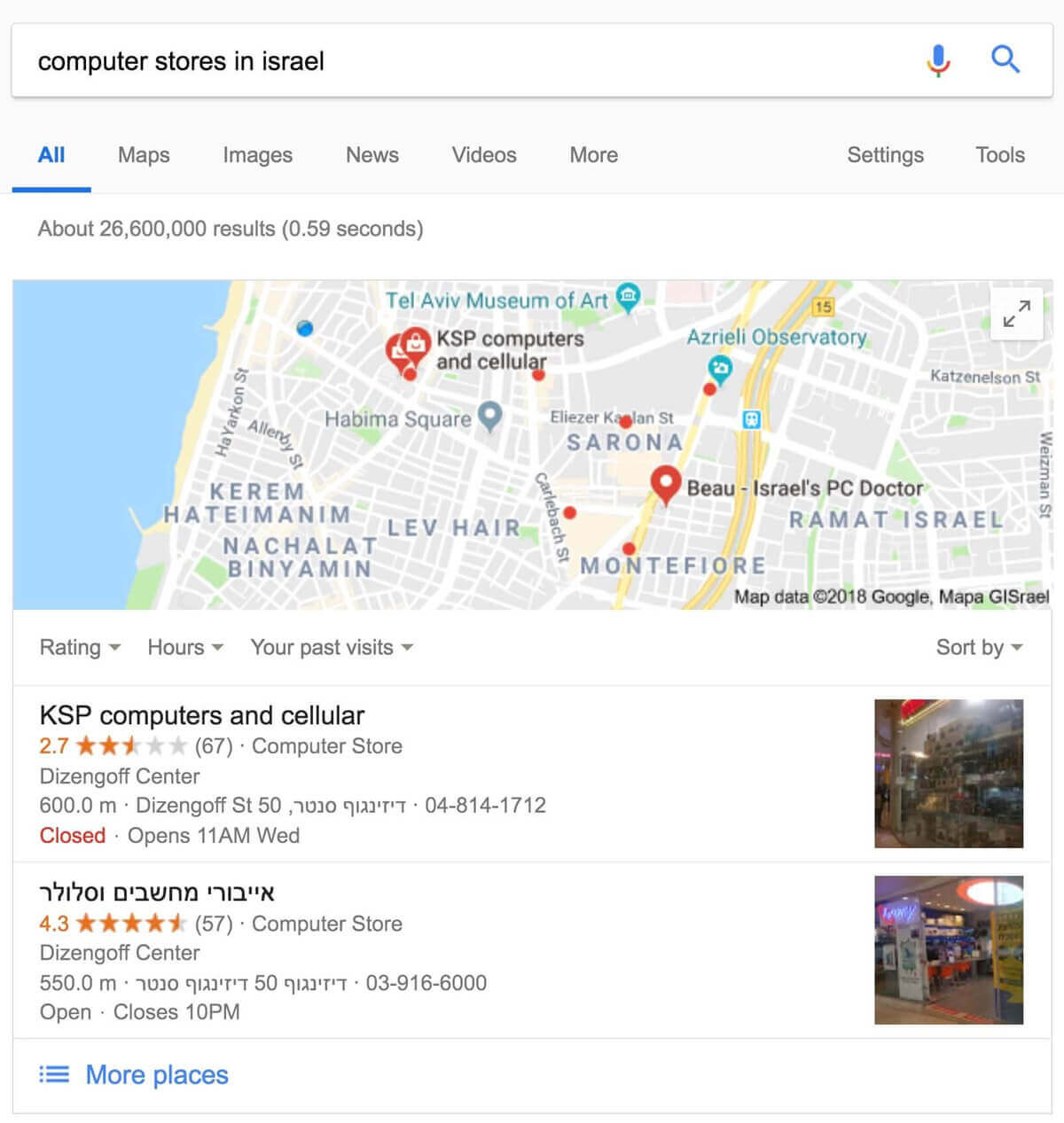
Properly implemented structured data enables star ratings, carousels, and other special features in your search results.
You can add structured data using code or tools in Google Search Console.
Once done, use Google’s Rich Results Test to verify your implementation. For general Schema.org validation, you can also use the Schema Markup Validator at validator.schema.org.
Schema and Structured Data – Highlights
- Avoid using invalid structured data. Don’t modify the source code of the site if you’re unsure how to implement structured data properly.
- Avoid creating fake reviews or adding irrelevant structured data to your site’s content.
- Google recommends using JSON-LD for structured data.
Furthermore, you’re welcome to read a more extensive guide I wrote about the topic, explaining Schema and Structured Data and how to add them to WordPress sites.
15. Optimize the robots.txt File
There are many situations where you don’t want certain pages, directories, or files to be crawled because they wouldn’t be useful to users in search results.
You can ask Google and search engines not to crawl specific files and directories using a file called robots.txt (post about this file in the link). This file should be in the root folder of your site. Be sure not to block pages or files that you want indexed. Here’s an example of a robots.txt file:
User-agent: *
Disallow: /admin/
Disallow: /private/
Disallow: /directory/some-pdf.pdf
In 2026, robots.txt also plays a role in managing AI crawlers. Bots like GPTBot (OpenAI), Google-Extended (Gemini), and ClaudeBot (Anthropic) use your content for AI training. You can block training crawlers while still allowing citation crawlers that link back to your site. On the other side of the equation, you can also use llms.txt to proactively serve structured content to AI systems.
The noindex tag, on the other hand, tells search engines not to add specific URLs to their index. You can add this tag to the <head> element of the page, like this:
<meta name="robots" content="noindex">Robots.txt – Key Points
- Robots.txt is only a request to prevent scanning of specific pages. If you block certain pages but they are linked from other internet pages, it’s likely you’ll still see these pages in search results.
- The NoIndex tag, on the other hand, completely prevents the display of pages in search results.
- Using Robots.txt, you can block entire directories, while NoIndex allows blocking individual pages only.
- If you don’t want to grant access to a specific page entirely, you should use other security methods like password protection or server-level blocking (for sensitive content, etc.).
It’s worth noting that if your site is on a subdomain and you want specific pages not to be crawled in this subdomain, you need to create a separate robots.txt file for it.
If you’re working with WordPress, there are plugins that allow you to easily specify which content you don’t want to appear in search results. If this is the case, take a look at the guide on setting up the Yoast SEO plugin for WordPress on this blog.
16. Present a Useful 404 Page
Users sometimes land on a non-existent page (404 error page) by clicking a broken link or typing a wrong URL. Your 404 page should guide them back to active content.
Include a link to the homepage, and consider adding links to popular or related content. You can use Google Search Console to find the source of URLs causing 404 errors.
404 Pages – Important Points
- Avoid adding 404 pages to search engine indexes. Ensure the server returns a 404 status code for these pages. For JavaScript-based sites, add a
noindexmeta tag when there’s a request for non-existent pages. - Despite the previous point, search engines should be allowed to crawl and access 404 pages, and they shouldn’t be blocked using the robots.txt file.
- Avoid displaying unclear messages on 404 pages.
- Design 404 pages to match your site’s overall design.
17. Allow Google to View the Page Like a User
When Google scans a page, it should see exactly what a regular user sees. Allow Googlebot to access all assets – JavaScript, CSS, and images.
If your robots.txt blocks these resources, it directly affects how algorithms process and index your content, potentially leading to poor rankings.
Use the URL Inspection tool in Google Search Console to verify how Googlebot renders your pages. It shows the rendered HTML and a screenshot of how Google sees the page. Chrome Lighthouse can also flag blocked resources or missing meta tags.
18. Adapt the Site for Mobile Devices
Building a mobile-friendly site is critical for rankings and SEO. Google completed its transition to mobile-first indexing in 2024, meaning it exclusively uses the mobile version of your site for crawling and indexing. Sites that don’t work on mobile will not be indexed at all.
With over 60% of web traffic coming from mobile devices, a great mobile experience is not optional.
There are three options for creating a mobile-friendly site:
- Responsive design that adapts to all devices (the preferred option).
- Building a separate mobile site with a different URL.
- Dynamic serving – the server provides different HTML and CSS files depending on the device’s needs.
Regardless of your chosen configuration for a mobile-friendly site, there are key points you should consider:
Mobile-Friendly Site – Highlights
- Avoid using annoying pop-ups that cover the screen on mobile devices and hinder user experience. Google’s page experience signals penalize intrusive interstitials.
- Mobile visitors expect the same functionality as the desktop version, such as the ability to interact, make payments, navigate easily, etc.
- Ensure your mobile pages contain the same content as the desktop version. With mobile-first indexing, content that exists only on the desktop version will not be indexed.
- Test your mobile experience using Chrome Lighthouse or PageSpeed Insights, which include mobile-specific performance and usability checks.
FAQs
Common questions about Technical SEO:
robots.txt and a noindex tag?
robots.txt file tells search engine crawlers not to crawl specific directories or files, but it doesn't prevent pages from appearing in search results if they're linked from other sites. The noindex meta tag, on the other hand, instructs search engines not to add a page to their index at all, ensuring it won't appear in search results regardless of incoming links.robots.txt?
GPTBot and Google-Extended use your content to train AI models without attribution. Citation crawlers like ChatGPT-User and PerplexityBot quote your content with source links, which can drive traffic. A common strategy is to block training-only crawlers while allowing citation crawlers. Blocking Google-Extended does not affect your organic search rankings - it only prevents your content from appearing in Gemini AI answers.In Conclusion
Technical SEO covers a lot of ground, but the effort is mostly front-loaded. Once you’ve run through these steps and fixed the issues, most configurations stay in place. Periodic checks every few months are usually enough.
Some of these actions require technical knowledge (like improving site speed or adding structured data), but they’re necessary to get the most out of your site’s ranking potential.
To truly maximize your SEO efforts, it’s also important to understand Google’s E-E-A-T principles – Experience, Expertise, Authority, and Trust. These factors influence how Google evaluates the quality and credibility of your content. With AI-powered search becoming more prominent, understanding the relationship between GEO and traditional SEO is also worth exploring.
If you’ve completed the technical SEO process, it’s time to move on and perform content optimization for your site – the process known as On-Page SEO.