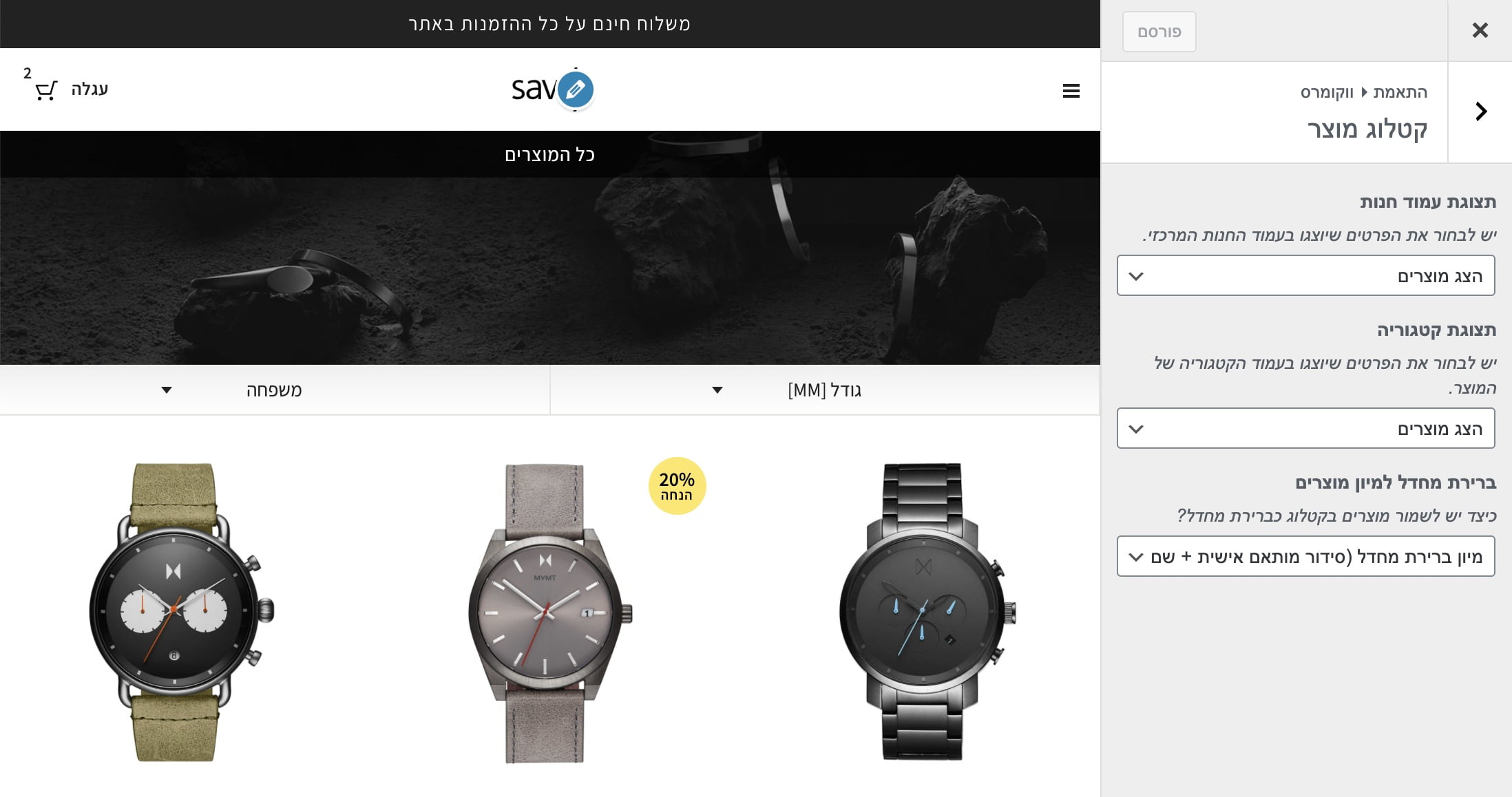
Use the following code to change the number of products WooCommerce displays per page. For this to work, make sure the “Products per page” option is selected in Customizer.
%27%20fill-opacity%3D%27.5%27%3E%3Cellipse%20fill%3D%22%23303030%22%20fill-opacity%3D%22.5%22%20rx%3D%221%22%20ry%3D%221%22%20transform%3D%22rotate(8.2%20-307.2%203247.5)%20scale(1047.96431%20457.09397)%22%2F%3E%3Cellipse%20fill%3D%22%23fdfdfd%22%20fill-opacity%3D%22.5%22%20rx%3D%221%22%20ry%3D%221%22%20transform%3D%22matrix(156.2035%20439.56778%20-2061.15016%20732.4442%201155%201090)%22%2F%3E%3Cellipse%20fill%3D%22%23fff%22%20fill-opacity%3D%22.5%22%20rx%3D%221%22%20ry%3D%221%22%20transform%3D%22matrix(-182.2831%20337.23423%20-284.35429%20-153.70024%202009.6%20124.8)%22%2F%3E%3Cellipse%20fill%3D%22%23919191%22%20fill-opacity%3D%22.5%22%20rx%3D%221%22%20ry%3D%221%22%20transform%3D%22matrix(-448.21247%2033.66252%20-17.4875%20-232.84402%201201.1%20569.7)%22%2F%3E%3C%2Fg%3E%3C%2Fsvg%3E)
Add this code to your theme’s functions.php file:
/**
 * Change number of products that are displayed per page (shop page)
 */
add_filter( 'loop_shop_per_page', 'new_loop_shop_per_page', 20 );

function new_loop_shop_per_page( $cols ) {
  // $cols contains the current number of products per page based on the value stored on Options –> Reading
  // Return the number of products you wanna show per page.
  $cols = 9;
  return $cols;
}
For more WooCommerce customization, see Mastering WooCommerce Hooks.
The ACF plugin in version 6.2.5 and above displays a message like this: ACF now automatically escapes unsafe HTML when rendered by the_field or the ACF shortcode. If you know your field content is safe and want to dismiss this message, add the following code to your functions.php file:
function savvy_acf_remove_msg() {
	add_filter('acf/admin/prevent_escaped_html_notice', '__return_true');
	add_filter('acf/shortcode/allow_unsafe_html', '__return_true');
	add_filter('acf/the_field/allow_unsafe_html', '__return_true');
}
add_action('init', 'savvy_acf_remove_msg');
URL Guessing is a built-in WordPress feature that attempts to perform automatic redirects when a user lands on an incorrect URL. In other words, WordPress tries to guess the URL and redirects the user to an address similar to the wrong one entered in the browser bar, so instead of getting a 404 page, the user is redirected to the address WordPress thinks they meant.
To disable this feature, add the following code to your theme’s functions.php file:
<?php

function sv_no_redirect_404($redirect_url)
{
	if (is_404()) {
		return false;
	}
	return $redirect_url;
}
add_filter('redirect_canonical', 'sv_no_redirect_404');
If you want to remove the schema that the Yoast SEO plugin adds for breadcrumbs, use the following snippet:
add_filter( 'wpseo_schema_graph_pieces', 'remove_breadcrumbs_from_schema', 11, 2 );
add_filter( 'wpseo_schema_webpage', 'remove_breadcrumbs_property_from_webpage', 11, 1 );

/**
 * Removes the breadcrumb graph pieces from the schema collector.
 *
 * @param array  $pieces  The current graph pieces.
 * @param string $context The current context.
 *
 * @return array The remaining graph pieces.
 */
function remove_breadcrumbs_from_schema( $pieces, $context ) {
    return array_filter( $pieces, function( $piece ) {
        return ! $piece instanceof YoastWPSEOGeneratorsSchemaBreadcrumb;
    } );
}

/**
 * Removes the breadcrumb property from the WebPage piece.
 *
 * @param array $data The WebPage's properties.
 *
 * @return array The modified WebPage properties.
 */
function remove_breadcrumbs_property_from_webpage( $data ) {
    if (array_key_exists('breadcrumb', $data)) {
        unset($data['breadcrumb']);
    }
    return $data;
}
This code removes the Breadcrumbs Schema from all site pages. Add this snippet to your theme’s functions.php file (preferably in a child theme).
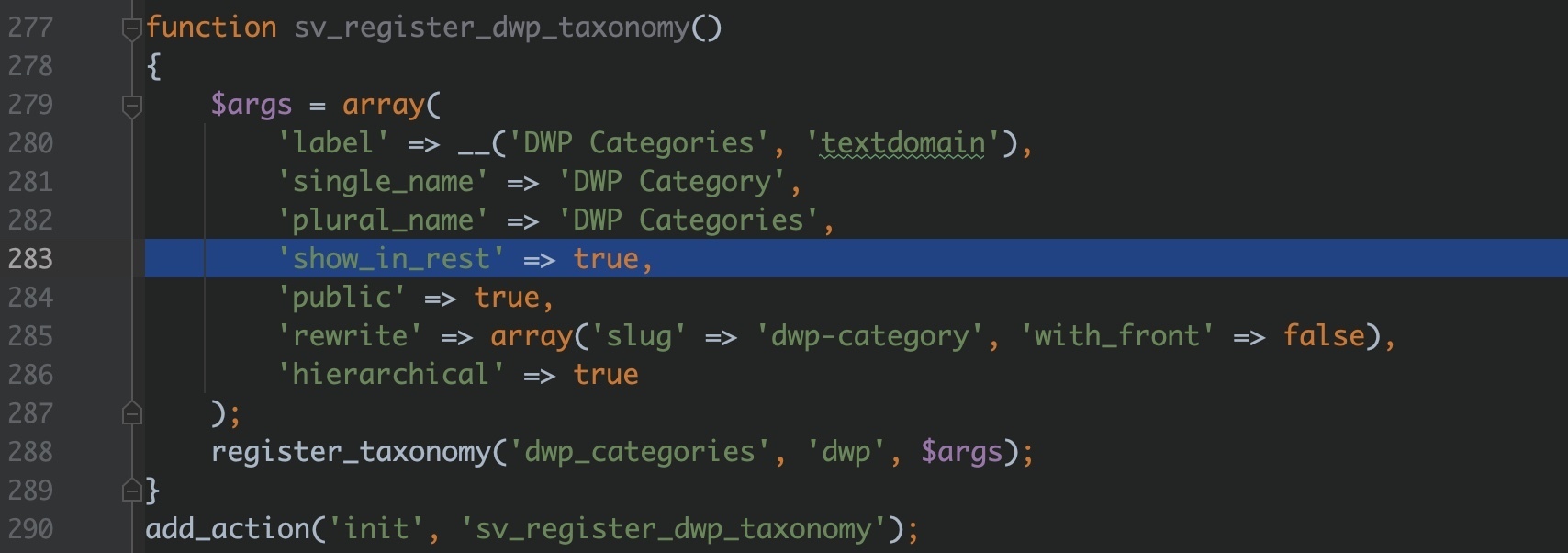
If you created a taxonomy for a specific Custom Post Type and do not see it when editing that CPT in Gutenberg, make sure you add 'show_in_rest' => true to both the CPT arguments and the taxonomy arguments.

Do you load the rtl.css file using the automatic method WordPress provides? That is, adding the rtl.css file to your theme directory so that when the site language is set to right-to-left (RTL), this file loads automatically. It is the preferred way to load RTL-specific CSS for RTL sites.
However, this file has no version (no query string), which makes cache busting difficult in the browser, especially for this file (if you are not using a caching plugin).
%22%20transform%3D%22translate(3.3%203.3)%20scale(6.67188)%22%20fill-opacity%3D%22.5%22%3E%3Cpath%20fill%3D%22%23060606%22%20d%3D%22M201.8%2027.6l60.9-3.2%201.5%2030-60.9%203.2z%22%2F%3E%3Cellipse%20fill%3D%22%23434343%22%20rx%3D%221%22%20ry%3D%221%22%20transform%3D%22matrix(9.42113%2050.34139%20-133.8307%2025.04573%20124.3%200)%22%2F%3E%3Cellipse%20fill%3D%22%23414141%22%20cx%3D%22230%22%20rx%3D%2267%22%20ry%3D%2227%22%2F%3E%3Cpath%20fill%3D%22%230b0b0b%22%20d%3D%22M200%2029h2v13h-2z%22%2F%3E%3C%2Fg%3E%3C%2Fsvg%3E)
To add the ver parameter to the rtl.css file based on when the file was last modified, use the following filter:
add_filter( 'locale_stylesheet_uri', function ($localized_stylesheet_uri) {
    $time_ver = filemtime( get_stylesheet_directory() . '/rtl.css' );
    return add_query_arg( array('ver' => $time_ver), $localized_stylesheet_uri );
});
If you want to change the zoom (magnification) behavior when hovering over a product on the WooCommerce product page, you can use the woocommerce_single_product_zoom_options filter:
add_filter( 'woocommerce_single_product_zoom_options', 'custom_single_product_zoom_options' );
function custom_single_product_zoom_options( $zoom_options ) {
    // Changing the magnification level:
    $zoom_options['magnify'] = 0.7;

    return $zoom_options;
}
Here are the parameters you can change:
$zoom_options = array (
    'url' => false,
    'callback' => false,
    'target' => false,
    'duration' => 120, // Transition in milli seconds (default is 120)
    'on' => 'mouseover', // other options: grab, click, toggle (default is mouseover)
    'touch' => true, // enables a touch fallback
    'onZoomIn' => false,
    'onZoomOut' => false,
    'magnify' => 1, // Zoom magnification: (default is 1  |  float number between 0 and 1)
);
For more WooCommerce product page customization, see Mastering WooCommerce Hooks.
For Rank Math users, use the rank_math/metabox/priority filter to change the display order of the Rank Math metabox in the editor.
Setting the value to low will make the Rank Math metabox appear after other metaboxes, such as ACF fields.
/**
 * Change the Rank Math Metabox Priority
 *
 * @param array $priority Metabox Priority.
 */
add_filter( 'rank_math/metabox/priority', function( $priority ) {
	return 'low';
});
This filter lets you change the URL base of the XML sitemap in Rank Math.
By default, the sitemap is accessible at /sitemap_index.xml. Using the rank_math/sitemap/base_url filter, you can change the base to a different path.
In the example below, the sitemap URL base is changed to search-sitemaps/ instead of the default value.
/**
 * Filter to change the Sitemap URL Base
 *
 * @param string $base New URL Base
 */
add_filter( 'rank_math/sitemap/base_url', function( $base ){
	return 'search-sitemaps/';
}, 10, 1 );
Use the rank_math/author_base filter to change the URL base for author archives in Rank Math.
When the author base is set using this filter, the Author Base option configured by users under Rank Math SEO → Titles & Meta → Authors will have no effect.
In the example below, the author base is changed to writers (i.e., /writers/username/ instead of /author/username/).
/**
 * Allow developers to change the author base.
 *
 * @param string $base The author base.
 */
add_filter( 'rank_math/author_base', function( $base ) {
	return 'writers';
});