The MCP Adapter lets AI agents like Claude talk to your WordPress site. It turns WordPress “abilities” into tools an AI can call, so you can ask an assistant to pull your orders, check SEO scores, or read site settings in plain language.
Before trusting it on a live site, I tested what it exposes on a clean WordPress. Some of what I found is not in the documentation, one surprise affects sites that never installed the adapter, and the biggest risk is not about MCP at all.
What the MCP Adapter actually does
An “ability” is a single action WordPress or a plugin registers, such as “read site info” or “delete a product.” The adapter publishes selected abilities over the Model Context Protocol so any compatible AI client can use them.
Abilities are private by default. One is reachable over the adapter only if it is marked public, and WordPress still runs that ability’s own permission check against the logged-in user before anything happens. That model is sound. The problems are in the defaults around it.
What I found testing it
Every result below was measured on 2026-10-24 on a fresh install: WordPress 7.1.3, MCP Adapter 0.7.1, with Elementor 4.3.5, WooCommerce 11.2.1, and Yoast SEO 28.7. I connected as an administrator, a shop manager, an author, and a subscriber.
A. Elementor starts an MCP server even without the adapter plugin
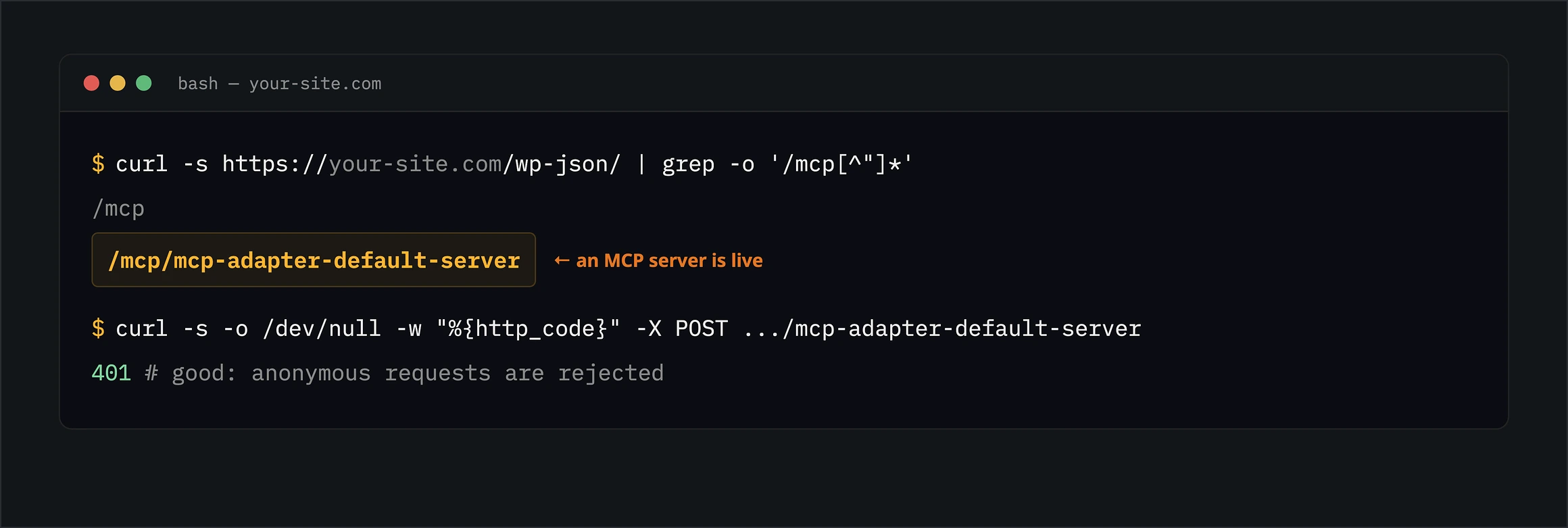
Check this one first. Elementor bundles the adapter and starts it for you. With only Elementor active and the MCP Adapter plugin never installed, the endpoint /wp-json/mcp/mcp-adapter-default-server was live.
Elementor runs on over 10 million sites, so many of them now serve an MCP server their owner never set up. The endpoint still requires a logged-in user, and I confirmed this on Elementor 4.3.5 only. Angie also ships the adapter. So does WP Rocket’s MCP integration: version 3.23.5.1 started this server and an OAuth one on its own, on an older bundled adapter (0.5.0). WooCommerce bundles it but did not start the server on its own.
Open /wp-json/ on your own site and search for mcp-adapter-default-server. If that route is present, your site is running an MCP server, whether or not you installed the adapter. An /mcp/ route on its own can also be an OAuth endpoint, so confirm the server route specifically.
B. The three core abilities are public out of the box
On WordPress 7.1.3, three built-in abilities carry a public flag: site info, the current user’s profile, and environment info (PHP version, database version, WordPress version). The adapter treats that flag as “expose over MCP,” so these appear on the default server with no action from you.
Site info and environment info require the manage_options capability to actually run, which normally means an administrator, though a custom role can hold it too. User info returns the signed-in user’s own profile to any logged-in user. None of this is a breach on its own, but it means the default server is never truly empty.
C. Any subscriber can connect and list every tool
Connecting to the default server only needs the basic read capability. On a membership site or a store, that is every registered customer.
A subscriber who connected could list all 14 published abilities, including woocommerce/product-delete. They could not run the ones they lack permission for; the delete attempt returned “Permission denied.” The concern is disclosure: the full list of what the AI layer can do, including destructive actions, is visible to any account holder.
D. One tool runs everything, which breaks client approvals
The default server exposes just three tools, and one of them, execute-ability, runs any published ability by name. The AI client sees a single tool, not one tool per action.
This matters because some AI clients ask you to approve tools by name. In Claude Code, approving execute-ability once, for a harmless read, also approves the call that deletes a product, because it is the same tool. On the default server, that client cannot tell a read from a delete.
E. The common opt-out trick leaves a second door open
The advice you will find online is to hide a risky ability by setting its meta.mcp.public flag to false. That worked for MCP: the hidden ability returned “not found.”
But an ability marked show_in_rest is also reachable through the Abilities REST API. With the ability hidden from MCP, the same credential still ran it through its REST route and trashed a product. To close it you also need show_in_rest set to false, and even then another plugin may expose the same action through its own endpoint. The next finding explains why.
F. The credential is not scoped to MCP, and this is the big one
An AI client authenticates with a WordPress application password. People picture that as “the MCP login,” but it is not. It is a full WordPress API credential for the user behind it.
To prove it, I took the application password a client would use and skipped MCP entirely. The same password deleted a product through WooCommerce’s own REST endpoint, read every user’s email address, and changed the site title through the core REST API.
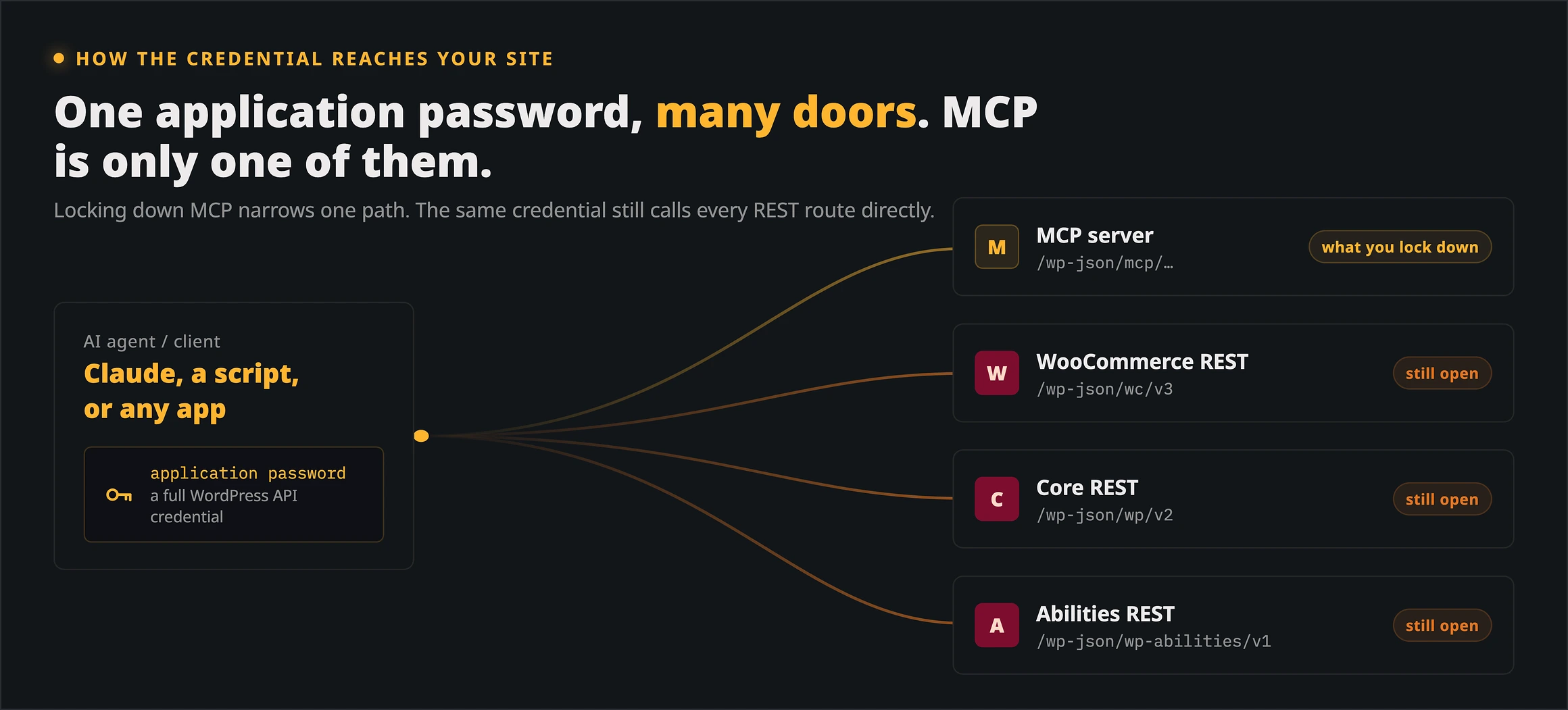
This reframes everything above. Locking down MCP shrinks the MCP surface, but the password still reaches WooCommerce, core, and the Abilities API directly, so none of it contains a leaked or over-privileged credential. The real security boundary is the capabilities of the user you connect as, not the tools you expose.
G. There is no audit trail by default
At the adapter’s own layer, the default server records nothing about which tool ran, for whom, or when. Your host, firewall, or an access log may still capture the raw requests, but the adapter adds no execution log of its own. WordPress also updates an application password’s “last used” time at most once a day, so even that is a coarse signal.
If an AI agent makes a change you did not expect, nothing from the adapter tells you what it did. You have to add logging yourself.
H. Prompt injection depends entirely on the model
If an ability returns text that visitors can write, such as comments or reviews, that text can carry hidden instructions to the AI. I planted a comment telling the assistant to delete two products, then asked it only to summarize the comments.
The results split by model. Three Claude models and the latest GPT model flagged the comment and refused; an older GPT model obeyed it, deleted both products, and reported the deletion as routine housekeeping. These were single runs, so treat them as observations, not guarantees. The point is that once you pre-approve execute-ability for a write-capable user, the model’s judgment is the last line of defense and it varies by model. Do not build on it; keep content-reading and write-capable sessions apart.
How to lock it down
Here is the configuration I tested and would run in production: no default server, one small server that exposes only what you need, a dedicated low-privilege user, and a log of every call.
Step 1: turn off the default server
If you do not need the auto-generated server, remove it with one filter. This also stops the copy that Elementor and other plugins start.
add_filter( 'mcp_adapter_create_default_server', '__return_false' );In my test, the /mcp/mcp-adapter-default-server route was then gone.
Step 2: run one custom server with an explicit list
A custom server exposes only the abilities you name, and it lists each one as its own tool. That restores per-ability approval in the AI client, and it lets you require a capability of your choice to connect.
add_action( 'mcp_adapter_init', function ( $adapter ) {
    $adapter->create_server(
        'site-tools',                 // server id
        'mcp',                        // REST namespace
        'site-tools',                 // route: /wp-json/mcp/site-tools
        'Site tools (read-only)',
        'Read-only tools for the AI agent',
        'v1.0.0',
        array( \WP\MCP\Transport\HttpTransport::class ),
        \WP\MCP\Infrastructure\ErrorHandling\ErrorLogMcpErrorHandler::class,
        \WP\MCP\Infrastructure\Observability\NullMcpObservabilityHandler::class,
        array(                        // the only abilities this server exposes
            'core/get-site-info',
            'woocommerce/products-query',
            'yoast-seo/get-post-seo-data',
        ),
        array(),
        array(),
        static fn() => current_user_can( 'mcp_connect' ) // who may connect
    );
} );
In my test, this server showed three separate read-only tools, refused a user without the mcp_connect capability with a 403, and rejected any ability not on the list with “Tool not found.”
Step 3: connect as a dedicated low-privilege user
Create a WordPress user whose only job is this connection. Give it a custom role with just the capabilities the exposed abilities need, plus the mcp_connect capability from the server above. Never point an AI client at your own administrator account.
Resist the temptation to hand an agent manage_options just to make the core abilities work; that turns its password into an admin key for the whole REST API. Keep the password out of plaintext config files where you can, and revoke it the moment a client is retired.
Step 4: restrict who can even hold an application password
By default any logged-in user can create an application password for themselves, so on a store or membership site every customer can mint an API credential. Limit that to your dedicated service accounts.
add_filter( 'wp_is_application_passwords_available_for_user', function ( $available, $user ) {
    $allowed = array( 42 ); // user IDs of your MCP service accounts
    return in_array( (int) $user->ID, $allowed, true );
}, 10, 2 );
With this in place, a subscriber trying to create an application password got a 501 “not available for your account.” While you are here, disable XML-RPC if you do not use it, since application passwords work there too.
Step 5: log every call
The adapter fires a filter before each tool call. A few lines turn that into an audit log you can actually read.
add_filter( 'mcp_adapter_pre_tool_call', function ( $args, $tool_name ) {
    $log   = get_option( 'mcp_audit', array() );
    $log[] = array(
        gmdate( 'c' ),
        wp_get_current_user()->user_login,
        $tool_name,
        wp_json_encode( $args ),
        $_SERVER['REMOTE_ADDR'] ?? '',
    );
    update_option( 'mcp_audit', array_slice( $log, -500 ), false );
    return $args;
}, 10, 2 );
This filter only sees MCP calls, not the direct REST routes the same credential can reach, so keep your server access logs as the real record.
If you must stay on the default server
When you cannot move to a custom server yet, hide a risky ability on both channels at once, MCP and REST, or the REST route stays open.
add_filter( 'wp_register_ability_args', function ( $args, $name ) {
    if ( 'woocommerce/product-delete' === $name ) {
        $args['meta']['mcp']['public'] = false; // hide from MCP
        $args['meta']['show_in_rest'] = false;  // and from the REST API
    }
    return $args;
}, 10, 2 );
Exposure is not the same as authorization
It is tempting to treat the public flag as a security control. The WordPress core team’s announcement of the flag is explicit that it is not.
The public flag controls discoverability and client exposure. It does not make an ability executable without authorization, which must be enforced by the ability itself. – WordPress Core team, “A unified public exposure flag for Abilities in WordPress 7.1”
Hiding an ability reduces what an attacker can find. The wall that stops them is each ability’s permission check and the privileges of the account you connect as, as the table sums up.
| Concern | Default server | Hardened custom server |
|---|---|---|
| Who can connect | Any user with read |
Only a capability you choose |
| Abilities exposed | All marked public | Only the ones you list |
| Tools the AI sees | One execute-ability |
One per ability, with read-only flags |
| Audit log | None | Yours, via a filter |
| Connect-user privileges | Whatever account you point at it | A dedicated low-privilege account |
FAQs
Common questions about securing the WordPress MCP Adapter:
Summary
The MCP Adapter’s model is sound, but its defaults are not: a server you did not ask for can be live, it exposes everything public through one tool, and it logs nothing. And the credential behind it is a full WordPress API key that reaches WooCommerce, core, and the Abilities API whether or not MCP is locked down. The account you connect as is the real boundary.
So turn off the default server, run a small custom one that exposes only what you need, connect as a dedicated low-privilege account, restrict who can hold an application password, and log every call. Then work through the WordPress hardening guide for the rest of your site.