
Most conversations about AI in WordPress start with the plugin and end with the demo. The question that comes later, usually when the first invoice arrives, is what it actually costs to run.
The honest answer is “less than you fear, and more than the plugin page suggests”. It depends almost entirely on three decisions: which model you pick, whether you use caching, and whether the work needs to happen in real time.
Below are three common WordPress scenarios with the math laid out, so you can swap in your own numbers.
How the bill works, in one paragraph
API providers charge per token, roughly three quarters of an English word. Input tokens (what you send: instructions, product data, the article) and output tokens (what the model writes back) are priced separately, and output is usually 5 to 10 times more expensive.
Prices are quoted per million tokens (MTok). Every price below was checked on November 2, 2026 on the vendors’ official pricing pages. Prices change often, so check again before you budget.
The price list
These are the six models used throughout this post, from three vendors, each with a small model and a stronger one. The sources are the official pricing pages of OpenAI, Anthropic and Google.
| Model | Input / MTok | Output / MTok | Cached input / MTok | Batch (in / out) |
|---|---|---|---|---|
| OpenAI gpt-6-luna | $0.10 | $0.50 | $0.01 | $0.05 / $0.25 |
| OpenAI gpt-6.1-terra | $1.00 | $5.00 | $0.05 | $0.50 / $2.50 |
| Anthropic Claude Haiku 5.5 | $0.10 | $0.50 | $0.01 | $0.05 / $0.25 |
| Anthropic Claude Sonnet 5.5 | $2.00 | $10.00 | $0.10 | $1.00 / $5.00 |
| Google Gemini 3.5 Flash-Lite | $0.30 | $2.50 | $0.03 | $0.15 / $1.25 |
| Google Gemini 3.8 Flash (until Dec 31, 2026) | $0.75 | $3.75 | $0.075 | $0.375 / $1.875 |
| Google Gemini 3.8 Flash (from Jan 1, 2027) | $1.50 | $7.50 | $0.15 | $0.75 / $3.75 |
Gemini 3.8 Flash prices double on January 1, 2027. Google lists the current rates “through December 31, 2026”, and every rate, including cache storage, doubles after that. The tables below show both prices for this model.
Claude Haiku 5.5 prices apply to prompts up to 100,000 tokens, which covers everything in this post. Anthropic also notes that its newer models use a tokenizer that produces more tokens for the same text:
Claude 4.7 and later models and Claude Mythos Preview use a newer tokenizer that contributes to their improved performance on a wide range of tasks. This tokenizer produces approximately 30% more tokens for the same text. – Anthropic, Pricing documentation
So treat the Claude figures below as a floor.
Scenario 1: a support chatbot
This is the scenario where costs surprise people, because every message re-sends a lot of text. If you are still deciding whether your site needs one, start with why a business needs a chatbot.
A typical setup: a system prompt with your tone and rules, plus a few thousand tokens of FAQ, shipping and returns policy, about 3,000 tokens that never change. On top of that come the conversation so far and the customer’s question, around 700 tokens, and the reply, around 250 tokens.
Assume 3,000 conversations a month, four messages each: 12,000 requests.
| Model | Monthly cost, no caching | Monthly cost, with prompt caching |
|---|---|---|
| gpt-6-luna | $5.94 | $2.70 |
| Claude Haiku 5.5 | $5.94 | $2.70 |
| Gemini 3.5 Flash-Lite | $20.82 | $11.10 |
| Gemini 3.8 Flash (2026 / from 2027) | $44.55 / $89.10 | $20.25 / $40.50 |
| gpt-6.1-terra | $59.40 | $25.20 |
| Claude Sonnet 5.5 | $118.80 | $50.40 |
Two things stand out. First, the gap between the cheapest and the most capable model is 20x for the same traffic. For “where is my order” and “do you ship to Eilat”, a small model is usually fine; route only the hard conversations to a bigger one.
Second, caching cuts the bill by more than half. Caching means the provider stores the unchanging start of your prompt and charges a fraction of the normal input price when it is reused.
The trick is ordering: put the static part (instructions, FAQ) first and the changing part (chat history, question) last. Otherwise, nothing matches the cache.
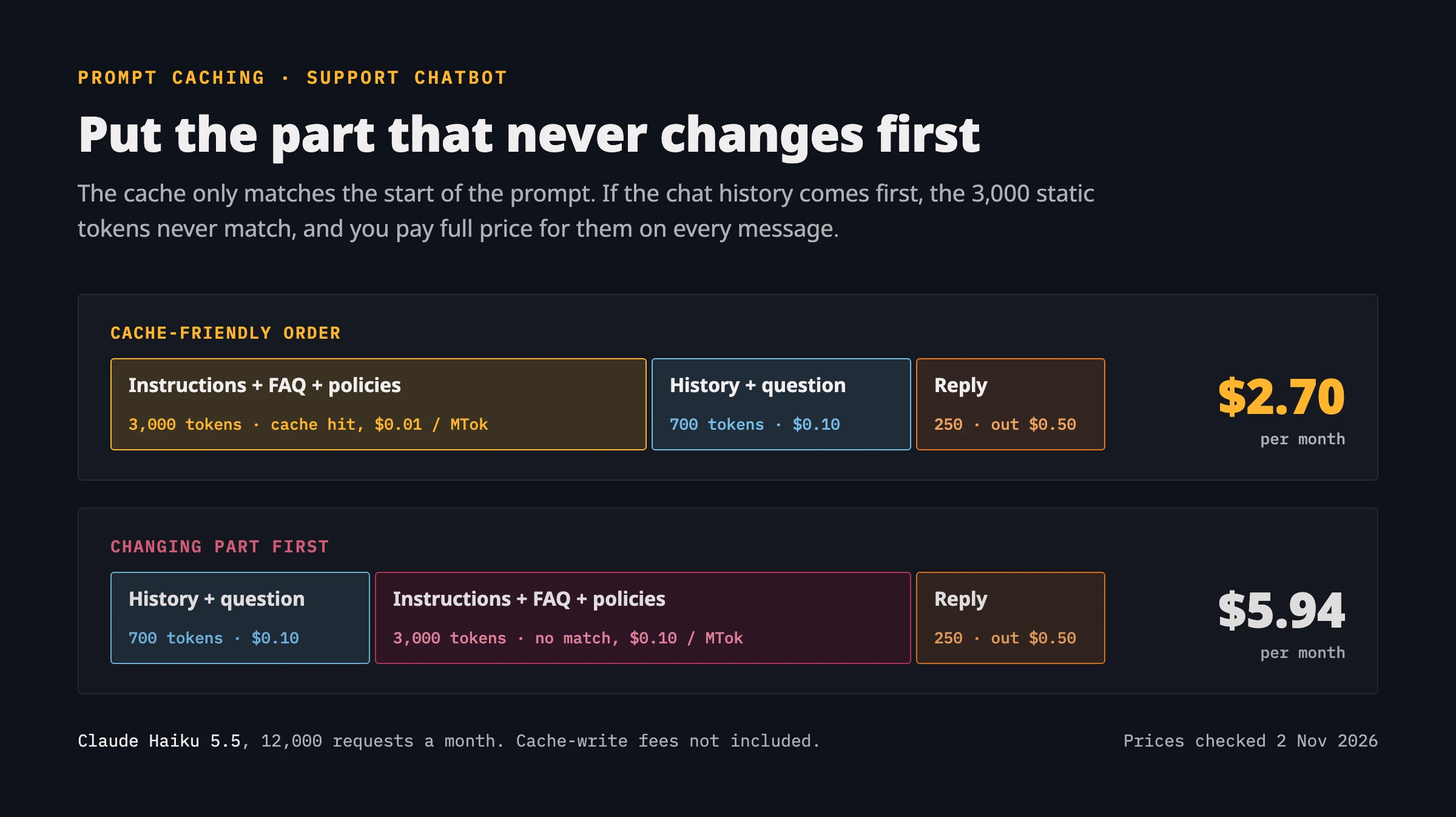
The “with caching” column ignores the extra fees around caching, so read the fine print for your provider. Anthropic and OpenAI charge 1.25 times the normal input price to write the cached prefix (for a 5-minute cache on Claude, a 30-minute one on OpenAI). That cost is small when the same prefix is reused thousands of times a month.
Google charges an hourly storage fee instead: $1 per million tokens per hour on Gemini 3.5 Flash-Lite. Keeping a 3,000-token prefix cached all month adds about $2.19 to the Flash-Lite figure above.
Scenario 2: WooCommerce product descriptions
Here the numbers are almost boringly small. Say you have 2,000 products and send each one’s attributes, category and a short style guide (about 600 tokens) and get back a 200-word description (about 300 tokens).
| Model | All 2,000 products, standard | Same, via Batch API |
|---|---|---|
| gpt-6-luna | $0.42 | $0.21 |
| Claude Haiku 5.5 | $0.42 | $0.21 |
| Gemini 3.5 Flash-Lite | $1.86 | $0.93 |
| Gemini 3.8 Flash (2026 / from 2027) | $3.15 / $6.30 | $1.58 / $3.15 |
| gpt-6.1-terra | $4.20 | $2.10 |
| Claude Sonnet 5.5 | $8.40 | $4.20 |
Because cost is a non-issue, this is the one place where I would pick the stronger model. Product copy is public, it affects conversions and SEO, and a weak description costs more in lost sales than $8 ever will.
What matters more is the workflow: nobody needs 2,000 descriptions back within a second. The Batch API lets you upload all requests as one job and collect the results later, usually within hours, at half the price. All three providers offer it.
A simple WP-CLI command or Action Scheduler job that exports products, submits a batch, and writes the results back as drafts for human review is the sane setup. Publishing straight to live product pages without review is how you end up with a “waterproof” cotton T-shirt.
Scenario 3: content summarization
Summaries are useful in several places: excerpts, meta descriptions, “key takeaways” boxes, newsletter blurbs. Assume a 2,000-word article (about 3,000 tokens with instructions) and a 150-token summary.
| Model | Backfill 1,500 archive posts (Batch) | 120 new posts / month | If generated on every page view (60,000 views) |
|---|---|---|---|
| gpt-6-luna | $0.28 | $0.04 | $22.50 |
| Claude Haiku 5.5 | $0.28 | $0.04 | $22.50 |
| Gemini 3.5 Flash-Lite | $0.96 | $0.15 | $76.50 |
| Gemini 3.8 Flash (2026 / from 2027) | $2.11 / $4.22 | $0.34 / $0.68 | $168.75 / $337.50 |
| gpt-6.1-terra | $2.81 | $0.45 | $225.00 |
| Claude Sonnet 5.5 | $5.63 | $0.90 | $450.00 |
The last column shows the mistake I see most often in plugins and custom themes: calling the API from the template, on render, for every visitor. A summary of a post that has not changed does not need to be regenerated.
Generate it once on the save_post hook (or transition_post_status when the post is published), store it in post meta, and regenerate only when the content changes. The difference between the “120 new posts” column and the “every page view” column is a factor of 500, for exactly the same output.
A short note on Claude Code and MCP
If you also use AI on the development side, for example Claude Code with MCP servers connected to your WordPress install, the cost driver is different. Each connected server adds its tool definitions to the context of every request, whether you use those tools or not.
Keep only the servers you need for the current task enabled. Savvy’s own guide to MCP servers for Claude Code is a good place to start when choosing which ones are worth it.
The takeaways
Five rules cover most of the savings in the scenarios above:
- Model choice is the biggest lever. Start with the small model and move up only where you can see the quality difference.
- Cache the static part of your prompts. For chatbots, that alone often halves the bill.
- Batch anything that can wait. Bulk product copy and archive backfills are textbook batch jobs at 50% off.
- Generate once, store, reuse. Never call the API on page render for content that has not changed.
- Set a hard spending limit in each provider’s dashboard before you launch. It costs nothing and turns a runaway loop into an error message rather than an invoice.
FAQs
Common questions about the cost of running AI on a WordPress site:
Summary
For most small and mid-sized WordPress sites, all three scenarios together come to anywhere from a few dollars to a few tens of dollars a month. The expensive setups are almost never expensive because of the model. They are expensive because of the architecture around it.




Awesome! Its genuinely remarkable post, I have got much clear idea regarding from this post