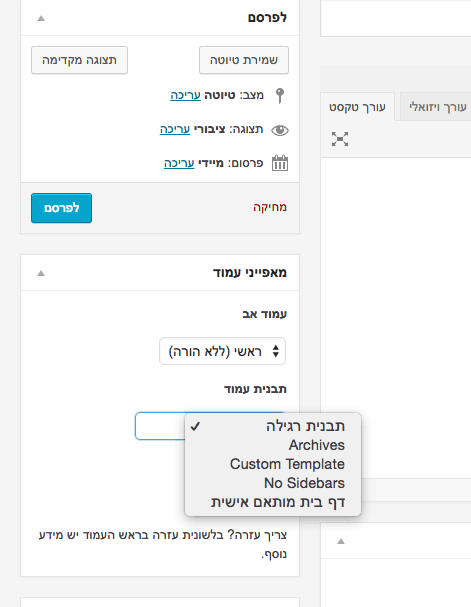
To create a custom page template as the homepage in WordPress, duplicate page.php from your theme’s main directory or create a new PHP file and add the following code at the top:
<?php /* Template Name: xxxxxx */ ?>
Replace xxxxxx with the name that will appear under “Page Attributes” when you create a new page.
Go to your WordPress admin panel, create a new page and select this template.
%22%20transform%3D%22translate(1.2%201.2)%20scale(2.3711)%22%20fill-opacity%3D%22.5%22%3E%3Cellipse%20fill%3D%22%23cacaca%22%20rx%3D%221%22%20ry%3D%221%22%20transform%3D%22matrix(-17.29584%20-32.61896%2035.40186%20-18.77144%20114.7%20195.7)%22%2F%3E%3Cellipse%20fill%3D%22%23c7c7c7%22%20cx%3D%223%22%20cy%3D%2286%22%20rx%3D%2242%22%20ry%3D%2223%22%2F%3E%3Cellipse%20fill%3D%22%23fff%22%20rx%3D%221%22%20ry%3D%221%22%20transform%3D%22rotate(-110.7%2090.2%20-20.1)%20scale(129.21869%2074.70396)%22%2F%3E%3Cellipse%20fill%3D%22%23fff%22%20cx%3D%2244%22%20cy%3D%22229%22%20rx%3D%2235%22%20ry%3D%22135%22%2F%3E%3C%2Fg%3E%3C%2Fsvg%3E "Custom homepage - WordPress")
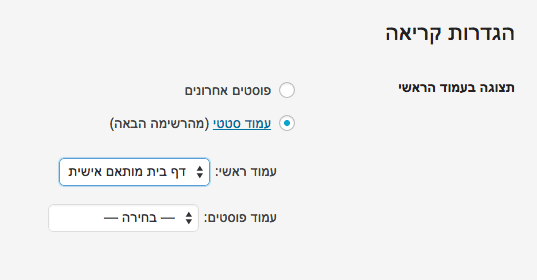
After publishing the page, go to Settings > Reading in the WordPress admin.
%27%20fill-opacity%3D%27.5%27%3E%3Cellipse%20fill%3D%22%23ccc%22%20fill-opacity%3D%22.5%22%20rx%3D%221%22%20ry%3D%221%22%20transform%3D%22matrix(9.35521%2070.11404%20-96.09846%2012.82227%20187.6%20153.7)%22%2F%3E%3Cellipse%20fill%3D%22%23cbcbcb%22%20fill-opacity%3D%22.5%22%20rx%3D%221%22%20ry%3D%221%22%20transform%3D%22rotate(-90.6%20267.6%20-226.3)%20scale(73.00035%20139.14122)%22%2F%3E%3Cpath%20fill%3D%22%23fff%22%20fill-opacity%3D%22.5%22%20d%3D%22M569.5%20238l-321-270.5%2060.9%20344z%22%2F%3E%3Cellipse%20fill%3D%22%23fff%22%20fill-opacity%3D%22.5%22%20rx%3D%221%22%20ry%3D%221%22%20transform%3D%22matrix(-304.47242%20209.18673%20-42.6458%20-62.0712%2072.2%2052.8)%22%2F%3E%3C%2Fg%3E%3C%2Fsvg%3E "Custom homepage - WordPress")
Select your page as the homepage. That is it – you now have a custom homepage. See the post on WordPress page templates.
A few weeks ago I ran into a situation where a client wanted different text instead of the standard “Add to Cart” or “Add to Bag” in WooCommerce. Here is the code to add to functions.php to change the text:
add_filter( 'woocommerce_product_single_add_to_cart_text', 'woo_custom_cart_button_text' );

function woo_custom_cart_button_text() {
         return __( 'My Button Text', 'woocommerce' );
 }
To allow SVG file uploads through the media library, add the following code to your functions.php file:
function cc_mime_types($mimes) {
  $mimes['svg'] = 'image/svg+xml';
  return $mimes;
}
add_filter('upload_mimes', 'cc_mime_types');
A more detailed explanation can be found in this post.
Adding this code to your .htaccess file will prevent external access to the wp-config.php file. For more tips on securing your WordPress site, see the linked post.
<files wp-config.php>
    order allow,deny
    deny from all
</files>
The following snippet takes the first image it finds in the post and sets it as the featured image. If you choose a featured image manually, it will of course display that one.
function autoset_featured() {
          global $post;
          $already_has_thumb = has_post_thumbnail($post->ID);
              if (!$already_has_thumb)  {
              $attached_image = get_children( "post_parent=$post->ID&post_type=attachment&post_mime_type=image&numberposts=1" );
                          if ($attached_image) {
                                foreach ($attached_image as $attachment_id => $attachment) {
                                set_post_thumbnail($post->ID, $attachment_id);
                                }
                           }
                        }
      }
add_action('the_post', 'autoset_featured');
add_action('save_post', 'autoset_featured');
add_action('draft_to_publish', 'autoset_featured');
add_action('new_to_publish', 'autoset_featured');
add_action('pending_to_publish', 'autoset_featured');
add_action('future_to_publish', 'autoset_featured');
For more on WordPress image handling, see Image Sizes in WordPress.
When users enter an incorrect username or password, an error message appears telling them which one is wrong. If someone is trying to break into your site by guessing one of these, that error message can help them understand what they got wrong. Block this by adding the following line to your functions.php file. For more security tips, see hardening your WordPress site:
add_filter('login_errors',create_function('$a', "return null;"));
Some prefer to work with the visual editor when writing posts and others prefer the text editor. Change the default post editor by adding the following lines to your functions.php file:
# Visual Editor as default
add_filter( 'wp_default_editor', create_function('', 'return "tinymce";') );

# HTML Editor as default
add_filter( 'wp_default_editor', create_function('', 'return "html";') );
For more editor configuration, see Enable Gutenberg for Custom Post Types.
You can redirect users who log into your WordPress site to different URLs based on their role.
function redirect_user_on_role()
{
	global $current_user;
   	get_currentuserinfo();
 	if ($current_user->user_level == 0)
 	{
       	wp_redirect( home_url() ); exit;
 	}
 	else if ($current_user->user_level > 1)
 	{
       	 wp_redirect( home_url() ); exit;
 	}
  	else if ($current_user->user_level >8)
 	{
		wp_redirect( home_url() ); exit;
 	}
 	else
 	{
     		$redirect_to = 'http://google.com/';
       	return $redirect_to;
 	}
}
add_action('admin_init','redirect_user_on_role');
For more security best practices, see Hardening WordPress Security.
By default WordPress blocks comments on Custom Post Types. To enable comments on a custom post type, add comments under supports where you register it (line 32):
function snippet_custom_init() {
      $labels = array(
          'name' => 'Snippet',
          'singular_name' => 'Snippet',
          'add_new' => 'Add New Snippet',
          'add_new_item' => 'Add New Snippet',
          'edit_item' => 'Edit Snippet',
          'new_item' => 'New Snippet',
          'all_items' => 'All Snippets',
          'view_item' => 'View Snippet',
          'search_items' => 'Search Snippets',
          'not_found' =>  'No snippets found',
          'not_found_in_trash' => 'No snippets found in trash',
          'parent_item_colon' => '',
          'menu_name' => 'Snippets',
          );

      $args = array(
          'labels' => $labels,
          'exclude_from_search' => false,
          'public' => true,
          'publicly_queryable' => true,
          'show_ui' => true,
          'show_in_menu' => true,
          'query_var' => true,
          'rewrite' => array( 'slug' => 'snippet' ),
          'capability_type' => 'post',
          'has_archive' => true,
          'hierarchical' => false,
          'taxonomies' => array('category'),
          'menu_position' => null,
          'supports' => array( 'title', 'author', 'thumbnail', 'excerpt', 'comments', 'editor' )
          );

        register_post_type( 'snippet', $args );
    }
add_action( 'init', 'snippet_custom_init', 0);
A trend I have seen on many blogs is to change the order of comments in WordPress posts so the most recently written comments appear at the top. If your blog posts have many comments, this option can be preferable to prevent the latest comments from being “buried” at the bottom of the page.
Here is how to reverse comment order in WordPress.
Option 1
Go to Settings > Discussion. Under “Other comment settings” find “Older comments at the top of each page” and change the setting accordingly.
%22%20transform%3D%22translate(1.4%201.4)%20scale(2.72656)%22%20fill-opacity%3D%22.5%22%3E%3Cellipse%20fill%3D%22%23fff%22%20cx%3D%2225%22%20cy%3D%2215%22%20rx%3D%2248%22%20ry%3D%22116%22%2F%3E%3Cellipse%20fill%3D%22%23fff%22%20cx%3D%2234%22%20cy%3D%2222%22%20rx%3D%2239%22%20ry%3D%22135%22%2F%3E%3Cellipse%20fill%3D%22%23d8d8d8%22%20cx%3D%22195%22%20cy%3D%2219%22%20rx%3D%22122%22%20ry%3D%22122%22%2F%3E%3Cellipse%20fill%3D%22%23fff%22%20cx%3D%2233%22%20cy%3D%2216%22%20rx%3D%2240%22%20ry%3D%2277%22%2F%3E%3C%2Fg%3E%3C%2Fsvg%3E)
Option 2
Add the following code to your theme’s functions.php file:
function wpb_reverse_comments($comments) {
		return array_reverse($comments);
	}
add_filter ('comments_array', 'wpb_reverse_comments');
Here we use the comments_array filter to reverse the comment order.
That is it – hope this tip helps when you want to reverse comment order on your WordPress site.
For more comment customization, see Show the Total Number of Comments in WordPress.