A founder emails me a link to something they built in an afternoon with Lovable. It looks great. Then comes the inevitable line: “can you just put it on WordPress?”
That word, “just,” is where the trouble starts. AI app builders are very good at producing a screen that looks finished. The problem is everything you cannot see in a screenshot.
These tools are not a fringe experiment. Lovable passed 200 million dollars in annual revenue and around 8 million users in under a year, and v0 has more than 4 million users. So a lot of people are about to hit the same wall: the gap between a prototype that looks done and a site that is actually ready for production. This is the hands-on companion to my broader guide on vibe coding for WordPress.
Skip to how I actually do the conversion
It looks finished. That is the trap.
Every conversion tool and tutorial I have seen treats “looks the same in a theme” as the finish line. In my experience, that is where the real work starts. The design is the easy 70 percent. The last 30 percent is what makes a site production ready, and it is exactly what an AI export leaves out.
“The final 30% – the part that makes software production-ready, maintainable, and robust – still requires real engineering knowledge.”
Addy Osmani, Head of Chrome Developer Experience at Google, describing the 70 percent problem.
The numbers back this up. Veracode’s 2025 code security report found that 45 percent of AI-generated code samples failed security testing. This is not theoretical: a real vulnerability in Lovable projects (CVE-2025-48757) exposed database read and write access on roughly 10 percent of the projects a researcher scanned, because the generated code shipped without proper access rules.
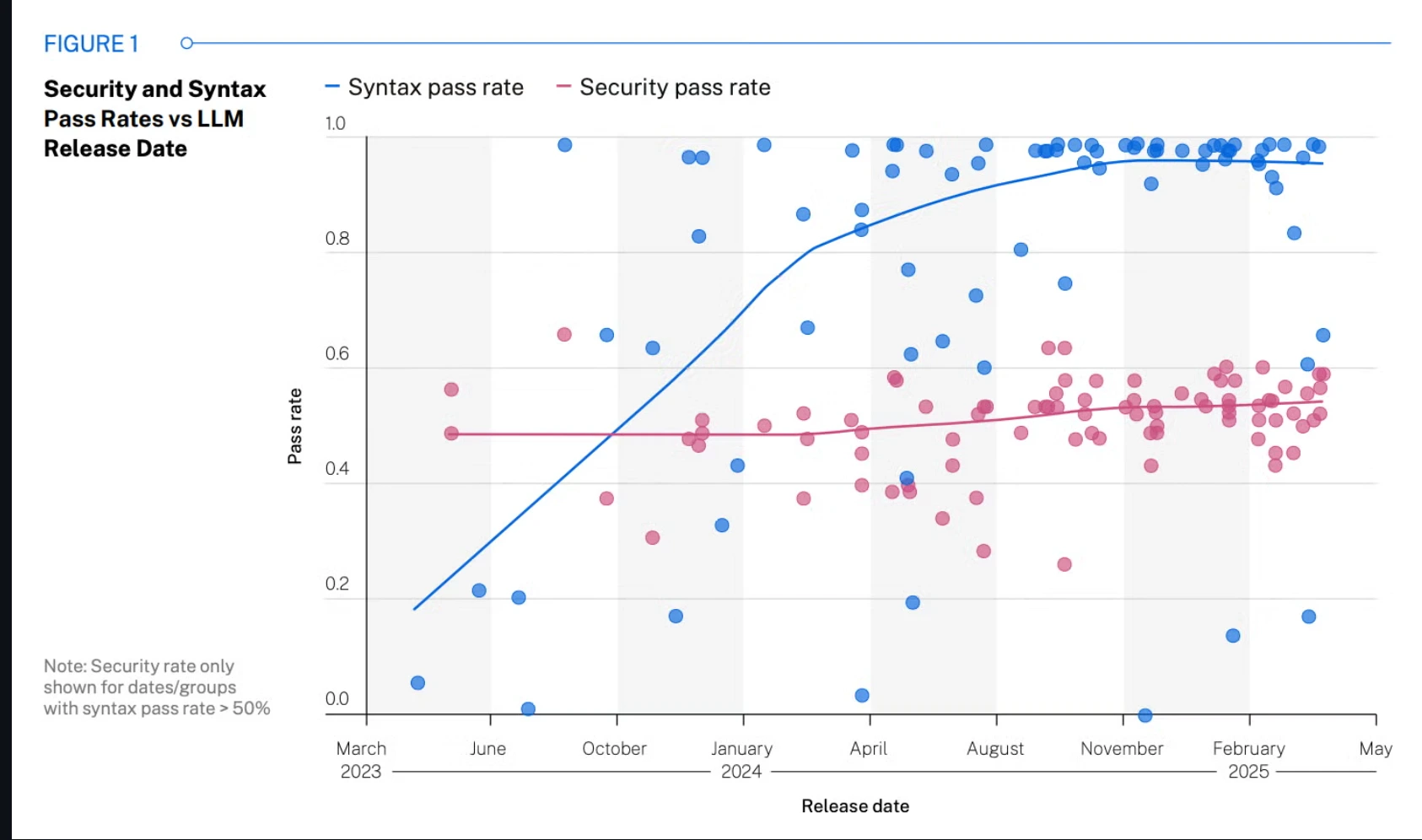
Source: Veracode, 2025 GenAI Code Security Report
Performance and accessibility are no better. Only about 48 percent of mobile sites pass Google’s Core Web Vitals, and WebAIM’s 2025 survey found detectable accessibility failures on almost 95 percent of the pages it tested. AI builders ship heavy JavaScript bundles, unoptimized images, and markup that was never checked against either standard.
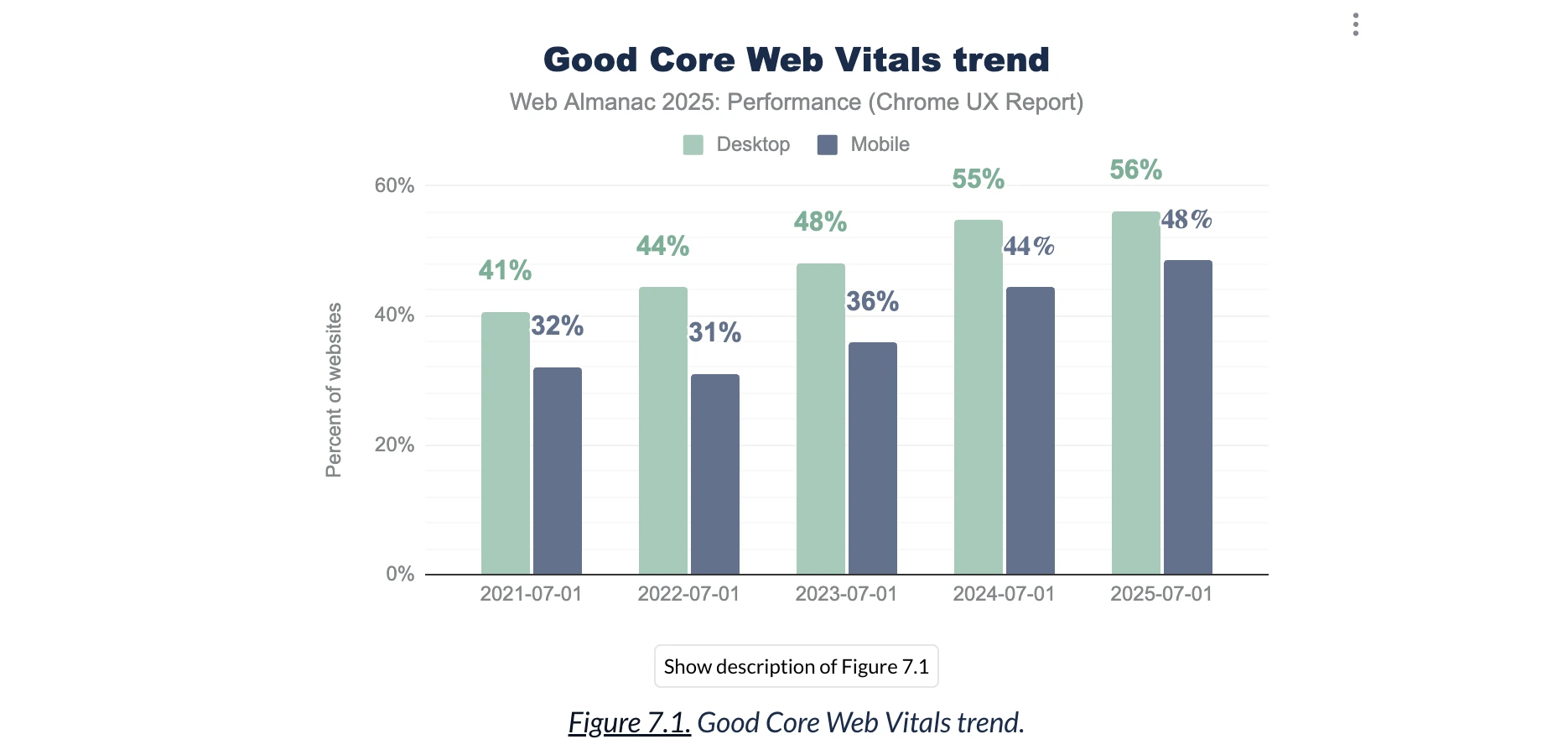
Source: HTTP Archive, Web Almanac 2025 (Chrome UX Report)
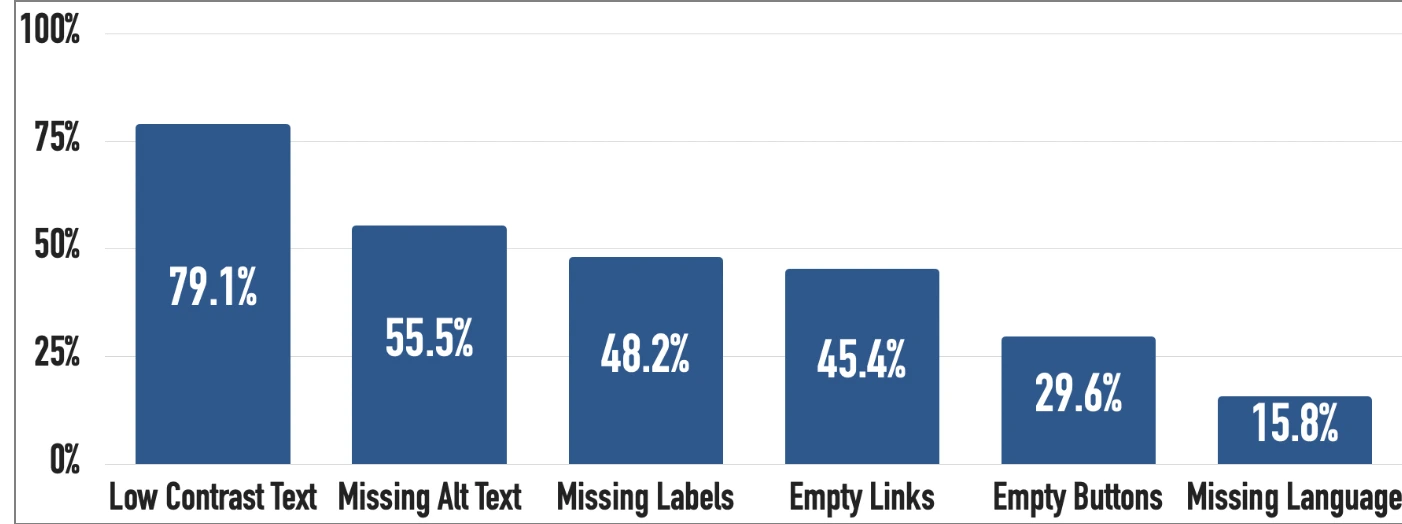
Source: WebAIM Million, 2025
AI exports regularly ship with live API keys and secrets baked into the front-end code. I have opened exports with a working database key sitting in plain sight. Never deploy one of these projects without a security review first.
There is one gap I care about more than the rest, because it is invisible until your traffic never arrives: search engines often cannot read these sites at all.
Your AI site may be invisible to Google
v0, Lovable, and Bolt produce single-page applications that render their content with JavaScript in the browser. When Googlebot, and especially AI crawlers like GPTBot and ClaudeBot, request the page, they often get an almost empty HTML shell.
This is not a hypothetical. Google’s John Mueller publicly reviewed a vibe-coded site and flagged that its content only existed in JavaScript.
“Your homepage should have everything that people and bots need to understand what your site is about.”
John Mueller, Google Search Advocate.
A server-rendered WordPress site sends the full HTML on the first request, which is exactly what search engines and AI answer engines need to index and cite you. If you care about being found, and about showing up in AI Overviews, this alone is a strong reason to move off a client-rendered prototype. I cover the citation side in my guide on schema markup for AI search.
Three ways to get it into WordPress
Before touching any code, you have a decision to make. There are three real paths, and the right one depends on how much of the project is design versus application logic. Here is how I think about them.
| Approach | What you get | Best when |
|---|---|---|
| Auto-convert (WPConvert, Lowpable) | A visual shell: your layout mapped into theme files, plus hours of cleanup | You need a quick static-looking site and will fix editability, speed, and security yourself |
| Rebuild as a native theme | A real, editable, fast, secure WordPress theme that keeps your design | Content marketing, client sites, anything that must be maintained and rank. My default. |
| Headless WordPress | WordPress as the backend, your React front-end stays | The app logic is genuinely complex and worth keeping, and you have a team to maintain two systems |
The auto-converters are honest about their limits if you read the fine print. They map your rendered HTML and CSS into template files and stop there. Their own documentation admits that dynamic logic, authentication, databases, and forms are not carried over. “One click” produces a visual shell, not a finished site.
For most of the projects people bring me, rebuilding as a native theme is the right call. It is more work up front, and it is the only path that fixes editability, performance, security, and search visibility at the same time.
What the converters quietly skip
When someone hands me an auto-converted theme and asks why it “feels off,” the answer is almost always in this list. These are the parts that separate a static clone from a site you can actually run a business on.
Real content editing
An AI export hardcodes every headline, price, and paragraph directly into the markup. Your client cannot change a single word without editing code. Production WordPress turns that content into editable fields and blocks.
<?php
// AI export: hardcoded, uneditable, and unescaped
// <h1>Launch faster with Acme</h1>

// Production WordPress: editable in the CMS, escaped on output
$headline = get_field('hero_headline'); // a field the client can edit
?>
<h1><?php echo esc_html($headline); ?></h1>
That one line fixes two problems at once: the content becomes editable, and the output becomes escaped and safe.
Content modeling
AI builders repeat a card component ten times by copying markup. In WordPress, a repeated thing (team members, testimonials, portfolio items) becomes a custom post type with fields and a query loop. Add one from the dashboard and it appears everywhere, styled and consistent.
Performance and security
The export ships a full front-end framework runtime to render text that should be plain HTML. Part of the job is stripping that weight, optimizing images, and enqueueing only what the page needs, the same work I describe in my guide to Core Web Vitals.
Security is the other non-negotiable. AI code rarely escapes output, verifies nonces, or checks user capabilities. Rebuilding it the WordPress way is how you close the holes the security studies keep finding, and it pairs with proper WordPress hardening.
Backend and forms
If your prototype used a service like Supabase for logins or data, none of that survives a theme conversion. Auth becomes WordPress users and roles, the contact form becomes a real handler with spam protection, and app data moves into the WordPress database or a proper API. This is the work every converter punts on.
How I actually do the conversion
The mental shift that makes all of this click is simple: you keep the design, not the code. The AI output is a high-fidelity reference, not a codebase to preserve. It is the same discipline I use turning a Figma design into WordPress. If you are starting from a Figma file rather than an AI prototype, that build is its own service. Here is the full process I run, start to finish.
- Audit the export and separate design from logic. Screenshots, layout, and CSS are keepers. The React runtime and the hardcoded content are not.
- Set up a clean theme (usually a block theme) on a local WordPress install.
- Rebuild the markup as real templates: header, footer, and page templates using WordPress template tags.
- Model the content with ACF, section by section, so the client can edit everything (details below).
- Turn anything repeated (features, testimonials, team members, logos) into a custom post type with its own fields and a query loop, so adding one in the dashboard adds it everywhere.
- Wire the templates to the fields and escape every value on output.
- Move the CSS into the theme and drop the SPA runtime. If the export is built with Tailwind, which v0, Lovable, and Bolt all use, set it up properly in the theme rather than shipping the CDN build.
- Run a performance pass: image sizes, lazy loading, caching, critical CSS, Core Web Vitals.
- Run a security pass: escape output, add nonces to forms, check capabilities, and pull any leaked API keys out of the front-end.
- Rebuild the backend pieces the export dropped: logins become WordPress users and roles, forms become a real handler with spam protection, and app data moves into the WordPress database or a proper API.
- Add the SEO layer the prototype never had: server-rendered HTML, metadata, and schema.
- QA against the original design on real devices, then hand off a documented, maintainable codebase.
Making every section editable with ACF
This is the step that separates a real site from a static clone, and the one every converter skips. I go through the design one section at a time, hero, features, pricing, testimonials, FAQ, footer, and build an ACF field group for each, so nothing stays hardcoded and the owner can change all of it from the dashboard:
- Headlines, subheadings, and body text
- Buttons and their links
- Icons, as an icon picker or an editable SVG or image field
- Images and background images, with the right sizes and real alt text
- Stats, prices, badges, and labels
- Section order and visibility, where it makes sense
The result: the hero, the pricing table, the FAQ, every block on the page is editable in WordPress, exactly what the AI export made impossible. That is what lets a client run the site without calling a developer for every word change.
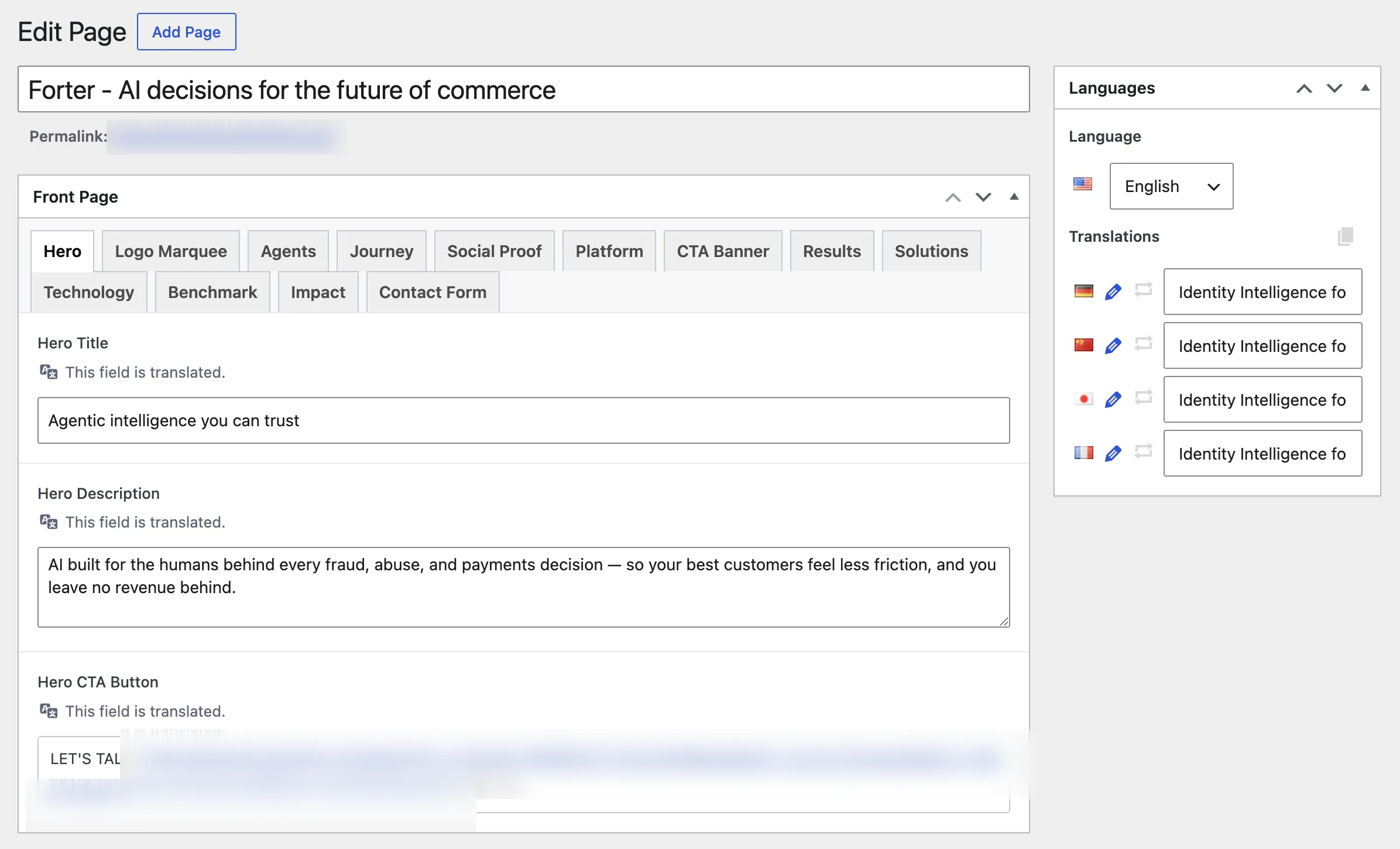
Every section becomes its own ACF field group, so the client edits the whole page (text, buttons, icons, and images) from the dashboard.
It is more involved than dropping a ZIP into a converter. It is also the difference between a site that looks like the prototype and a site that behaves like a real product: editable, fast, secure, and visible in search. That last 30 percent is the whole job, and it is the part I get called in for.
FAQs
The questions I get asked most often when a vibe-coded project needs a real home.
Summary
An AI app builder gives you a great-looking prototype and a false sense that the hard part is done. The design is the easy 70 percent. Editability, performance, security, and search visibility are the 30 percent that decides whether the thing is a real site or a nice screenshot.
Converting v0, Lovable, or Bolt to WordPress the right way is not about running the export through a tool. It is about keeping the design and rebuilding everything underneath it as a proper, server-rendered, editable, secure WordPress site. That is the work, and it is the reason a prototype and a production site are not the same thing.