The following code lets you extend how long it takes before WordPress automatically logs you out of the admin area. Add this code to your theme’s functions.php file:
function keep_me_logged_in_for_1_year( $expirein ) {
   return 31556926; // 1 year in seconds
}
add_filter( 'auth_cookie_expiration', 'keep_me_logged_in_for_1_year' );
For more security tips, see Hardening WordPress Security.
To change the appearance of the tag cloud, use the following snippet. A full reference of the options is available at this link:
// Tag cloud custom
function style_tags($args) {
    $args = array(
         'largest'    => '10',
         'smallest'   => '10',
         'format'     => 'list',
         );
    return $args;
}
add_filter('widget_tag_cloud_args', 'style_tags');
For more on tags and taxonomies, see Taxonomies in WordPress.
You can hide specific admin menu items from a specific user in the WordPress dashboard. Replace username with the login of the user you want to hide those menu items from:
function remove_menus()
{
    global $menu;
    global $current_user;
    get_currentuserinfo();

    if($current_user->user_login == 'username')
    {
        $restricted = array(__('Posts'),
                            __('Media'),
                            __('Links'),
                            __('Pages'),
                            __('Comments'),
                            __('Appearance'),
                            __('Plugins'),
                            __('Users'),
                            __('Tools'),
                            __('Settings')
        );
        end ($menu);
        while (prev($menu)) {
            $value = explode(' ',$menu[key($menu)][0]);
            if(in_array($value[0] != NULL ? $value[0] : "" , $restricted)) {
                unset($menu[key($menu)]);
            }
        } // end while

    } // end if
}
add_action('admin_menu', 'remove_menus');
This uses a WordPress hook. Learn more in WordPress Hooks Explained.
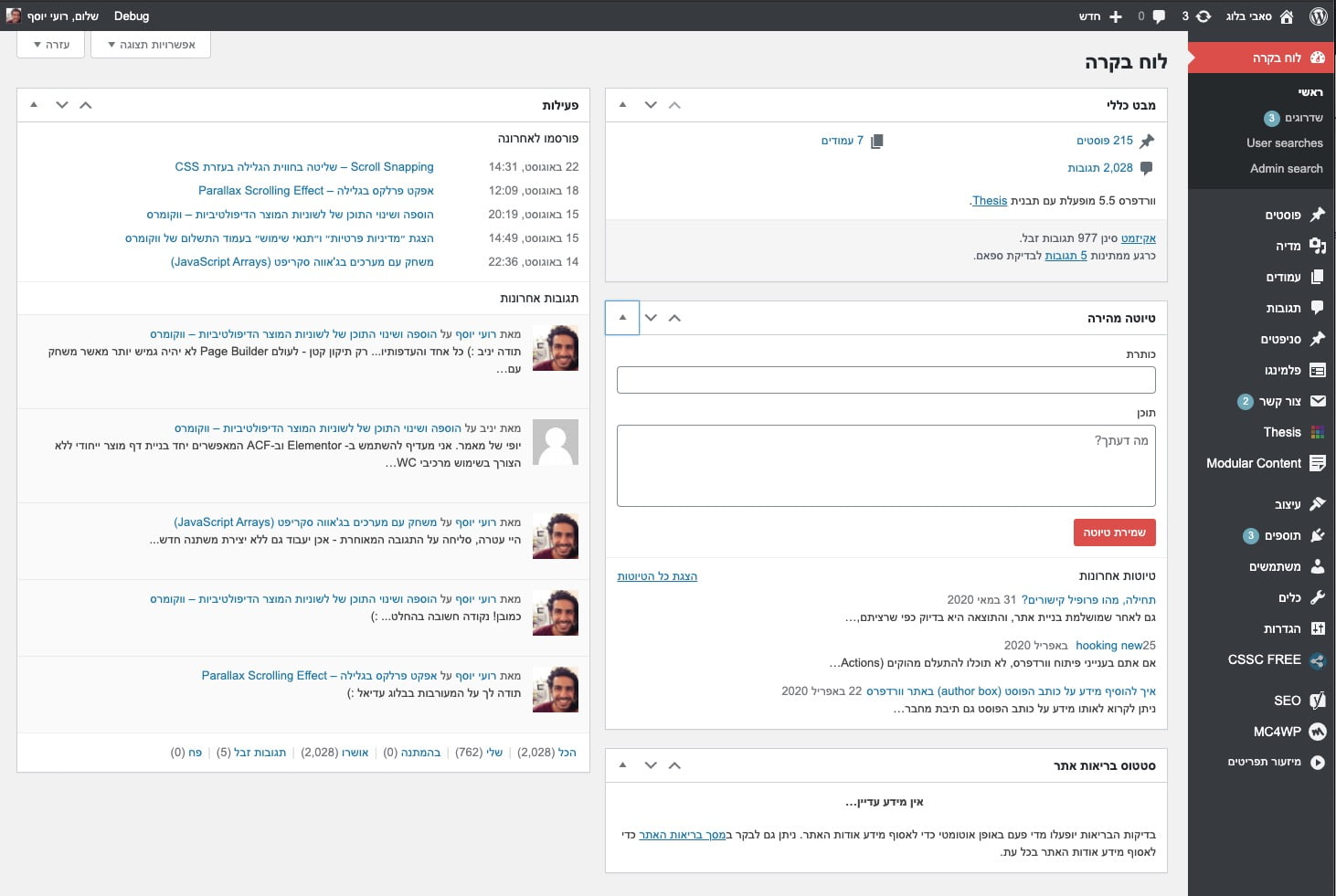
The following snippet lets you remove specific meta boxes from the main Dashboard page in WordPress. These are the default meta boxes shown on the main admin screen.
To remove or change which boxes are displayed, add this snippet to your theme’s functions.php file and choose which boxes to remove:
function my_custom_dashboard_widgets()
{
    global $wp_meta_boxes;

    // Main column (left):
    // Browser Update Required
    unset($wp_meta_boxes['dashboard']['normal']['high']['dashboard_browser_nag']);
    // PHP Update Required
    unset($wp_meta_boxes['dashboard']['normal']['high']['dashboard_php_nag']);
    // Right Now - Comments, Posts, Pages at a glance
    unset($wp_meta_boxes['dashboard']['normal']['core']['dashboard_right_now']);
    // Right Now
    unset($wp_meta_boxes['dashboard']['normal']['core']['network_dashboard_right_now']);
    // Activity
    unset($wp_meta_boxes['dashboard']['normal']['core']['dashboard_activity']);
    // Site Health Status
    unset($wp_meta_boxes['dashboard']['normal']['core']['dashboard_site_health']);

    // Side Column (right):
    // WordPress Events and News
    unset($wp_meta_boxes['dashboard']['side']['core']['dashboard_primary']);
    // Quick Draft, Your Recent Drafts
    unset($wp_meta_boxes['dashboard']['side']['core']['dashboard_quick_press']);

    // Recent Comments
    unset($wp_meta_boxes['dashboard']['normal']['core']['dashboard_recent_comments']);

    // Incoming Links
    unset($wp_meta_boxes['dashboard']['normal']['core']['dashboard_incoming_links']);

    // Plugins - Popular, New and Recently updated WordPress Plugins
    unset($wp_meta_boxes['dashboard']['normal']['core']['dashboard_plugins']);

    // Other WordPress News Feed
    unset($wp_meta_boxes['dashboard']['side']['core']['dashboard_secondary']);


    // Recent Drafts List
    unset($wp_meta_boxes['dashboard']['side']['core']['dashboard_recent_drafts']);
}

add_action('wp_dashboard_setup', 'my_custom_dashboard_widgets');
This is the page we are talking about:
%22%20transform%3D%22translate(2.9%202.9)%20scale(5.71094)%22%20fill-opacity%3D%22.5%22%3E%3Cpath%20fill%3D%22%23141414%22%20d%3D%22M259.1-27.4l3.8%20216-44%20.8-3.8-216z%22%2F%3E%3Cellipse%20fill%3D%22%23fff%22%20rx%3D%221%22%20ry%3D%221%22%20transform%3D%22rotate(62.8%20-69%20126.6)%20scale(107.27896%20131.31111)%22%2F%3E%3Cellipse%20fill%3D%22%23b0b0b0%22%20rx%3D%221%22%20ry%3D%221%22%20transform%3D%22matrix(5.81048%20184.89241%20-13.62194%20.42809%20213%2045.5)%22%2F%3E%3Cellipse%20fill%3D%22%23fff%22%20cx%3D%2273%22%20cy%3D%22155%22%20rx%3D%22114%22%20ry%3D%22114%22%2F%3E%3C%2Fg%3E%3C%2Fsvg%3E "Removing default meta boxes from the main Dashboard page")
For safe admin customizations, see What Are Child Themes and How to Use Them.
If you want WordPress category archive pages to display all posts regardless of post type, add the following code to your functions.php file:
function any_ptype_on_cat($request) {

    if ( isset($request['category_name']) )
        $request['post_type'] = 'any';

    return $request;
}
add_filter('request', 'any_ptype_on_cat');
For more on custom post types, see How to Create Custom Post Types.
To display which template file a page uses in the header, add the following code to your functions.php file:
add_action('wp_head', 'show_template');
function show_template() {
    global $template;
    print_r($template);
}
For more on template files, see WordPress Template Hierarchy.
To remove the widgets that come by default with WordPress, add the following code to your theme’s functions.php file:
// Unregister all default WordPress Widgets
function unregister_default_wp_widgets() {
    unregister_widget('WP_Widget_Pages');
    unregister_widget('WP_Widget_Calendar');
    unregister_widget('WP_Widget_Archives');
    unregister_widget('WP_Widget_Links');
    unregister_widget('WP_Widget_Meta');
    unregister_widget('WP_Widget_Search');
    unregister_widget('WP_Widget_Text');
    unregister_widget('WP_Widget_Categories');
    unregister_widget('WP_Widget_Recent_Posts');
    unregister_widget('WP_Widget_Recent_Comments');
    unregister_widget('WP_Widget_RSS');
    unregister_widget('WP_Widget_Tag_Cloud');
}
add_action('widgets_init', 'unregister_default_wp_widgets', 1);
This uses the widgets_init action. Learn more in WordPress Hooks Explained.
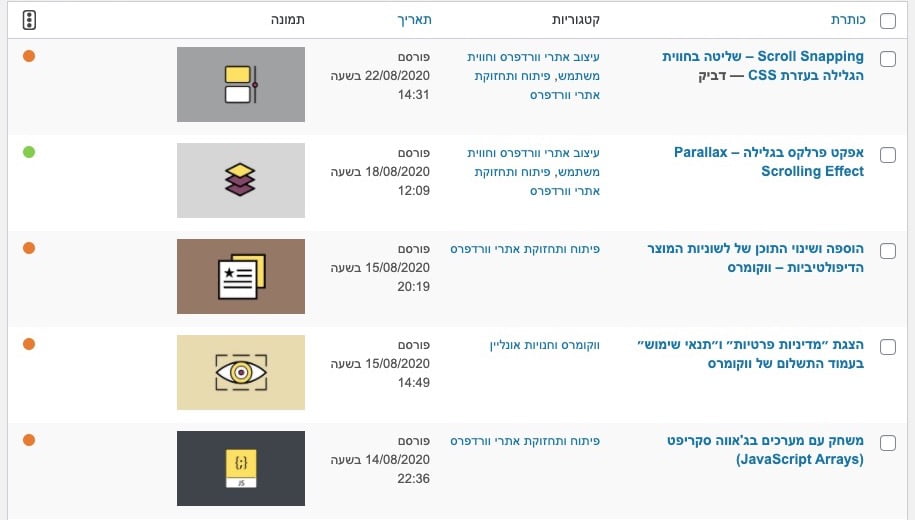
Want to know how to display the featured image next to each post and page when viewing the posts or pages list in the WordPress admin?
You can use a plugin for this, but it is unnecessary. Simply add the following code to your theme’s functions.php file.
function posts_columns($defaults){
    $defaults['sv_post_thumbs'] = __('Image');
    return $defaults;
}

function posts_custom_columns($column_name, $id){
    if($column_name === 'sv_post_thumbs'){
        the_post_thumbnail( 'thumbnail' );
    }
}

add_filter('manage_posts_columns', 'posts_columns', 5);
add_action('manage_posts_custom_column', 'posts_custom_columns', 5, 2);
The result will look something like this:
%22%20transform%3D%22translate(1.8%201.8)%20scale(3.57422)%22%20fill-opacity%3D%22.5%22%3E%3Cellipse%20fill%3D%22%23c6c6c6%22%20cx%3D%2267%22%20cy%3D%2293%22%20rx%3D%2243%22%20ry%3D%22234%22%2F%3E%3Cellipse%20fill%3D%22%23a8a8a8%22%20rx%3D%221%22%20ry%3D%221%22%20transform%3D%22rotate(46.4%20-120.7%20145.3)%20scale(25.80892%2024.00646)%22%2F%3E%3Cellipse%20fill%3D%22%23fff%22%20rx%3D%221%22%20ry%3D%221%22%20transform%3D%22matrix(-63.3357%2043.34615%20-66.35241%20-96.95155%20196.1%2094.6)%22%2F%3E%3Cellipse%20fill%3D%22%23fff%22%20rx%3D%221%22%20ry%3D%221%22%20transform%3D%22matrix(-22.6948%20-2.6348%2014.86208%20-128.01413%200%2082.4)%22%2F%3E%3C%2Fg%3E%3C%2Fsvg%3E "Adding featured image to posts column in WordPress admin")
This uses WordPress hooks to add admin columns. Learn more in WordPress Hooks Explained.
To completely disable WordPress search, add the following code to your theme’s functions.php file:
<?php function sv_filter_query($query, $error = true) {
    if (is_search()) {
        $query->is_search = false;
        $query->query_vars[s] = false;
        $query->query[s] = false;
        if ($error == true)
            $query->is_404 = true;
    }
}

add_action('parse_query', 'sv_filter_query');
add_filter('get_search_form', create_function('$a', "return null;"));

function remove_search_widget() {
    unregister_widget('WP_Widget_Search');
}

add_action('widgets_init', 'remove_search_widget');
Ever wondered how to limit search results to a specific Custom Post Type? It is simple. We have already seen how to completely disable WordPress search by modifying functions.php. Now we will do something similar to filter our search results.
Add the following code to your functions.php file:
function sv_search_filter($query) {

    if ($query->is_search && !is_admin() ) {
        $query->set('post_type',array('post','page'));
    }

return $query;
}

add_filter('pre_get_posts','sv_search_filter');
Note this line:
$query->set('post_type',array('post','page'));
You can filter search results by changing the values in that array. Search results will now show only pages and posts, but you can change this array to include any post type you want.