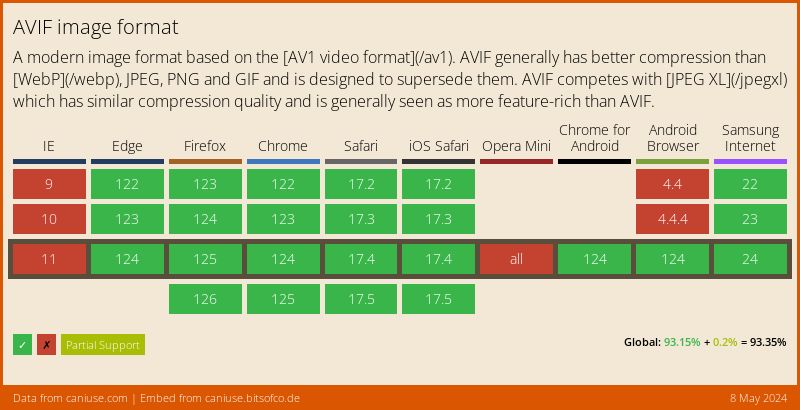
AVIF is a modern image format that has moved from “promising newcomer” to a practical default for performance-focused WordPress sites. With native support in WordPress 6.5+ and over 93% global browser coverage, there’s no reason to wait.
In this post I’ll cover what AVIF is, how to use it in WordPress, and how it compares to WebP.
AVIF delivers files that are 30-50% smaller than WebP at equivalent quality, which translates directly into faster page loads and better Core Web Vitals.
What is AVIF?
AVIF (AV1 Image File Format) is an image format based on the AV1 video codec. It supports high compression efficiency, HDR, transparency, and a wide color gamut, all while maintaining excellent quality.
AVIF is designed for the modern web, offering smaller file sizes compared to WebP and traditional formats like JPEG or PNG.
Benefits of Using AVIF in WordPress
- Smaller file sizes: AVIF often delivers 30–50% smaller images than WebP without noticeable quality loss.
- Transparency support: Just like PNG and WebP, AVIF supports alpha channels.
- HDR and wide color support: AVIF can display richer, more vibrant colors.
- Next-gen compression: Based on the AV1 codec, it’s designed for modern devices and browsers.
- Improved page speed: Lighter images mean faster loading times and better Core Web Vitals scores.
With over 93% browser coverage and native WordPress support, AVIF is no longer experimental. It’s a practical choice for any site that cares about speed.
Browser Support
AVIF is supported by all major browsers: Chrome 85+ (2020), Firefox 93+ (2021), Safari 16+ (2022), and Edge 90+ (2021). As of 2026, that translates to over 93% of global browser traffic.
The only gap is very old browser versions and some niche environments. For maximum compatibility, serve AVIF with a WebP or JPEG fallback, but the vast majority of your visitors will get the AVIF version.
How to Use AVIF in WordPress
Since WordPress 6.5 (March 2024), AVIF is supported natively. You can upload .avif files to the Media Library just like JPEG or PNG, and WordPress will generate thumbnails and intermediate sizes automatically.
The catch: your server needs PHP 8.1+ with either the GD library compiled with AVIF support or Imagick with AVIF support. Most modern managed hosts already meet this requirement, but shared hosting may lag behind.
If your host doesn’t support AVIF processing yet, you have several options:
1. Manual MIME Type Override (for Older Hosts)
If your server’s image library lacks AVIF support, you can still allow AVIF uploads (though WordPress won’t generate thumbnails):
// Allow AVIF uploads on servers without native AVIF support
function allow_avif_uploads($mime_types) {
    $mime_types['avif'] = 'image/avif';
    return $mime_types;
}
add_filter('upload_mimes', 'allow_avif_uploads');
2. Use a Plugin like Converter for Media
Converter for Media is a popular plugin that can convert uploaded images to WebP and AVIF formats. It automatically serves the best format depending on browser support, ensuring optimal performance for all users.
3. Convert to AVIF with LiteSpeed Cache
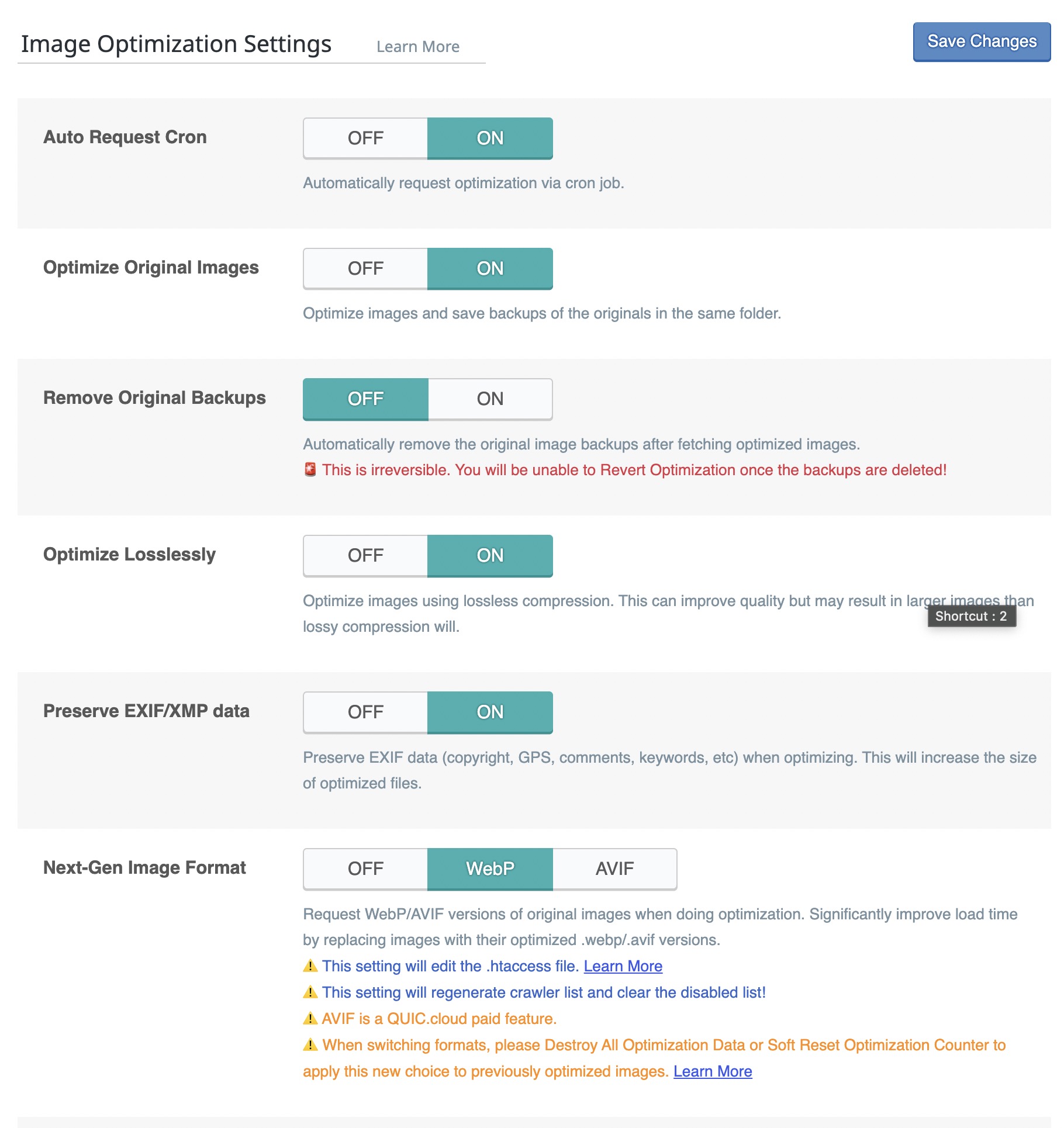
If you’re using a LiteSpeed server, the LiteSpeed Cache plugin offers built-in support for converting and serving AVIF images.
Under the Image Optimization tab, you can enable AVIF conversion with a fallback to WebP or original formats. This solution is seamless and highly efficient.
4. Serve AVIF with Fallback using <picture> Tag
The <picture> tag allows you to serve modern image formats like AVIF with fallbacks for older browsers:
<picture>
  <source srcset="image.avif" type="image/avif">
  <source srcset="image.webp" type="image/webp">
  <img src="image.jpg" alt="Descriptive alt text">
</picture>
Browsers try each <source> in order. If AVIF isn’t supported, WebP will load. If neither are supported, the JPEG fallback will display.
Always include a
.jpgfallback to ensure full compatibility.
AVIF vs WebP: Comparison Table
| Feature | AVIF | WebP |
|---|---|---|
| Compression Efficiency | Excellent (30–50% smaller than WebP) | Very good |
| Transparency Support | Yes | Yes |
| Animation Support | Yes | Yes |
| Color Range | Wider (supports HDR) | Limited |
| Browser Support | 93%+ (all major browsers since 2022) | 97%+ (slightly wider legacy coverage) |
| Encoding Speed | Slower | Faster |
File Size in Practice
The table above tells part of the story, but real-world numbers make the difference concrete. Take a typical 800×600 product photo saved as a 290 KB JPEG:
- WebP compresses it to roughly 190-200 KB (about 30% smaller than JPEG).
- AVIF brings it down to around 130-150 KB (about 50% smaller than JPEG, 20-30% smaller than WebP).
On a page with 15-20 images, that gap adds up to 1-2 MB of saved bandwidth per page load. For mobile visitors on slower connections, that can mean several seconds of faster load time and a measurable improvement in Largest Contentful Paint (LCP).
The trade-off is encoding speed. AVIF can take several seconds to encode a high-resolution image, compared to milliseconds for WebP. In practice this doesn’t affect visitors since plugins like Converter for Media and LiteSpeed Cache encode in the background, but it does mean initial processing takes longer after uploading.
Which Format Should You Use?
For most WordPress sites in 2026, the answer is both. Serve AVIF as the primary format and WebP as the fallback. This gives you the best compression for the 93% of browsers that support AVIF, while the remaining visitors still get a modern format with WebP.
If you can only pick one, AVIF wins on compression and color quality. WebP wins on encoding speed and slightly broader legacy support. A <picture> tag or a conversion plugin handles the decision automatically, so there’s no reason to compromise.
What About JPEG XL?
JPEG XL is another next-gen format worth watching. It offers comparable compression to AVIF, much faster encoding, and a unique ability to losslessly recompress existing JPEG files (saving ~20% with zero quality loss). However, browser support is still limited to Safari as of early 2026, with Chrome support expected later in the year. For now, AVIF remains the more practical choice for WordPress sites.
FAQs
Common questions about AVIF in WordPress:
.avif files directly to the Media Library, and WordPress will generate thumbnails automatically. Your server needs PHP 8.1+ with GD or Imagick compiled with AVIF support.Summary
AVIF has matured into a production-ready format for WordPress. With native support since WP 6.5, broad browser coverage, and compression that beats WebP by 30-50%, it’s the clear default for image-heavy sites. Pair it with a WebP fallback using the <picture> tag or a conversion plugin, and you’ll cover virtually every visitor.
The best strategy in 2026: serve AVIF first, WebP as fallback, and JPEG as the safety net.