Google and other search engines work hard to understand the content of every web page. You can help them by adding explicit information that describes what your page is about – this information is called schema markup, or “structured data.”
Schemas are code snippets that help search engines interpret different types of content more accurately. While search engines can usually tell content types apart on their own, schema markup helps them understand exactly what they’re looking at and provides additional context they can’t extract otherwise.
Most schemas work behind the scenes, but some enable Rich Snippets – enhanced search results that display extra information like star ratings, prices, recipes, or event dates alongside the standard title, description, and URL.
Using schema correctly helps search engines interpret your content, highlights relevant pages in search results, improves the user experience, and boosts your organic CTR.
Schema markup is closely tied to the E-E-A-T signals that Google looks for. Structured data helps search engines identify who you are, what you offer, and why your content can be trusted.
In this guide, you’ll learn about the most recommended schema types for content websites, blogs, and e-commerce stores. Here’s an example of search results from pages that use schema – notice the star rating and vote count displayed alongside the standard result:
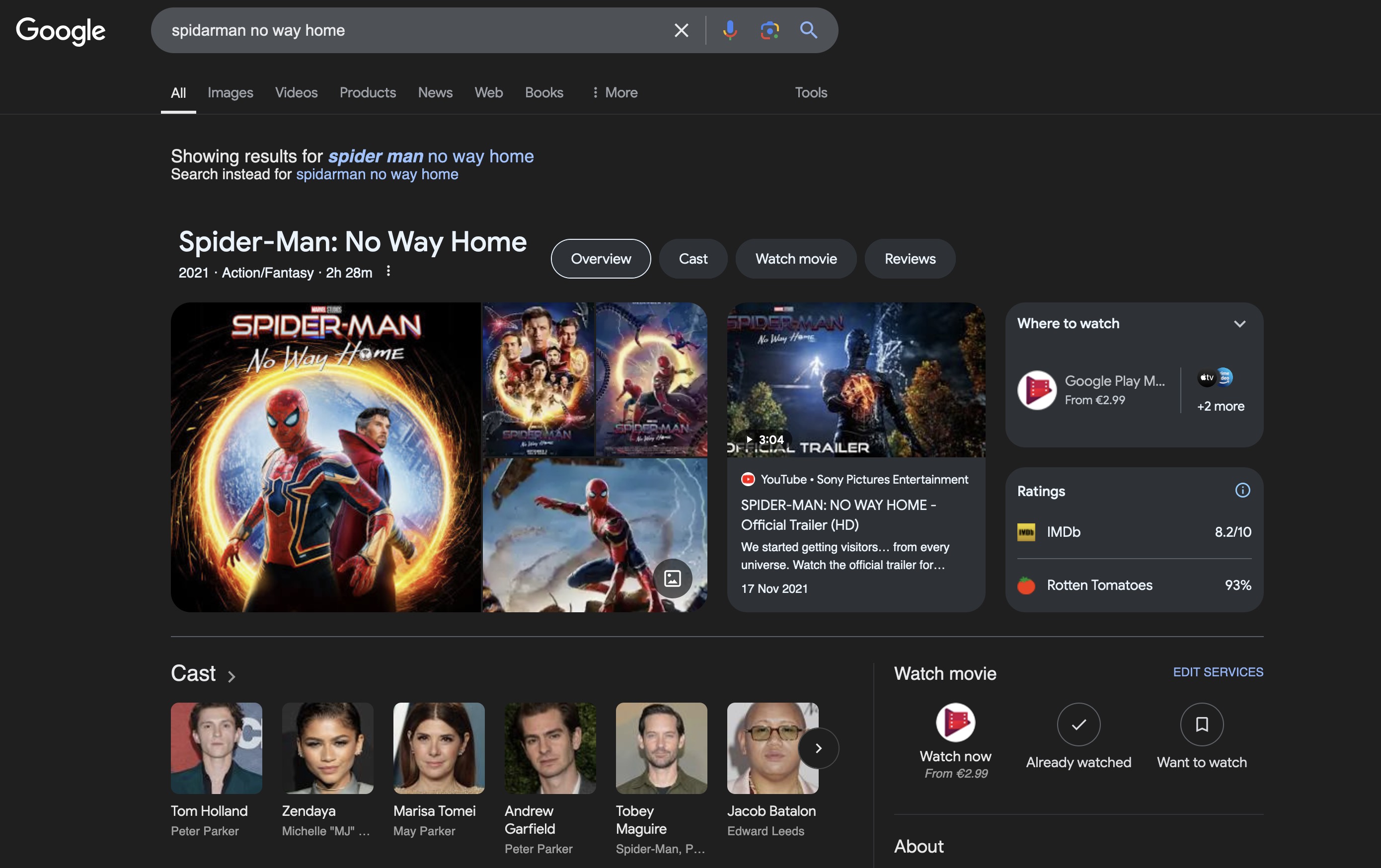
Movie Rating Schema in search results
For a deeper introduction, read about what schema and structured data are and how to add them to WordPress.
Recommended Schemas for E-commerce and Businesses
Here are the main schema types recommended for online stores, e-commerce sites, and businesses:
Local Business Schema
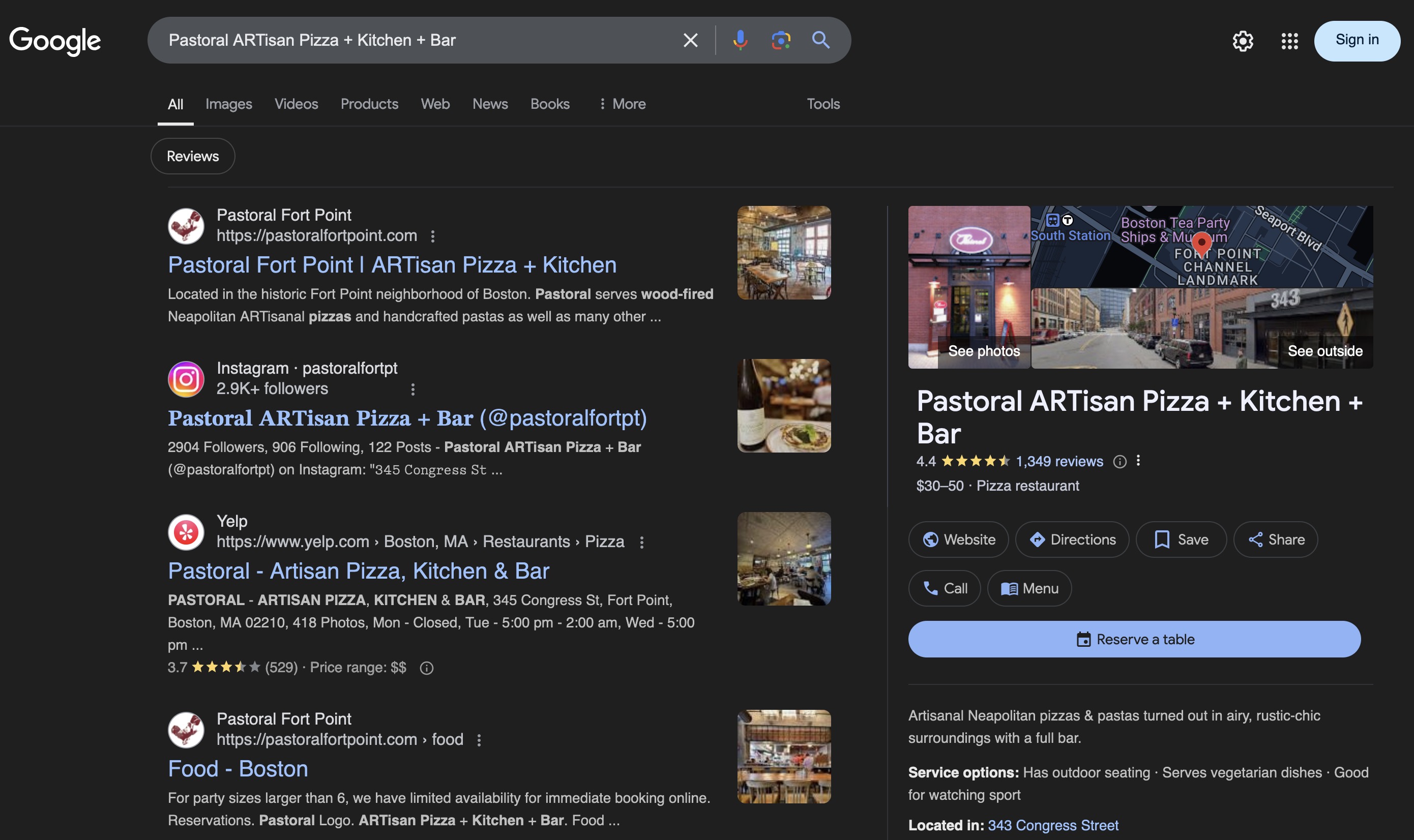
Local Business Schema
This schema is relevant only for physical stores, showrooms, or physical services. It marks the business location and lets you provide Google with details like business hours, address, phone number, and social media links.
Information is typically managed through Google Business Profile, but explicitly embedding the data on your website increases the chances of appearing in local results. If you have a single location, add the schema to your homepage, about page, and contact page. For multiple locations, add a unique Local Business markup to each branch’s dedicated page.
Local Business Schema example:
<script type="application/ld+json">
{
    "@context": "https://schema.org",
    "@type": "Restaurant",
    "address": {
        "@type": "PostalAddress",
        "addressLocality": "Tel Aviv Center",
        "addressRegion": "Tel Aviv",
        "postalCode": "6701101",
        "streetAddress": "Bograshov 25"
    },
    "aggregateRating": {
        "@type": "AggregateRating",
        "ratingValue": "4.5",
        "reviewCount": "1435"
    },
    "name": "Falafel Gabay",
    "openingHours": [
        "Sunday-Thursday 09:00-22:30",
        "Friday 09:00-15:00",
        "Saturday closed"
    ],
    "priceRange": "$$",
    "servesCuisine": [
        "Mediterranean",
        "Falafel"
    ],
    "telephone": "+972-3-629-7060",
    "url": "https://falafelgabay.co.il/"
}
</script>
Product Schema
The Product Schema lets you tag products of any type and display names, prices, and stock availability directly in search results. Beyond helping search engines understand the product, it gives your site a competitive edge over listings that don’t use schema.
Google does not allow Product Schema on category pages – only on individual product pages or pages showing the same product from multiple sellers. For product lists, use the ItemList schema type instead.
For businesses selling physical products, proper Product Schema implementation can significantly impact search performance. Shoppers see the average rating, price, and availability at a glance – before they even click.

Product Schema
This front-loaded information helps shoppers make faster, more informed decisions – increasing the chance they’ll click your result over a competitor’s.
Product Schema example:
<script type="application/ld+json">
{
    "@context": "https://schema.org",
    "@type": "Product",
    "aggregateRating": {
        "@type": "AggregateRating",
        "bestRating": "5",
        "ratingCount": "1580",
        "ratingValue": "4.6"
    },
    "image": "gopro.jpg",
    "name": "GoPro Hero 9 Screen Protector",
    "offers": {
        "@type": "AggregateOffer",
        "highPrice": "9.98",
        "lowPrice": "7",
        "priceCurrency": "USD",
        "offerCount": "3",
        "offers": [
            {
                "@type": "Offer",
                "url": "https://www.amazon.com/example-offer-1"
            },
            {
                "@type": "Offer",
                "url": "https://www.amazon.com/example-offer-2"
            }
        ]
    }
}
</script>
Aggregate Rating Schema
The Aggregate Rating Schema is what produces the familiar gold stars next to search results. It’s relevant whenever you want to display ratings and reviews for your products or services.
Make sure rating markup appears only on pages where reviews actually exist. Placing a rating on your “Contact Us” page, for example, is a common mistake that can make your structured data look like spam.
If your business provides a specific service (e.g., fitness coaching, interior design), include the aggregate rating within your Organization or Local Business schema. If you sell multiple products, include the rating within each individual Product schema.
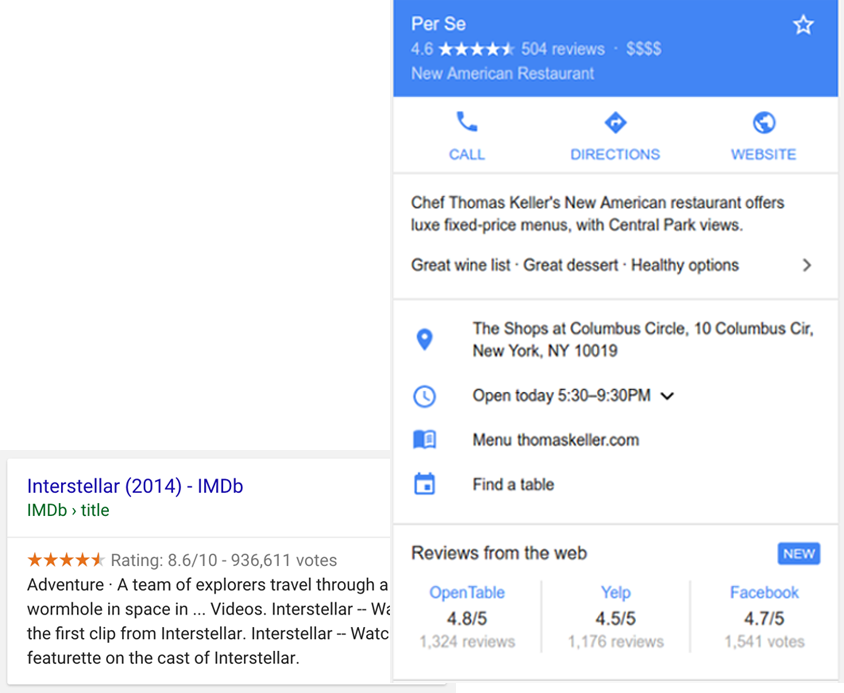
Aggregate Rating Schema
Aggregate Rating Schema example:
<script type="application/ld+json">
{
    "@context": "https://schema.org",
    "@type": "Product",
    "name": "Apple iPhone 15 Pro Max 256GB",
    "aggregateRating": {
        "@type": "AggregateRating",
        "ratingValue": "4.7",
        "bestRating": "5",
        "worstRating": "1",
        "ratingCount": "2840"
    }
}
</script>
Review Schema
The Review Schema is similar to Aggregate Rating, but it displays a single specific review rather than a combined score. You can use both schemas independently, but the ideal approach is to embed a Review within an Aggregate Rating schema to show the relationship between the overall score and individual reviews.
Note that standalone reviews rarely appear in search results anymore. Search engines now focus on providing comprehensive information, so Aggregate Rating generally delivers better results than a single Review.
Review Schema example:
<script type="application/ld+json">
{
    "@context": "https://schema.org",
    "@type": "Review",
    "itemReviewed": {
        "@type": "LocalBusiness",
        "name": "Ollivanders Wand Shop",
        "url": "http://www.ollivanders-wands.wiz",
        "image": "http://www.ollivanders-wands.wiz/storefront.jpg",
        "address": {
            "@type": "PostalAddress",
            "streetAddress": "Diagon Alley South Side",
            "addressLocality": "London",
            "addressRegion": "City of London",
            "postalCode": "N1 8DA",
            "addressCountry": "GB"
        }
    },
    "reviewRating": {
        "@type": "Rating",
        "ratingValue": "5",
        "bestRating": "5",
        "worstRating": "1"
    },
    "name": "Extremely helpful",
    "author": {
        "@type": "Person",
        "name": "Harry Potter"
    },
    "reviewBody": "Mr Ollivander was so helpful, he happily went through what seemed like hundreds of wands before finding the perfect one for me!"
}
</script>
Event Schema
The Event Schema has been around for a while but remains underutilized by most businesses. A well-implemented Event Schema displays location, date, time, and a description directly in search results – which can significantly increase clicks.
The potential is huge: festivals, concerts, sports events, conferences, meetups, and grand openings can all benefit. If tickets are available for purchase, include a direct link to the ticket page within the schema.
Event Schema example:
<script type="application/ld+json">
{
    "@context": "https://schema.org",
    "@type": "Event",
    "name": "Justin Bieber Concert",
    "startDate": "2025-10-13T19:30",
    "endDate": "2025-10-13T23:59",
    "location": {
        "@type": "Place",
        "name": "Hayarkon Park",
        "address": {
            "@type": "PostalAddress",
            "streetAddress": "Rokach Blvd",
            "addressLocality": "Tel Aviv",
            "postalCode": "6345313",
            "addressRegion": "TLV",
            "addressCountry": "Israel"
        }
    },
    "image": [
        "https://example.com/event-image.jpg"
    ],
    "description": "Tickets for Justin Bieber's concert at Hayarkon Park in Tel Aviv.",
    "offers": {
        "@type": "Offer",
        "url": "https://www.example.com/tickets/",
        "price": "350",
        "priceCurrency": "ILS",
        "availability": "https://schema.org/InStock",
        "validFrom": "2025-10-13T16:00"
    },
    "performer": {
        "@type": "PerformingGroup",
        "name": "Justin Bieber"
    }
}
</script>
Recommended Schemas for Content and Brand Websites
Here are the main schema types recommended for content sites, blogs, and brand websites:
Q&A Schema
Question-and-answer platforms have grown significantly in recent years, driving the adoption of the Q&A Schema. These sites let users ask questions, answer others, and rate the quality of responses. Proper implementation lets you display questions and answers alongside search results:
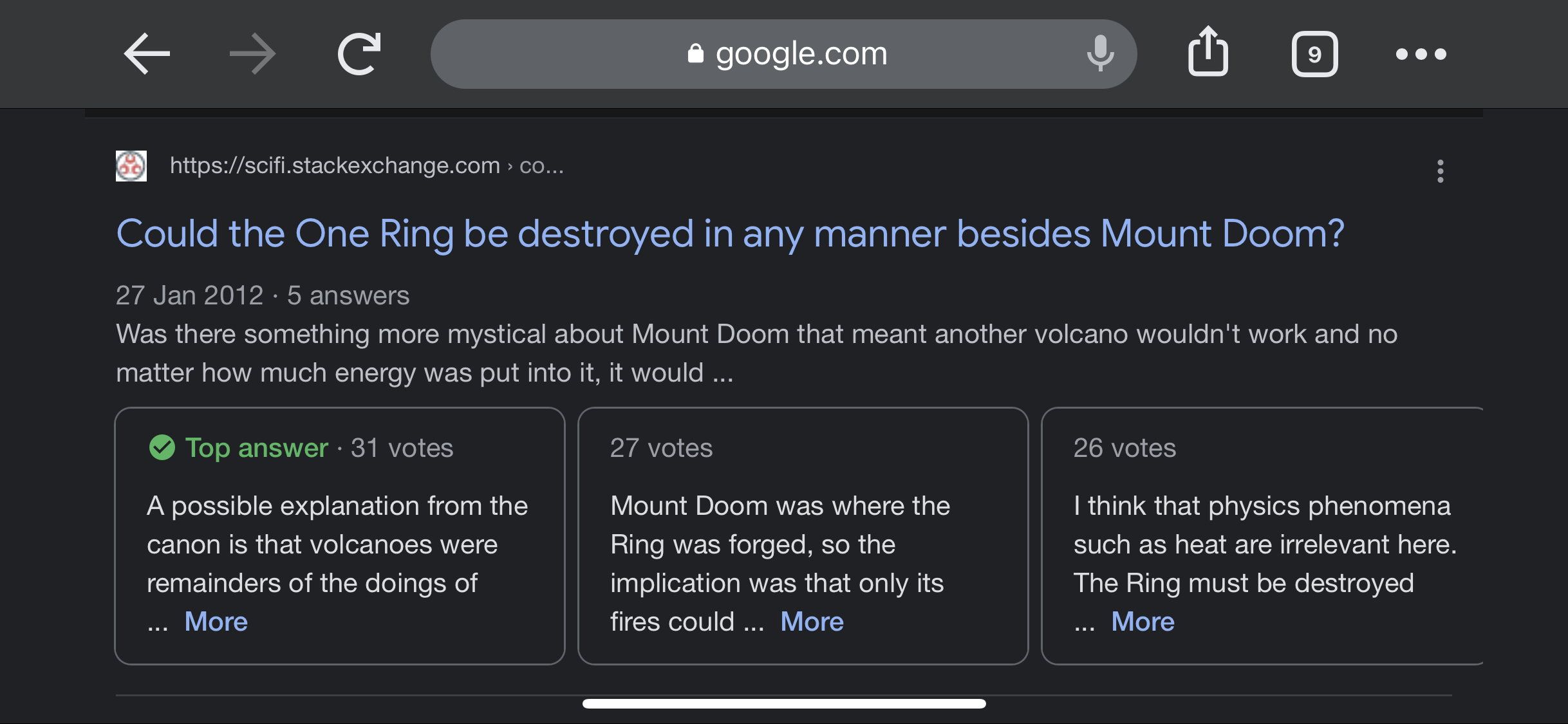
Q&A Schema
This schema may look similar to the FAQ schema, but they serve entirely different purposes. Confusing the two can hurt your search visibility.
Use the Q&A schema when:
- The page is structured as a question-and-answer format.
- Multiple answers are available for a single question.
- Users can submit additional answers to a question.
For example, use this schema when your site lets customers ask questions about products or services and other customers can answer them.
Q&A Schema example:
<script type="application/ld+json">
{
    "@context": "https://schema.org",
    "@type": "QAPage",
    "mainEntity": {
        "@type": "Question",
        "name": "How do you describe roller skating?",
        "text": "How do you describe roller skating?",
        "answerCount": 4,
        "upvoteCount": 15,
        "dateCreated": "2021-04-19",
        "author": {
            "@type": "Person",
            "name": "Ben Friedman"
        },
        "acceptedAnswer": {
            "@type": "Answer",
            "text": "Recreational and competitive sport in which the participants use special shoes fitted with small wheels to move about on rinks or paved surfaces.",
            "dateCreated": "2021-04-20",
            "upvoteCount": 1337,
            "author": {
                "@type": "Person",
                "name": "Ron Cohen"
            }
        }
    }
}
</script>
FAQ Schema
The FAQ Schema is designed for pages that provide a series of questions and answers around a specific topic. To get the most out of it, use this schema when:
- You have a dedicated FAQ page with answers written by your team.
- You have a product support page with frequently asked questions about a specific product.
- Most websites have some form of FAQs – it’s worth taking the time to add this schema to your site.

FAQ Schema
FAQ Schema example:
<script type="application/ld+json">
{
    "@context": "https://schema.org",
    "@type": "FAQPage",
    "mainEntity": [
        {
            "@type": "Question",
            "name": "How many wishes does the genie give?",
            "acceptedAnswer": {
                "@type": "Answer",
                "text": "Most genies give 3 wishes to each person."
            }
        },
        {
            "@type": "Question",
            "name": "Can I wish for more wishes?",
            "acceptedAnswer": {
                "@type": "Answer",
                "text": "Absolutely not! That's rule number one when making wishes from a genie."
            }
        }
    ]
}
</script>
How-To Schema
The How-To Schema is designed for content that walks users through a task step by step. If your site includes usage instructions or procedural guides, this schema can help search engines understand the structure of your content.
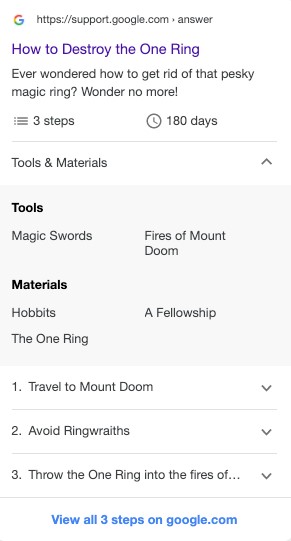
How-To Schema
The unique aspect of this schema is the level of detail you can include – tools, materials, cost, time estimates, and more.
As of 2023, Google removed How-To rich results from search (both desktop and mobile). The schema itself is still valid and helps search engines understand your content structure, but it no longer generates visual rich results in Google.
How-To Schema example:
<script type="application/ld+json">
{
    "@context": "https://schema.org",
    "@type": "HowTo",
    "name": "How to Make Hummus",
    "description": "Learn how to make classic hummus at home in a few simple steps.",
    "totalTime": "PT30M",
    "supply": [
        { "@type": "HowToSupply", "name": "Chickpeas" },
        { "@type": "HowToSupply", "name": "Tahini" },
        { "@type": "HowToSupply", "name": "Lemon juice" }
    ],
    "tool": [
        { "@type": "HowToTool", "name": "Food processor" }
    ],
    "step": [
        {
            "@type": "HowToStep",
            "name": "Prepare chickpeas",
            "text": "Soak dried chickpeas overnight, then cook until soft."
        },
        {
            "@type": "HowToStep",
            "name": "Blend ingredients",
            "text": "Add chickpeas, tahini, lemon juice, garlic, and salt to a food processor. Blend until smooth."
        },
        {
            "@type": "HowToStep",
            "name": "Serve",
            "text": "Transfer to a plate, drizzle with olive oil and paprika."
        }
    ]
}
</script>
Video Schema
If your site hosts a video you want to promote, Video Schema can help it appear directly in Google search results.
Google typically prioritizes YouTube videos, but when the information isn’t available on YouTube, that’s your window of opportunity. Video Schema helps Google understand what your video contains and can surface it in organic results.

Video Schema
Video Schema example:
<script type="application/ld+json">
{
    "@context": "https://schema.org",
    "@type": "VideoObject",
    "name": "Cutest Dog Species",
    "description": "This is a video about the most cute dog species.",
    "thumbnailUrl": [
        "https://example.com/photos/1x1/photo.jpg",
        "https://example.com/photos/4x3/photo.jpg",
        "https://example.com/photos/16x9/photo.jpg"
    ],
    "uploadDate": "2024-04-17T08:00:00+08:00",
    "duration": "PT2M37S",
    "contentUrl": "https://www.example.com/video/123/file.mp4",
    "embedUrl": "https://www.example.com/embed/123",
    "interactionStatistic": {
        "@type": "InteractionCounter",
        "interactionType": { "@type": "WatchAction" },
        "userInteractionCount": 4856935
    }
}
</script>
Recommended Tools for Creating Schema Markup
Here are some tools that make generating structured data easier:
Rank Math Plugin
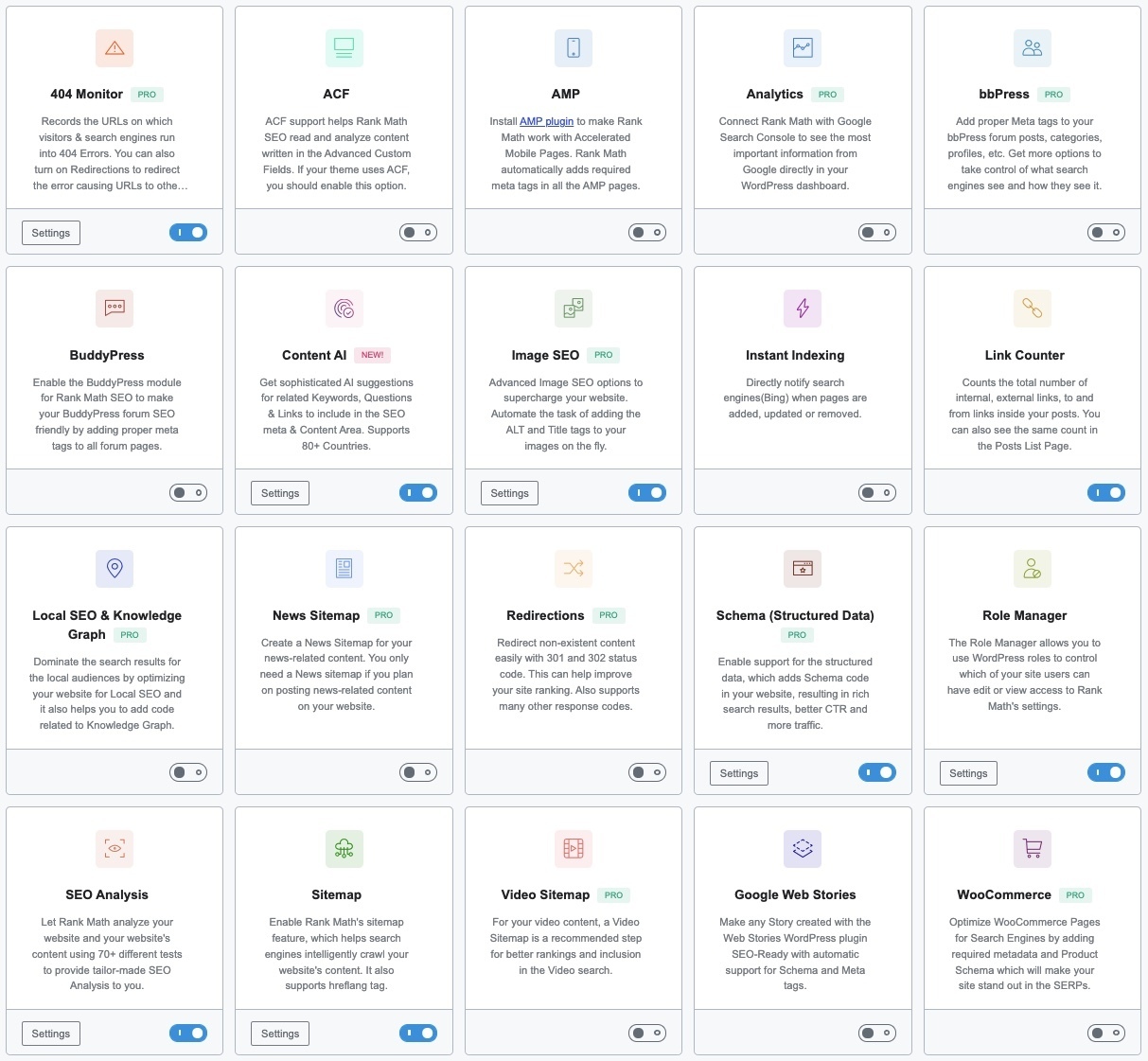
Rank Math is a popular SEO plugin for WordPress. Founded in 2018, it has grown rapidly and is now one of the most widely used SEO plugins. If you’re deciding between SEO plugins, check out the Rank Math vs Yoast SEO comparison.
The plugin is user-friendly and accessible even for those less familiar with SEO. One of its biggest advantages over competitors is the range of features available in the free version:
- Keyword Analysis – provides data for a given keyword including volume, clicks, and CTR.
- Rank Tracker – shows your SERP rankings for tracked keywords.
- SEO Audit – gives your site a score with a report on areas that need improvement.
- Schema Builder – offers over 840 schema types (14 in the free version) with code validation to ensure correctness.
Merkle Structured Data Tool
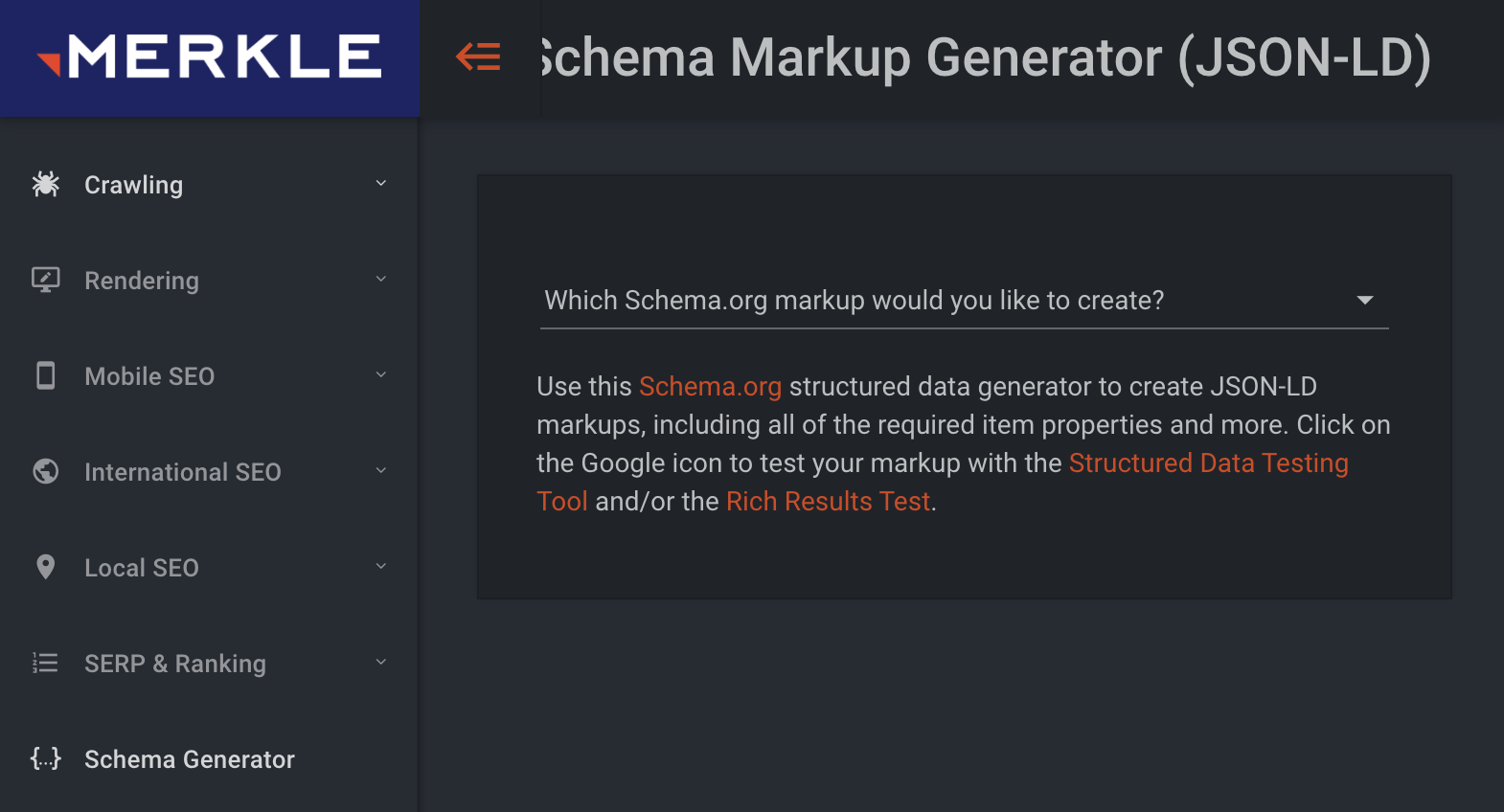
Merkle Structured Data Generator
If you need to generate basic schemas like Organization, FAQs, or Breadcrumbs, the Merkle Structured Data Tool is a solid free option. Enter your data, and it generates the JSON-LD code for you.
You can create common schema types like Breadcrumbs, Events, How-To, and Job Postings, then validate, copy, and paste them into your site.
How to Verify Your Schema Markup
After embedding schemas on your site, you need to confirm that Google can read them correctly and without errors. Here are the best tools for that:
Rich Results Test
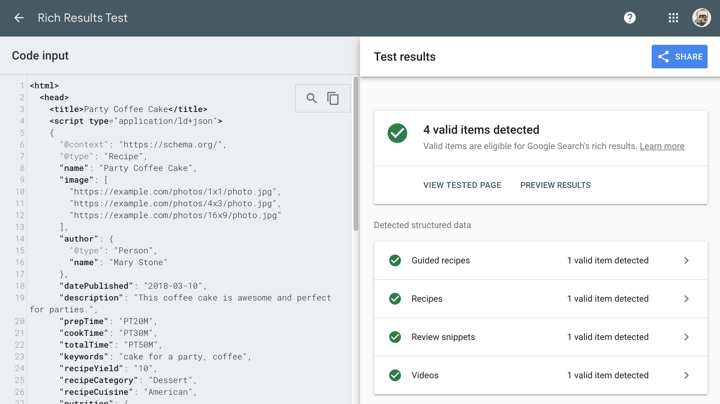
Google Rich Results Test
Google’s own tool for checking whether your schemas are implemented correctly. You can test by pasting code or entering a page URL, and choose between desktop and mobile testing.
It’s important to distinguish between warnings and errors: a warning won’t prevent rich results from showing (but indicates incomplete data), while an error will block rich results entirely.
Schema.org Markup Validator
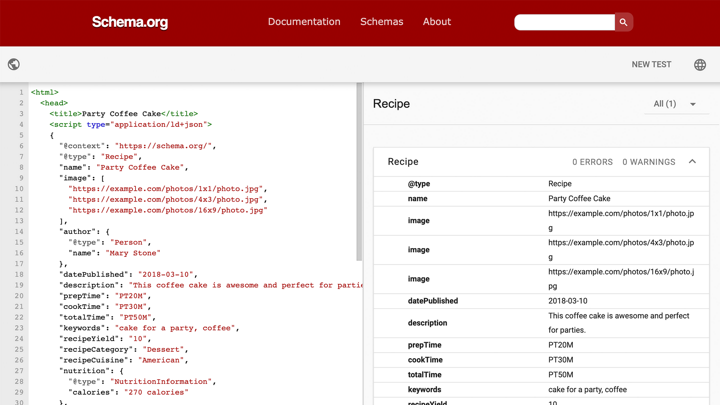
Schema.org Markup Validator
The Schema.org Validator is the most comprehensive validation tool available. It works similarly to Google’s tool but covers a broader range of schema types. Use both tools together to ensure your structured data is correctly implemented.
FAQs
Common questions about schema markup and structured data:
<script type="application/ld+json"> tag in the head or body of the page, without modifying the HTML itself.Summary
There are many schema types available, and using them effectively can improve your search visibility, increase traffic, and make your results stand out.
You can implement schemas using SEO plugins like Rank Math or external tools like Merkle. After adding them, always validate with Google’s Rich Results Test and the Schema.org Validator to make sure everything works correctly.
As AI-powered search grows, certain schema types – like FAQPage, Speakable, and HowTo – are becoming especially valuable for getting cited by AI Overviews and generative engines. Read more in the guide on schema markup for AI search, or run a free AI Visibility Audit to check your schema and 14 other AI signals.