Google Fonts is a reliable service with solid network performance – it runs on Google’s global CDN, after all.
But initiating an HTTP request to those font servers adds Round Trip Times (RTT) before the actual download starts. The browser has to perform several steps before the request reaches the server:
These steps (DNS, TCP, TLS) add one to three RTTs of latency before the actual request even reaches the server.
Modern browsers try to predict which connections are needed and open them early through preconnect to specific domains. This eliminates costly RTTs from the critical rendering path.
But browsers can’t predict every domain your page will need. That’s where we come in – we can tell the browser which sockets to open ahead of time using rel="preconnect".
Consider a common scenario: loading Google Fonts to improve the loading time of your WordPress site.
A more “aggressive” option than preconnect is preload, which may be preferable for fonts. Use preload together with a proper font-display setting, and you’re all set.
If you host your Google Fonts locally, use preload instead of preconnect since there’s no third-party origin to connect to.
What’s the issue with standard Google Fonts loading?
There’s one performance issue with font loading, and that’s the fonts starting to load later in the process. The following graph illustrates this problem clearly:
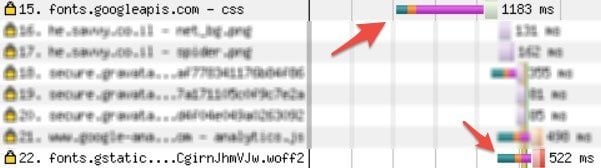
Note that in this graph, the browser fetches the html and discovers that it needs some css asset located on the fonts.googleapis.com domain.
Once it finishes downloading this css, it constructs the CSSOM and realizes that this page requires several fonts. Therefore, it initiates requests to each of them from the fonts.gstatic.com domain.
Before that, as previously shown, it must perform the DNS, TCP, & TLS process, so only after these requests are completed, HTTP/2 multiplexing takes place.
<link rel="preconnect" href="https://fonts.googleapis.com">
<link rel="preconnect" href="https://fonts.gstatic.com" crossorigin>
<link href="https://fonts.googleapis.com/css2?family=Assistant:wght@300;400;700;800&display=swap" rel="stylesheet">
Note the two preconnect hints – one for the CSS API origin (fonts.googleapis.com) and one for the font file origin (fonts.gstatic.com). The crossorigin attribute is only needed on the second one because font files are CORS resources. Also notice the updated Google Fonts API v2 syntax (css2) with the display=swap parameter.
Adding preconnect to this blog results in the following:

In this graph, we add a preconnect hint that tells the browser to establish a connection to fonts.gstatic.com early.
The browser initiates the connection in parallel with the CSS fetch and finishes it ahead of time. When the font requests come in, the connection is already open – fonts load immediately.
The result: unnecessary RTTs are eliminated from the critical path, saving anywhere from 100 to 300 ms. The browser also begins the request earlier compared to the first scenario.
For WordPress sites, here’s how to add both preconnect hints when loading Google Fonts. The priority is set to 0 in add_action so these hints appear as early as possible in the <head>.
<?php
function savvy_preconnect() { ?>
    <link rel="preconnect" href="https://fonts.googleapis.com">
    <link rel="preconnect" href="https://fonts.gstatic.com" crossorigin>
<?php
}
add_action('wp_head', 'savvy_preconnect', 0);
Google Fonts use @font-face rules, and since the specifications require that the requests be made “anonymously,” the crossorigin attribute must be added to the preconnect hint we created.
What about browser support?
preconnect is supported in all major browsers, including Chrome, Firefox, Safari, and Edge. It’s worth noting that browsers treat this as a hint – they can choose to perform only part of the DNS, TCP, TLS handshake as they see fit.
This also serves as the natural fallback: browsers that don’t fully support preconnect simply skip it with no negative side effects. You can check the latest browser support data on Can I Use.
FAQs
Common questions about preconnect and Google Fonts:
preconnect tells the browser to establish a connection (DNS lookup, TCP handshake, TLS negotiation) to a server before it's actually needed. For Google Fonts, this means the connection to fonts.gstatic.com is ready by the time the browser discovers it needs font files, saving 100-300 ms.fonts.googleapis.com serves the CSS stylesheet, and fonts.gstatic.com serves the actual font files. Add rel="preconnect" for both, with the crossorigin attribute only on fonts.gstatic.com (because font files are CORS resources).preconnect performs the full connection setup: DNS resolution, TCP handshake, and TLS negotiation. dns-prefetch only resolves the DNS. Use preconnect for critical third-party origins you know you'll need, and dns-prefetch as a lighter fallback for less critical domains.preconnect to speed up the connection to their servers. If you self-host Google Fonts on your own server, use preload instead - there's no third-party origin to preconnect to, so preload directly initiates the font download.@font-face specification requires font requests to be made anonymously (CORS). Without the crossorigin attribute on the preconnect hint, the browser opens a non-CORS connection that can't be reused for font requests - effectively wasting the preconnect.Use preconnect Wisely
preconnect is a valuable tool, not just for Google Fonts. As the example above shows, it saves roundtrip time in the critical rendering path – in some cases close to a full second.
That said, each preconnect opens a socket that costs roughly 3 KB (TLS certificate) plus CPU overhead. Browsers close unused connections after about 10 seconds. I’d recommend limiting preconnect to 4-6 origins at most.
Always verify the impact using WebPageTest or Chrome DevTools. A preconnect to an unused domain does more harm than good.
preconnect works for any third-party origin, not just fonts. CDNs, analytics endpoints, API servers – if you know a connection is coming, hint it early.
If you’d rather skip third-party connections entirely, consider loading Google Fonts locally from your server. Self-hosting eliminates DNS lookups, gives you full control over caching, and lets you use preload instead.