For years, CSS had no way to select a parent based on what it contained. If a div held an image, you couldn’t style that div differently – not without JavaScript. The :has pseudo-class, introduced in CSS Selectors Level 4, changes that completely.
I started using css :has() the day Firefox shipped support in late 2023, and it’s become one of my most-used selectors. It enables patterns that previously required event listeners and DOM queries.
What is the CSS :has Property?
The :has pseudo-class is a relational selector that matches an element when its descendants (or siblings) satisfy a given condition. Think of it as asking “does this element contain X?” directly in CSS.
Syntax
element:has(selector) {
    /* styles */
}
Here, element is the target you want to style, and selector describes what must exist inside it. You can also use combinators: element:has(> selector) restricts the check to direct children only.
Practical Examples
Here are a few common patterns. Each one includes the static code and a live demo you can interact with.
Example 1: Highlighting a Parent Based on a Child
Style a div when it contains an img element:
<div>
    <p>This div contains an image.</p>
    <img src="https://via.placeholder.com/150" alt="Placeholder Image">
</div>
<div>
    <p>This div does not contain an image.</p>
</div>
div:has(img) {
border: 2px solid green;
padding: 10px;
}Try it yourself – click the button below to toggle an image inside the left box and watch the border change:
This box can contain an image.
This box never has an image. No green border.
Example 2: Styling a List’s Parent Based on a Child Class
Target a ul when it contains a li with a specific class:
<ul>
    <li>Item 1</li>
    <li class="highlight">Item 2</li>
    <li>Item 3</li>
</ul>
<ul>
    <li>Item A</li>
    <li>Item B</li>
    <li>Item C</li>
</ul>
ul:has(li.highlight) {
background-color: lightyellow;
padding: 10px;
}Example 3: Form Validation Styles
Style a form group’s container based on the validity state of its input – no JavaScript required for the styling:
<form>
    <div class="form-group">
        <label for="email">Email:</label>
        <input type="email" id="email" required>
    </div>
    <button type="submit">Submit</button>
</form>
.form-group:has(input:invalid) {
border: 2px solid red;
padding: 10px;
}Type in the input below to see the border react in real time. The CSS :has(input:invalid) and :has(input:valid) selectors handle the visual feedback:
CSS rule: .ch-form-group:has(input:valid) { border-color: #2d8a4e; }
Real-World Use Cases
The basic examples above show how :has() works. But the real value becomes clear in production patterns that used to require JavaScript.
Dark Mode Toggle with :has(:checked)
A single checkbox can control an entire component’s color scheme. The parent container uses :has(#darkmode:checked) to flip between light and dark styles. Zero lines of JavaScript.
.card:has(#darkmode:checked) {
    background: #0e1219;
    color: #f1eeee;
}

.card:has(#darkmode:checked) .btn {
    background: #FFB42F;
    color: #0e1219;
}
Toggle the switch below to see it in action:
Empty State Detection
Show a placeholder message when a container has no items. Combine :has() with :empty or the negation pseudo-class:
.list-container:not(:has(li)) .empty-state {
    display: block;
}

.list-container:has(li) .empty-state {
    display: none;
}
This removes the need for JavaScript checks like if (list.children.length === 0). The browser handles visibility reactively as items are added or removed.
Quantity Queries
Style a grid differently based on how many items it contains. If there are 4 or more children, switch to a multi-column layout:
.grid:has(:nth-child(4)) {
    grid-template-columns: repeat(2, 1fr);
}

.grid:not(:has(:nth-child(4))) {
    grid-template-columns: 1fr;
}
Before :has(), you’d need JavaScript to count children and toggle a class. Now CSS handles it automatically.
Comparison with JavaScript
Before :has, parent-conditional styling required DOM queries and manual class toggling. Here is the same effect as Example 1 in vanilla JavaScript:
document.addEventListener("DOMContentLoaded", function() {
    const divs = document.querySelectorAll('div');

    divs.forEach(div => {
        if (div.querySelector('img')) {
            div.style.border = '2px solid green';
            div.style.padding = '10px';
        }
    });
});
The CSS version is a single line. But beyond brevity, there is a fundamental difference: the CSS rule is reactive. If an image is added or removed later, the style updates instantly. The JavaScript version only runs once on page load.
| Aspect | CSS :has() | JavaScript |
|---|---|---|
| Lines of code | 1-3 | 5-10+ |
| Reactive to DOM changes | Yes, automatic | Needs MutationObserver |
| Performance | Browser-optimized | Script execution + reflow |
| Works without JS | Yes | No |
| Complex logic (API calls, conditions) | No | Yes |
The
:haspseudo-class is fast in modern browsers, but unconstrained selectors like:has(img)without a type prefix force the engine to check every element on the page. Prefer constrained selectors likediv:has(img)and use the direct child combinatordiv:has(> img)when you only care about immediate children.
Browser Support
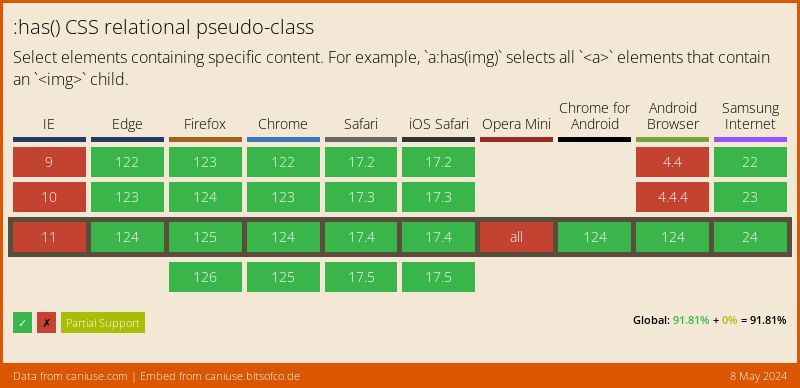
The :has pseudo-class reached Baseline status in December 2023 and is now supported by all major browsers. Chrome 105+, Firefox 121+, Safari 15.4+, and Edge 105+ all handle it, covering over 96% of global users as of early 2026.
You can use CSS @supports with @supports selector(:has(*)) for feature detection if you still need a fallback path. In practice, the remaining unsupported browsers are primarily older Android WebView and Samsung Internet versions.
FAQs
Common questions about the CSS :has() pseudo-class:
div:has(img) targets any div that contains an img.
:has() handles parent-child styling natively in CSS without DOM queries or event listeners. It is also reactive - styles update automatically when the DOM changes. JavaScript is still needed for logic beyond styling, like API calls or complex conditions.
:has(img) can slow rendering because the engine checks every element. Prefix with a type or class (div:has(img)) and use the direct child combinator (:has(> img)) to keep things fast.
:has() composes with :not(), :is(), :where(), and state pseudo-classes like :checked or :invalid. For example, form:has(input:invalid) targets forms containing invalid inputs.
:is() matches an element itself against a list of selectors. :has() matches an element based on what it contains. For example, div:is(.red, .blue) matches divs with those classes, while div:has(.red) matches divs that contain a child with class .red.
Conclusion
The :has pseudo-class gives CSS true parent selectors, something developers waited years for. I reach for it on almost every project now – form validation indicators, dark mode toggles, conditional layouts. Browser support is universal at this point.
If you’re exploring more modern CSS features, check out native CSS nesting, the CSS @property rule, or the mask-image property.