Your SaaS company just finished a penetration test. The report landed in your inbox, and your WordPress marketing site has findings. Maybe it’s a SOC 2 requirement, maybe an enterprise customer’s security questionnaire pushed you into it. Either way, you need to fix these findings before the re-test.
The same ten findings show up in nearly every WordPress pentest report. This guide maps each one to the exact fix, with code you can apply today.
A pentest report is not a to-do list. It is a prioritized risk map. Treat critical findings as blockers and medium findings as planned work.
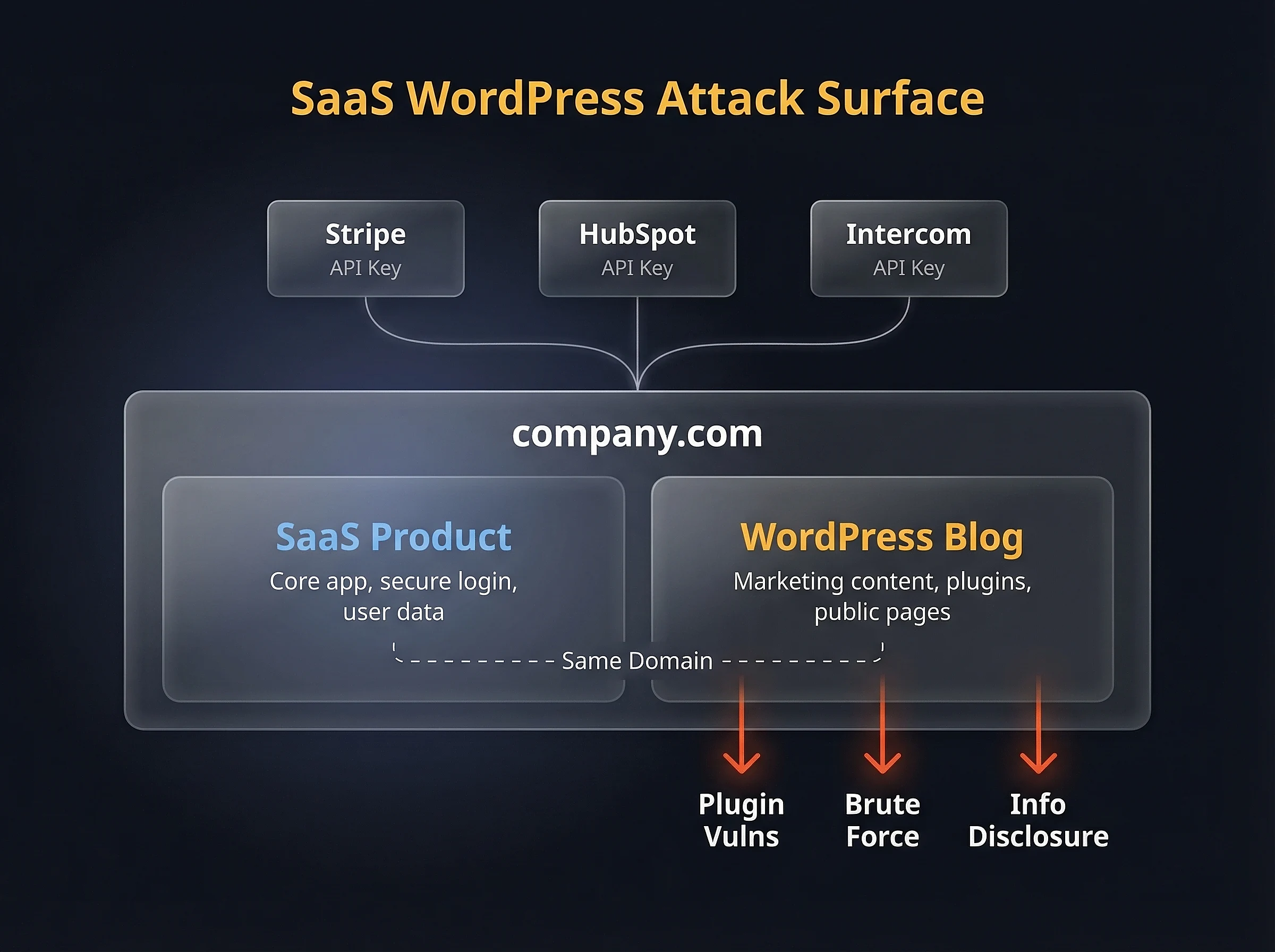
SaaS WordPress attack surface – shared domain trust, API keys to third-party services, and common pentest entry points
What a Pentest Report Actually Tells You
A vulnerability scan runs automated checks against known signatures. A penetration test goes further. A real pentester tries to chain vulnerabilities together, escalate privileges, and reach assets they shouldn’t touch.
When your report comes back with WordPress findings, it typically means the pentester found issues in your marketing site, blog, or documentation portal. For SaaS companies, this site often sits on the same domain as the product, which means a compromised blog can serve phishing pages under your brand.
SOC 2, ISO 27001, and PCI DSS all require annual penetration testing and documented remediation. “We’ll fix it later” doesn’t pass an audit. You need to remediate, document the fix, and verify it before the re-test.
Triage: Severity vs. Fix Complexity
Before touching any code, sort your findings by severity and fix complexity. Not every critical finding is hard to fix, and not every quick fix is low priority.
| Finding | CVSS Severity | Fix Complexity | Est. Time |
|---|---|---|---|
| XSS in Plugins/Themes | Critical | Medium | 2-4 hrs |
| XML-RPC Brute Force | High | Low | 15 min |
| Outdated Plugins (Known CVEs) | Critical | Low | 1-2 hrs |
| SQL Injection | Critical | Medium | 2-8 hrs |
| User Enumeration | Medium | Low | 30 min |
| Missing Security Headers | Medium | Low | 30 min |
| Weak SSL/TLS Configuration | High | Low | 1 hr |
| Debug Mode in Production | High | Low | 5 min |
| Excessive Admin Accounts | Medium | Low | 30 min |
| Missing MFA | High | Medium | 1-2 hrs |
If your report shows SQL injection or a known CVE with a public exploit, stop reading and patch those first. Everything else can wait.
Fixing the Top 10 WordPress Pentest Findings
Each finding below includes what the pentester found, why it matters, and the exact fix. I’ve ordered them by how often they appear in real reports.
1. Cross-Site Scripting (XSS) in Plugins and Themes
XSS accounts for roughly half of all WordPress plugin vulnerabilities. The pentester found a place where user input gets rendered without escaping, allowing script injection.
If the XSS is in a third-party plugin, update it. If no patch exists, replace the plugin. If it’s in your custom theme code, fix the output escaping:
// Vulnerable: raw output
echo $user_input;

// Fixed: escaped output
echo esc_html( $user_input );

// For HTML attributes
echo '<a href="' . esc_url( $link ) . '" title="' . esc_attr( $title ) . '">';

// For content that should allow safe HTML
echo wp_kses_post( $content );
Every echo statement that outputs user-controlled data needs an escaping function. WordPress provides esc_html(), esc_attr(), esc_url(), and wp_kses_post() for different contexts. Use them consistently across your hardened WordPress setup.
2. XML-RPC Brute Force
WordPress ships with xmlrpc.php enabled by default. The system.multicall method lets attackers try hundreds of passwords in a single HTTP request, bypassing login rate limits entirely.
Block it at the server level. A PHP-level filter still loads WordPress on every request:
# Nginx
location = /xmlrpc.php {
    deny all;
    return 403;
}
# Apache .htaccess
<Files xmlrpc.php>
Require all denied
</Files>I wrote a detailed walkthrough on disabling XML-RPC in WordPress that covers edge cases with Jetpack and other services that depend on it.
3. Outdated Plugins with Known CVEs
According to Patchstack’s 2026 State of WordPress Security report, 96% of WordPress vulnerabilities come from plugins and themes. There were 11,334 new vulnerabilities discovered in 2025 alone.
Run a quick audit:
wp plugin list --fields=name,version,update_version,status
wp theme list --fields=name,version,update_version,status
Update everything on staging first, test core functionality, then deploy to production. For SOC 2, document each update as a change management ticket with before/after version numbers.
Remove any plugin you’re not actively using. Every plugin is attack surface, even when deactivated.
4. SQL Injection
SQL injection in WordPress almost always comes from custom code or older plugins that build queries with raw user input instead of using $wpdb->prepare().
// Vulnerable: direct variable interpolation
$results = $wpdb->get_results(
    "SELECT * FROM {$wpdb->posts} WHERE post_title = '$search_term'"
);

// Fixed: parameterized query
$results = $wpdb->get_results(
    $wpdb->prepare(
        "SELECT * FROM {$wpdb->posts} WHERE post_title = %s",
        $search_term
    )
);
Search your codebase for any direct use of $wpdb->query(), $wpdb->get_results(), or $wpdb->get_var() that doesn’t wrap the query in $wpdb->prepare(). Those are your injection points.
5. User Enumeration
Pentesters flag two enumeration vectors in WordPress. The author archives at /?author=1 redirect to a URL containing the username. The REST API at /wp-json/wp/v2/users returns usernames to unauthenticated requests.
// Block author archive enumeration
add_action( 'template_redirect', function() {
    if ( is_author() ) {
        wp_redirect( home_url(), 301 );
        exit;
    }
});

// Restrict REST API user endpoint to authenticated users
add_filter( 'rest_authentication_errors', function( $result ) {
    if ( true === $result || is_wp_error( $result ) ) {
        return $result;
    }
    $current_route = $_SERVER['REQUEST_URI'] ?? '';
    if ( strpos( $current_route, '/wp/v2/users' ) !== false
        && ! is_user_logged_in() ) {
        return new WP_Error(
            'rest_forbidden',
            'Authentication required.',
            array( 'status' => 401 )
        );
    }
    return $result;
});
If you’d rather not add custom code, the Stop User Enumeration plugin handles both vectors out of the box.
For a deeper look at locking down the REST API without breaking your site, see how to secure the WordPress REST API. You can also change the WordPress admin login URL to reduce bot traffic.
6. Missing Security Headers
This is one of the most common findings. Every pentester checks for Content-Security-Policy, X-Frame-Options, X-Content-Type-Options, Strict-Transport-Security, Referrer-Policy, and Permissions-Policy.
# Nginx - add to server block
add_header X-Frame-Options "SAMEORIGIN" always;
add_header X-Content-Type-Options "nosniff" always;
add_header Referrer-Policy "strict-origin-when-cross-origin" always;
add_header Permissions-Policy "camera=(), microphone=(), geolocation=()" always;
add_header Strict-Transport-Security "max-age=31536000; includeSubDomains; preload" always;
add_header Content-Security-Policy "default-src 'self'; script-src 'self' 'unsafe-inline'; style-src 'self' 'unsafe-inline';" always;
PCI DSS 4.0 now requires Content-Security-Policy specifically. Start with a report-only CSP, monitor violations, then enforce. I covered the full process in how to add and configure security headers on WordPress.
7. Weak SSL/TLS Configuration
Pentesters flag deprecated TLS versions (1.0 and 1.1) and weak cipher suites. Modern browsers don’t need them, and compliance frameworks prohibit them.
# Nginx - TLS hardening
ssl_protocols TLSv1.2 TLSv1.3;
ssl_ciphers 'ECDHE-ECDSA-AES128-GCM-SHA256:ECDHE-RSA-AES128-GCM-SHA256:ECDHE-ECDSA-AES256-GCM-SHA384:ECDHE-RSA-AES256-GCM-SHA384';
ssl_prefer_server_ciphers on;
ssl_session_timeout 1d;
ssl_session_cache shared:SSL:10m;
After applying, test your configuration with SSL Labs. Aim for an A or A+ rating. More background on SSL certificates for WordPress.
8. Debug Mode in Production
WP_DEBUG left enabled in production leaks file paths, PHP warnings, and database query details to anyone who triggers an error. This is a five-minute fix that pentesters flag as high severity because of the information disclosure.
// wp-config.php - production settings
define( 'WP_DEBUG', false );
define( 'WP_DEBUG_LOG', false );
define( 'WP_DEBUG_DISPLAY', false );
define( 'SCRIPT_DEBUG', false );
define( 'DISALLOW_FILE_EDIT', true );
While you’re in wp-config.php, set DISALLOW_FILE_EDIT to prevent code editing through the admin panel. For the full list of production-safe constants, see optimizing your wp-config.php.
9. Excessive Admin Accounts
More administrator accounts means more targets for credential stuffing. Pentesters flag this when they find multiple admin-level users, especially accounts that haven’t logged in recently.
wp user list --role=administrator --fields=ID,user_login,user_emailReview every account. Downgrade users who don’t need full admin access to Editor or Author. Delete accounts that belong to former team members or agencies. ISO 27001 requires role-based access control, and this is the easiest way to demonstrate it.
10. Missing Multi-Factor Authentication
No MFA on admin accounts is a guaranteed pentest finding. With username enumeration and a weak password, an attacker is one credential away from full site access.
Use app-based TOTP (Google Authenticator, Authy) or hardware keys. Enforce it for every user with publishing or admin capabilities.
SMS-based 2FA is no longer considered sufficient for SOC 2. Use app-based TOTP or hardware keys.
I covered plugin options and setup steps in how to set up two-factor authentication on WordPress.
Mapping Fixes to Compliance Frameworks
Not every finding maps to every framework. This table shows which fixes are required vs. optional across the three most common compliance standards SaaS companies face.
| Finding | SOC 2 | ISO 27001 | PCI DSS |
|---|---|---|---|
| XSS Remediation | Required | Required | Required |
| XML-RPC Disabled | Required | Required | Recommended |
| Plugin Patching | Required | Required | Required |
| SQL Injection Fix | Required | Required | Required |
| User Enumeration Block | Required | Required | Recommended |
| Security Headers | Required | Required | Required |
| TLS Hardening | Required | Required | Required |
| Debug Mode Off | Required | Required | Recommended |
| Least Privilege Access | Required | Required | Required |
| MFA Enforced | Required | Required | Required |
Keep a record of every fix: what changed, when, who approved it, and how it was verified. Auditors don’t just want the fix. They want the evidence trail.
A Remediation Workflow Auditors Love
Fixing the vulnerability is half the job. The other half is documentation that survives an audit. Here’s a workflow that keeps auditors happy:
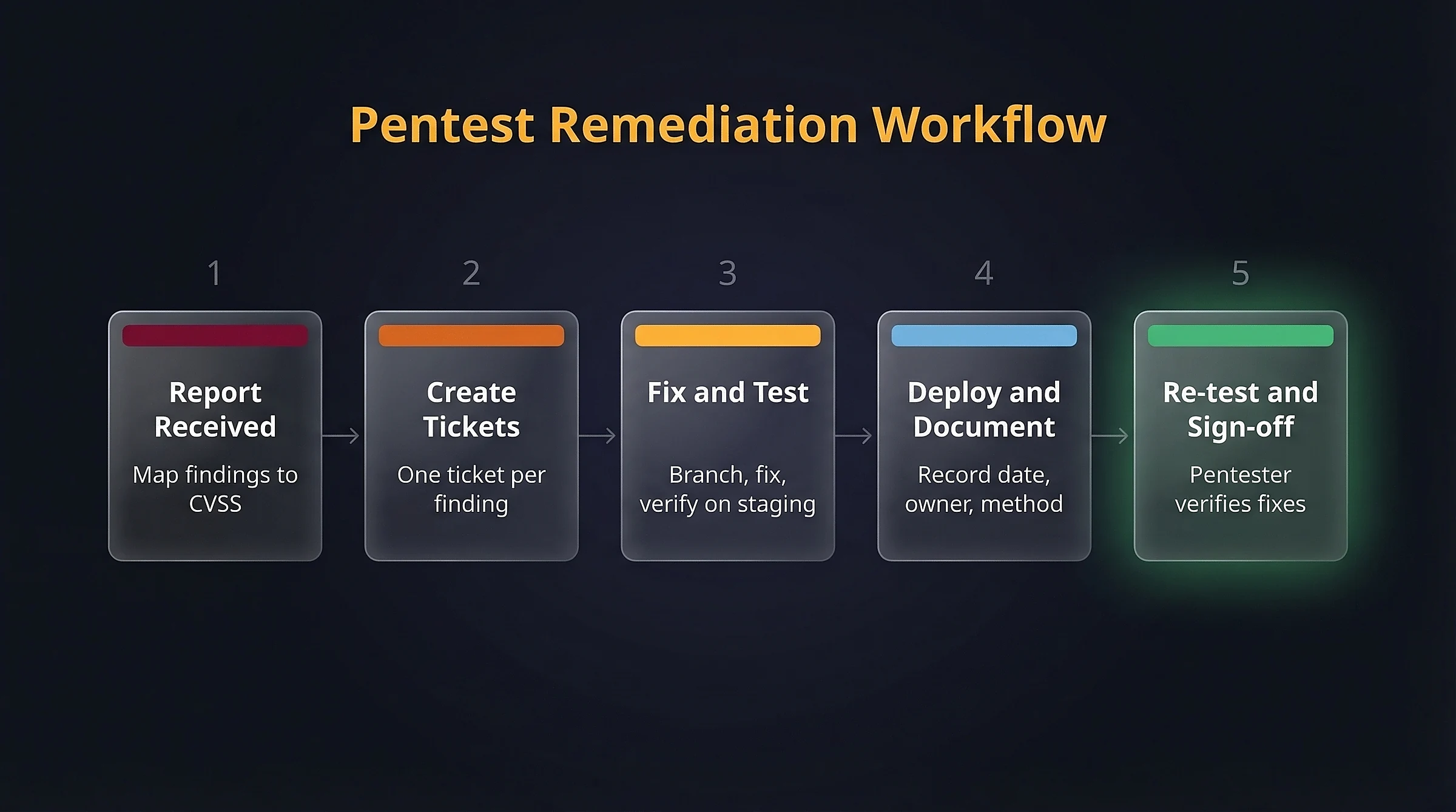
Five-step remediation workflow from pentest report through re-test sign-off
- Create a ticket per finding. Map each pentest finding to a ticket in your project management tool. Include the original finding ID, CVSS score, and affected component.
- Fix on a branch. Each remediation gets its own git branch and pull request. The commit message references the finding ID.
- Test on staging. Verify the fix works and doesn’t break functionality. Screenshot or log the verification.
- Deploy and document. Record the deployment date, the person who deployed, and the verification method.
- Request a re-test. Ask the original pentester to verify the specific findings. Their sign-off is your audit evidence.
Maintain a vulnerability register that tracks every finding from discovery through remediation and verification. This single document answers most auditor questions before they’re asked.
FAQs
Common questions about WordPress pentest remediation:
WP_DEBUG don't require development skills. Server-level changes like security headers, TLS configuration, and xmlrpc.php blocking require access to Nginx or Apache config files. Code-level fixes like XSS escaping and SQL injection remediation need a developer who understands WordPress internals.wp-config.php hardening.xmlrpc.php breaks Jetpack and some mobile apps. Plugin updates can introduce regressions. Always test fixes on a staging environment first, and deploy changes one at a time so you can isolate any issues.Summary
Pentest reports feel overwhelming when they land, but the findings are predictable. The ten items in this guide cover the vast majority of WordPress results I see in SaaS company reports.
Fix the critical items first, document everything, and schedule the re-test. The combination of technical fixes and audit-ready documentation is what separates a passing report from a repeat engagement.
If your team needs help turning a pentest report into a clean re-test, that’s exactly what I do. Get in touch and I’ll review your report.